55
AFTER USE
1 Switch off the vacuum cleaner.
2 Unplug from the mains.
3 Rewind the cable by pressing
the rewind button ‹.
WARNING: When using the
cable rewind, always hold
the plug as the cable will
rewind quickly.
EMPTYING THE
DUST CANISTER
WARNING: Never operate
the cleaner without the
dust canister filter Ì or
motor protection filter Ò
fitted.
1 Disconnect the cleaner from the
mains socket.
2 Disconnect the hose from the
cleaner.
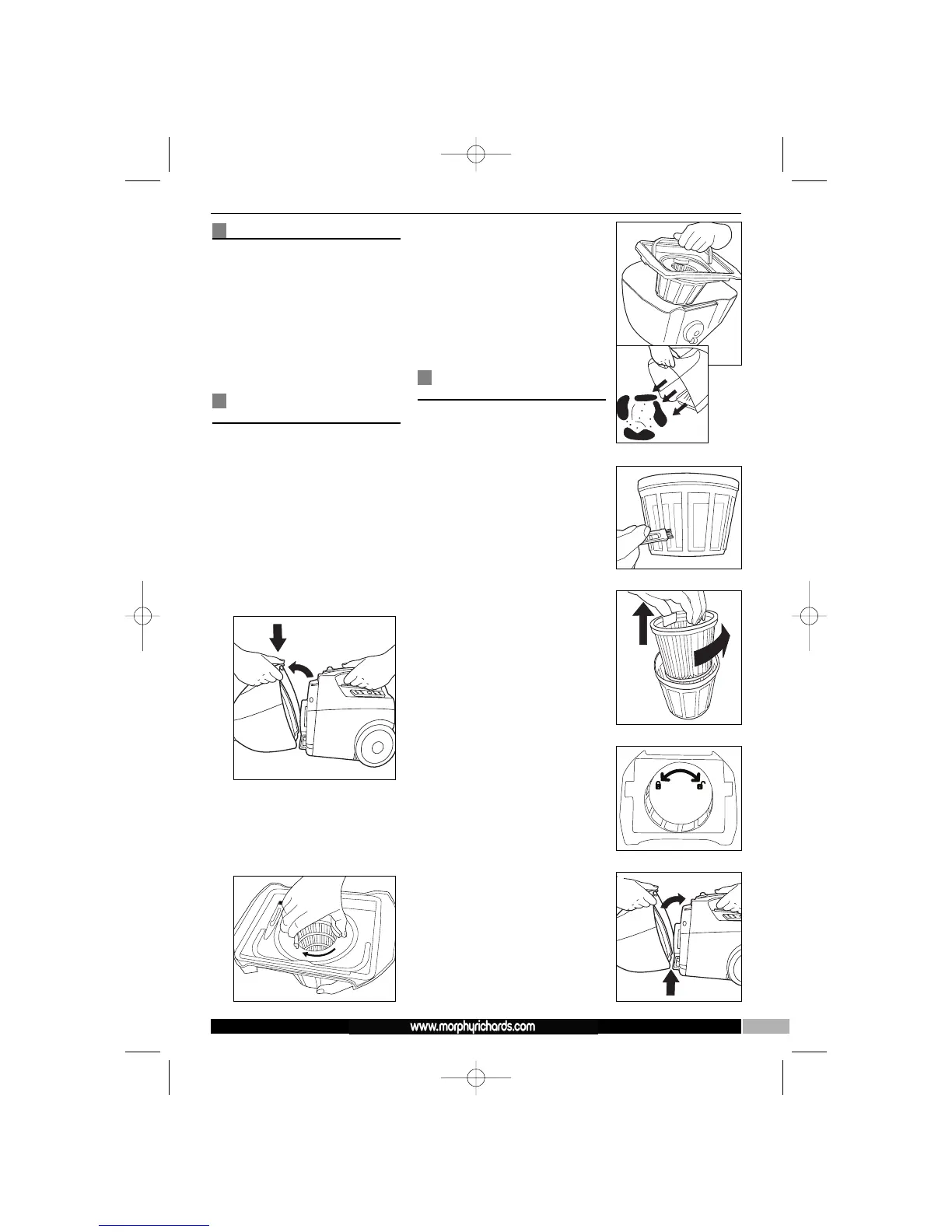
3 Remove the dust canister ‡
from the cleaner by pushing the
release latch ⁄ D.
4 Take the dust canister to the
bin.
5 Rotate the pleated filter
inside the mesh filter to
shake loose the dust E.
6 Raise the filter assembly Ì
handle then lift out the filter
assembly from the dust canister
‡ F.
7 Empty the dust canister into the
bin.
8 Place dust canister safely to one
side.
Cleaning the pleated
filter
You should clean the pleated
filter each time the product is
emptied.
1 Use the small brush provided
(located on filter assembly) to
remove any fluff from the
outside of the mesh filter G.
2 Rotate the mesh filter Ô
clockwise to release the mesh
filter and pleated filter Ó
assembly from the filter holder
H.
3 Lift out and clean the pleated
filter Ó, then empty out the
dust from the mesh filter Ô into
the bin.
4 Re-assemble the filter assembly
by placing the pleated filter
inside the mesh filter, then place
the filter holder on top in the
correct position. Rotate the
mesh filter assembly
anti-clockwise to lock the
assembly together I.
5 Place the filter assembly back
inside the dust canister. Make
sure the filter assembly is
placed level and that the filter
holder seal is seated neatly.
6 Re-attach the dust canister to
the cleaner by hooking the
bottom of the dust canister in
first, then close the canister until
it clicks and the canister release
catch ⁄ is fully down and
secured J.
If there is resistance when
you re-fit the canister onto
the cleaner, remove and
carefully reseat the filter
assembly back into the
canister, ensuring the filter
assembly seal is located
fully and neatly.
D
F
G
E
I
J
H




 To Next Page