71
Morrison Bros. Co. ‑ Dubuque, IA ‑ 800‑553‑4840
1218C‑0142 PP rev 11‑28‑2018
To activate Morrison 1218 tank gauge on FuelCloud account, perform the following steps:
• Sign up for a FuelCloud account or login to your existing FuelCloud Dashboard and select “Devices” on the left
navigation bar.
• On the FuelCloud website, go to “Devices.”
Morrison/FuelCloudInstructions
1. LogintoyourFuelCloudDashboardandselect‘Devices’ontheleftnavigationbar.
2. OntheFuelCloudWebsitegoto“Devices”
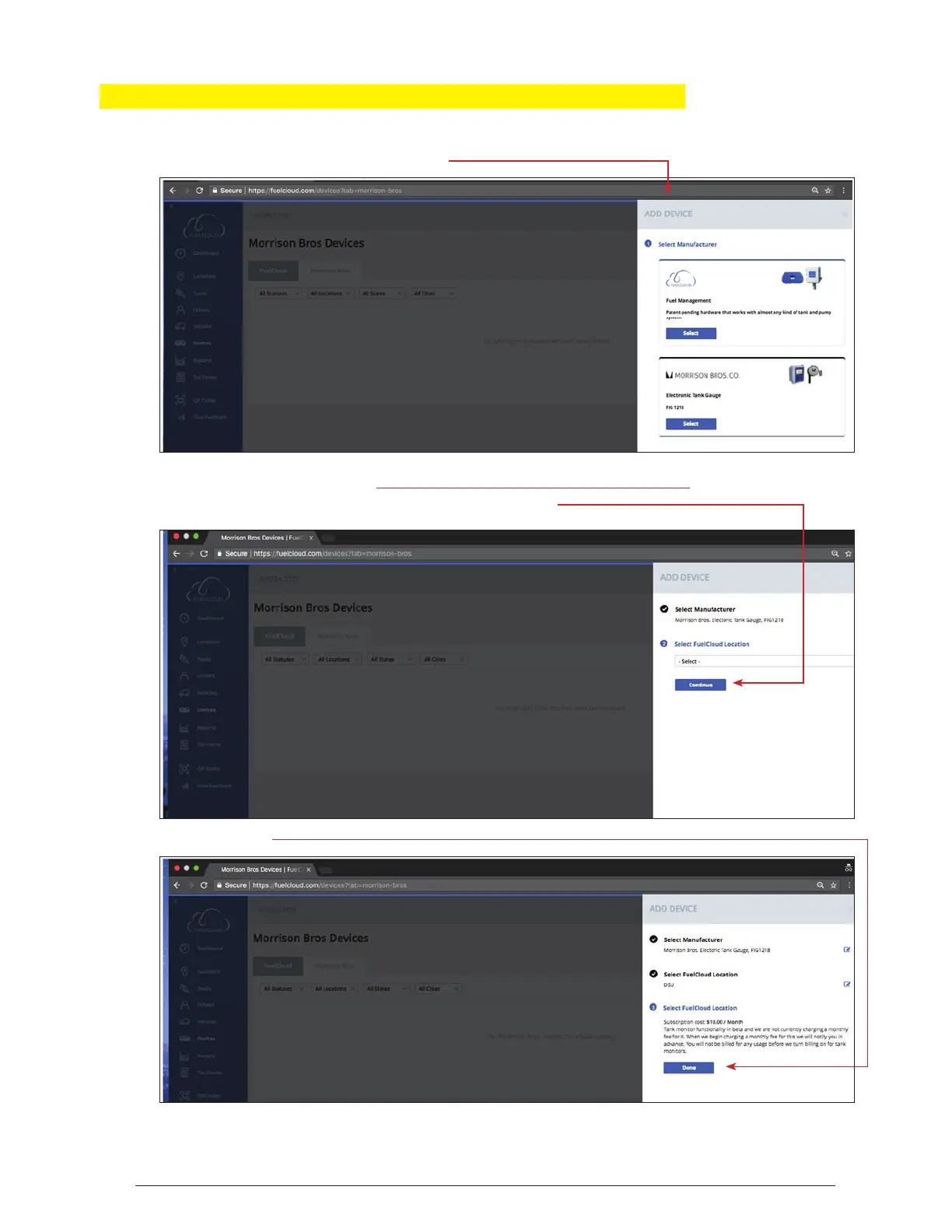
3. SelectAddDevice‐SelectMorrisonBrosCo
• Select ADD DEVICE
• Select MORRISON BROS CO
• Select location from drop down menu and click CONTINUE
Morrison/FuelCloudInstructions
1. LogintoyourFuelCloudDashboardandselect‘Devices’ontheleftnavigationbar.
2. OntheFuelCloudWebsitegoto“Devices”
3. SelectAddDevice‐SelectMorrisonBrosCo
• Select DONE
4. SelectLocationfromDropDownMenuandhit“Continue”
5. SelectDone



 To Next Page