Chapter
1
Getting Started with Motion M1200 and M1300 Tablet PCs
Motion Computing M1200 and M1300 Tablet PC User Guide 6
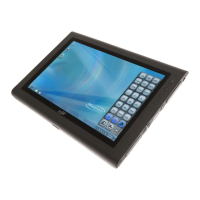
Both Motion M1200 and M1300 Tablet PCs offer these standard features:
•Microsoft® Windows® XP Tablet PC Edition operating system
• 12.1-inch XGA TFT LCD display
• M-Series Digitizer Pen
• 256MB base RAM, upgradeable to 1GB; minimum 20GB hard drive
• Front panel status LEDs
• Front panel function Buttons
• Motion Dashboard for easy access to Tablet PC functions
• Screen rotation; handwriting and drawing recognition; voice recognition
software; dual-head video controller
• Power switch On/Off; with Stand By and Hibernate modes
• AC Power Adapter and power cord
• I/O: Microphone in; Headphone out; DC power in; two USB ports; IEEE
1394 port; external VGA monitor port; RJ-11 (modem); RJ-45 (Ethernet
network)
• Pen storage slot and Pen tether anchor on the Tablet PC chassis
• PC card slot, for networking, memory expansion or accessory connec-
tions
• USB keyboard and mouse support
• 6-cell, prismatic Lithium-ion battery
• Programmable power-saving schemes
• Lightweight Magnesium alloy chassis
• Kensington lock slot
WHAT’S NEW
WITH THE
M
OTION
M1300
Intel Centrino mobile technology
• Higher CPU performance
• Improved graphics performance
• Integrated 802.11b wireless LAN capability
USB 2.0 interface
• Peripheral-to-PC connection speed: 480 Mbps; 40 times faster
than USB 1.1
• Fully backward compatible to USB 1.1


 To Next Page