4.1
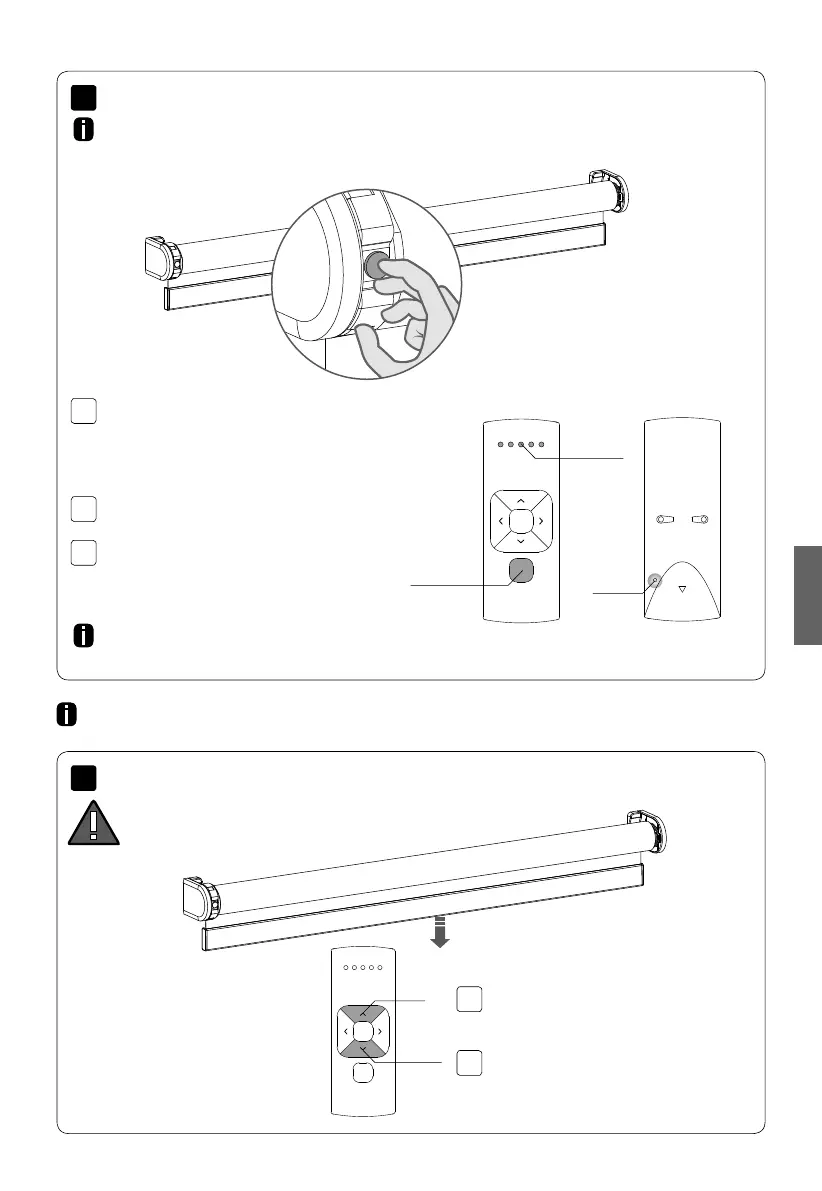
3.1
3.2
3.3
4.2
3
4
MOTION CM-09/10 ELECTRONIC TUBULAR MOTOR
English
Shortly press the down button to check if the
blind unrolls the right way. If the blind moves
up the direction of rotation must be changed.
Pair a remote control that is able to program blinds. See pages 6 and 7
for remote controls details. In this manual CM-12 is displayed.
WARNING: risk of damage.
Stop the blind before reaching
the end positions.
End limits must be programmed to use a blind properly and to prevent it from being damaged.
Proceed to step 9 if end limits are already set.
Shortly press the program button on the
motor. The blind will start stepping, indicating
that program mode has been activated.
(The blind remains stepping until the program
mode is de-activated.)
Repeat steps 3.1 - 3.3 to remove a blind from
a channel.
Press the pair button on the back of the remote
control to pair the blind to the selected channel.
The blind will shortly stop stepping indicating
that the remote has been paired to the blind.
Select a desired channel for the blind using the
channel selection button on the remote control.
Channel
Selection
Pair
Button
Channel
indicator
Up
Down
Pair a remote
Check direction of rotation
Simultaneously press the up and down button
to change the direction of rotation.
English



 To Next Page