+
16
17
16.2
17.1 17.2
17.4 17.517.3
16.1
MOTION CM-09/10 ELECTRONIC TUBULAR MOTOR
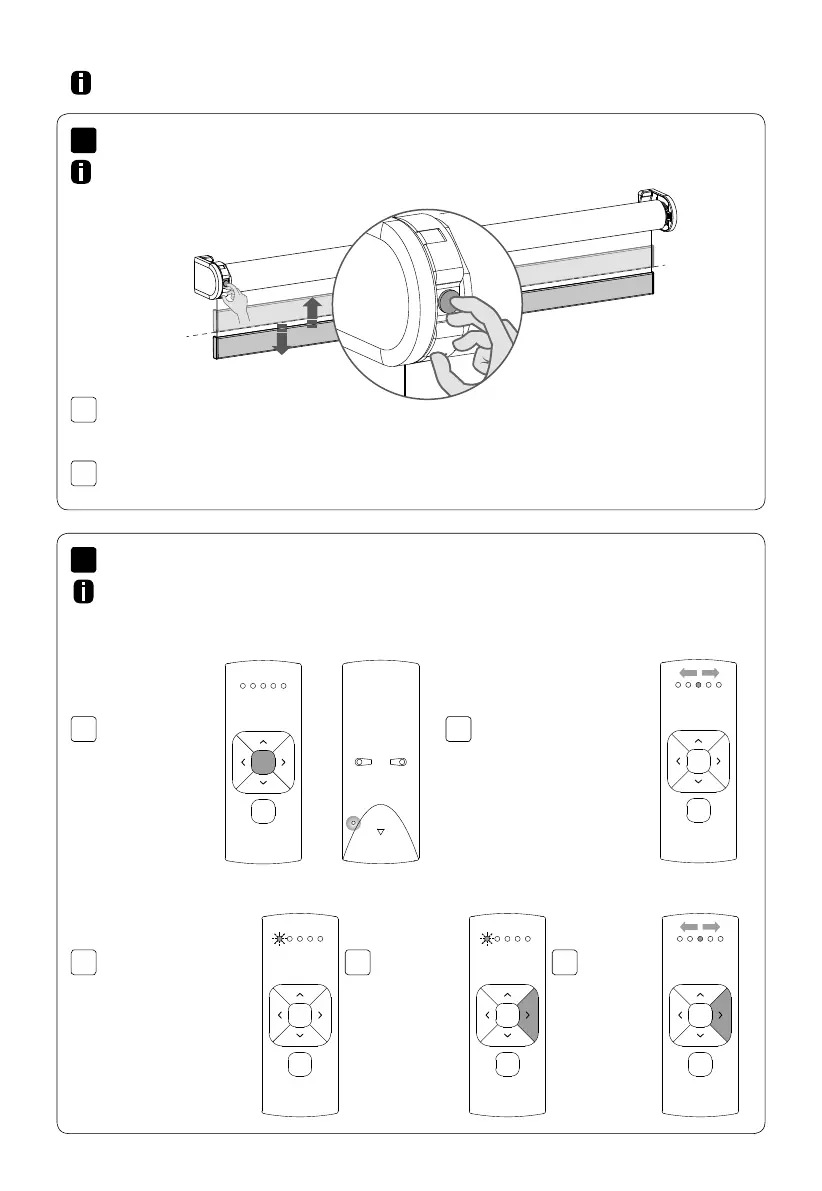
Hold the program button to manually operate
the blind.The blind will move as long as the
button is being pressed. (max. 15 sec.)
To move the blind in opposite direction, release
the program button and repeat step 16.1.
In case there is no remote control or pull control, the blind can
be operated with the program button on the motor.
Advanced options
The remote starts searching
for blinds (search mode).
This is indicated by the LED’s
flashing from left to right.
To activate
Single select
simultaneously
hold the centre
button and press
the pair button.
To search for
the next blind
press the right
button. Search
mode will be
activated.
To find the
previous blind
press the left
button.
To exit
Single select
press the
right button
during
search
mode.
Once a blind is found,
the channel LED will
flash and the blind starts
stepping, indicating that
program mode has been
activated. The blind
can now be (un)paired
to the remote and/or
programmed.
Single select makes it possible to activate program mode on a single blind through a
remote control, without having to physically press the program button on the blind.
Manual control
Single select 5 channel remote



 To Next Page