Need help?
Do you have a question about the Motorline professional MC52 and is the answer not in the manual?
Key safety and usage guidelines for installation and operation of the gate automation system.
Specific safety precautions and installation requirements for qualified technicians.
Supplier liability limitations regarding installation, use, and maintenance errors.
Explanation of symbols used throughout the manual for clear communication of information.
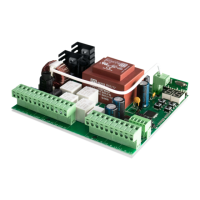
Detailed technical data for the MC52 control board, including power, outputs, and dimensions.
Explanation of the status indicator LEDs on the control board.
Pin assignments and functions for all connectors on the control board.
Visual guide for connecting accessories, motors, and other components to the control board.
Step-by-step procedure for the initial setup and configuration of the gate automation system.
Instructions for adding or removing remote control transmitters for gate operation.
Introduction to P menus (P0-P9) for configuring gate operation parameters.
Introduction to E menus (E0-E9) for configuring specific features and logic.
Configuration of course, deceleration, force, pedestrian time, and pause/delay settings.
Configuration of photocells, operating logic, flashing light, and remote programming.
Configuration of E menus for features like present man, soft start, brake, and course time.
Resetting to factory defaults and configuring RGB output modes.
Procedure for testing motors by direct connection with capacitor.
Basic steps for end-users to resolve common gate automation problems.
Advanced diagnostic and repair procedures for qualified technicians.
 General
| Brand | Motorline professional |
|---|---|
| Model | MC52 |
| Category | Garage Door Opener |
| Language | English |

 To Next Page