EasyManua.ls Logo

Motorola 7528X - User Manual

Motorola 7528X
210 pages
Print Icon
To Next Page IconTo Next Page
Loading...
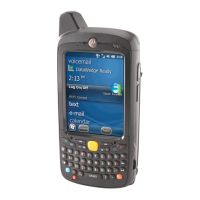
WORKABOUT PRO4
HAND-HELD COMPUTER
(Windows Embedded Hand-Held 6.5)
USER GUIDE
Draft #6

Table of Contents

Question and Answer IconNeed help?

Do you have a question about the Motorola 7528X and is the answer not in the manual?

Overview

The Workabout Pro4 is a modular, industrial hand-held computer designed for various data capture applications in fields like courier/delivery, field service, meter reading, asset management, warehousing and logistics, and manufacturing. It runs on Windows Embedded Hand-Held 6.5.
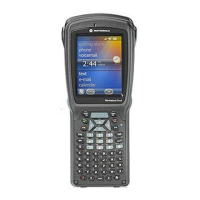
Technical Specifications:

  • Model Numbers: 7528X and 7528XP
  • Processor: Texas Instruments® OMAP3® Processor 1 GHz
  • RAM: 512 MB
  • Flash ROM: 4 GB
  • Operating System: Microsoft Windows® Embedded Hand-Held 6.5
  • Display: 9.4 cm (3.7 in) VGA/QVGA (640 x 480) transflective color/touch display with 165 cd/m² sunlight visibility.
  • Keyboards: Alphanumeric (7528 Long) with high-reliability ultra-white backlight.
  • Wireless Communications: Integrated Bluetooth® V2.1 + EDR (standard), WLAN - XWing2 802.11a/b/g/n WiFi (standard, with optional diversity antenna module), optional GPS module (supports SBAS), and optional Cinterion HSPA + WAN radio including GPS Receiver (Supports GLOSNASS). Bluetooth and 802.11a/b/g/n are available simultaneously.
  • Audio: Standard integrated microphone and receiver, high volume 86dBA beeper (95dBA beeper with extended ranger laser), and optional speech module certified with Vocollect and Wavelink Speakeasy clients.
  • Power Management: 4400 mAh high-capacity Lithium-ion battery (Model No. WA3010) and super capacitor power backup.
  • Expansion Ports: Micro SD slot, 100 Pin Expansion Interface (non-PCMCIA), dedicated USB port, and audio port.
  • Camera (optional): 8Mpixel color, autofocus, 4X digital zoom, Dual LED flash, video capable.
  • Environmental:
    • Operating temperature: -20°C to +50°C (-4°F to +122°F)
    • Storage temperature: -40°C to +60°C (-40°F to +140°F)
    • Humidity: 5% to 95% non-condensing
    • Rain/Dust: IP65, IEC 60529
    • Drop rating: 1.5m (5 ft), 26 drops to polished concrete (powered with options and accessories), multiple 1.8m (6 ft) drops to concrete.
  • Regulatory Approvals: Worldwide Safety, EMC, RF, Laser approvals, CE Mark, RoHS compliant, WEEE compliant, REACH compliant.

Usage Features:

  • Power On/Off: Press and hold the [Power] button for at least one second to switch on. Pressing the [Power] button turns the unit off into a power-saving "suspend" state. To fully shut down, press and hold the [Power] button until the Power Option screen appears and select "Power off."
  • Resetting:
    • Warm Reset: Press and hold [FN/BLUE] and [Power] simultaneously for at least four seconds. Preserves file system, Application directory, and registry, but RAM content is not preserved.
    • Cold Reset: Press and hold [FN/ORANGE], [FN/BLUE], and [Power] simultaneously for at least four seconds. Reinitializes all hardware, erases RAM, but preserves non-volatile storage.
    • Clean Start: Press and hold [FN/BLUE], [Power], and [SCAN] simultaneously for at least six seconds. Returns to factory settings, flushes registry keys, and deletes volatile storage.
  • Touchscreen Calibration: Access via Start > Settings > System > Screen > Align Screen.
  • Keyboard Navigation: Use [Arrow] keys for cursor movement, [ENTER] to execute, [SHIFT] for uppercase/shifted functions, [BACKSPACE/DEL] to erase, [CTRL] and [ALT] as modifiers, [TAB] to move between fields, and [ESC] to close menus/dialogs. [SCAN] keys activate the scanner beam or can be remapped. Modifier keys can be activated or locked on, indicated by icons in the navigation bar.
  • Function and Macro Keys: Dedicated function keys [F1]-[F4] are directly accessible. Additional function keys [F1]-[F10] are accessed via [FN/BLUE] combinations. Macro keys (M1-M10 on Long units) can be programmed for frequently used keystrokes or functions.
  • Keypad Backlight: Adjustable via Start > Settings > System > Backlight.
  • Display Backlight: Adjustable intensity and duration via Start > Settings > System > Backlight.
  • Screen Orientation: Change between portrait and landscape (right- or left-handed) via Start > Settings > System > Screen > General tab.
  • Touchscreen Locking: Lock the touchscreen to prevent accidental actions via Start > Lock icon in the softkey bar.
  • Audio Indicators: Configurable sounds for events like screen taps and notifications via Start > Settings > Sounds & Notifications.
  • microSD and SIM Card Installation: Slots are located under the battery. microSD for non-volatile memory, SIM for voice and Internet access.
  • Data Transfer: Connect to a PC via a docking station or snap module using a USB cable. For Windows XP, use Microsoft ActiveSync. For Windows Vista/7+, use Windows Mobile Device Center.
  • Phone Communication: If equipped with a Cinterion PHS8-P HSPA+ radio modem, use the onscreen keypad or physical [Talk]/[End] keys for calls, conference calls, and speed dial.
  • Today Screen: Customizable home screen with applets like phone, voicemail, calendar. Items can be reordered or added/removed via Start > Settings > Home > Items tab.
  • Programs: Access applications via the Start button. Includes Office Mobile (Excel Mobile, OneNote Mobile, Word Mobile, PowerPoint Mobile, SharePoint Workspace Mobile), Internet Explorer, Messenger (Windows Live), Notes, Task Notification, File Explorer, ActiveSync, Internet Sharing, Task Manager, Search Phone, PartnerUp, HomeVU, Modem Link, Remote Desktop Mobile, and WiFiConnect A.R.C.
  • Settings: Comprehensive options to tailor device behavior and appearance, including Clocks & Alarms, Lock (password protection), Home (Today screen customization), Power (battery management), Sound & Notifications, Connections (Bluetooth, Wi-Fi, modem setup, VPN), Personal (App Launch Keys, Buttons), System (About, Backlight, Certificates, Contrast, Customer Feedback, Dr. Debug, Encryption, Error Reporting, GPS, Manage Triggers, Managed Programs, Memory, Microphone, PartnerUp, HomeVU, Restrictions, Regional Settings, Remove Programs, Screen, System Properties, Task Manager, Total Recall, TweakIT).

Maintenance Features:

  • Battery Charging: Batteries are shipped at 40% charge and must be fully charged before use. Charging takes 3-4 hours. Can be charged in the unit or in a spare battery charge well in a desktop docking station. Chargers will not charge if battery temperature is outside 0°C to 45°C.
  • Battery Swap Time: Minimum of 4 minutes without data loss, assuming default power saving parameters.
  • Touchscreen Care: Use a stylus or finger, avoid harsh chemicals (mustard, ketchup, sodium hydroxide, concentrated caustic solutions, benzyl alcohol, concentrated acids). Consider a disposable screen protector in harsh environments. Avoid prolonged direct sunlight.
  • Cleaning: Do not immerse in water. Dampen a soft cloth with mild detergent or soapy water. Avoid abrasive cleaners, solvents, or strong chemicals. For ink marks, use isopropyl alcohol.
  • Total Recall: Utility to create backups and clones of device settings and applications. Can restore to a known state or clone configurations to other devices. Profiles can be stored on persistent memory (Flash Disk) or external USB drives.
  • TweakIT: Utility for advanced system settings adjustments, including interface, network, and server configurations (e.g., FTP Server, SNTP Server, Registry Editor).

Motorola 7528X Specifications

General IconGeneral
BrandMotorola
Model7528X
CategoryHandhelds
LanguageEnglish

Related product manuals