Activate Your Phone
>
Activate Your Phone
If you bought a phone at a Sprint Store, it is
probably activated and ready to use. If it is
not activated, call Nextel Customer Service
at 1-800-639-6111 from any other phone.
•
Press the red End/Power key (.) to turn the
phone on.
When your phone powers up the first time, it
performs a series of security checks. If you don’t
pass the security checks, you will see messages
and screen prompts showing what to do next.
If you continue to encounter security messages, call
Nextel Customer Service at 1-800-639-6111 from a
landline phone.
>
Switch to Spanish Menus (optional)
1. Press / > Settings > Display/Info > Language.
2. Highlight Español and press r.
>
Make Your First Phone Call
1. Enter a phone number using your keypad. (If you
make a mistake while dialing, press Delete [right
softkey] to erase.)
2. Press the green Talk key (,).
3. When you’re finished, press ..
Make Your First Call
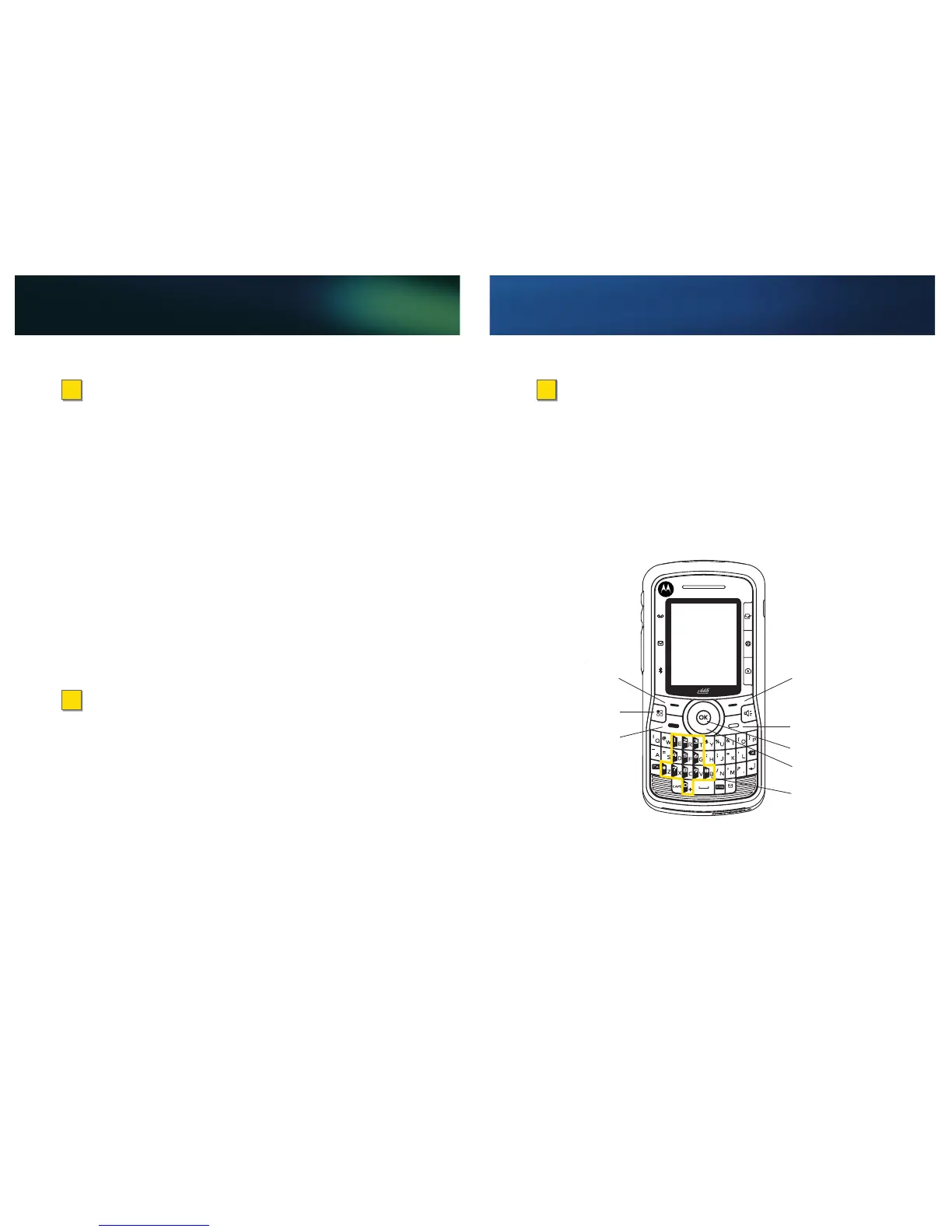
Right Softkey
End/Power Key (.)
OK Key (r)
Navigation Key
Menu Key (/)
Left Softkey
Talk Key (,)
Keypad
(numbered keys)


 To Next Page
 Loading...