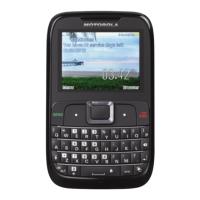
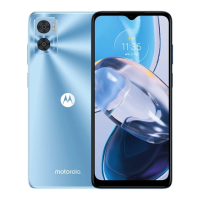
This document describes the MOTO Brea, a GSM/GSG phone, model EX119, with a streamlined QWERTY design.
Function Description
The MOTO Brea is a mobile phone designed for communication and multimedia. It supports dual SIM cards, allowing users to use two SIM cards simultaneously without changing them. The phone offers personalization features, music playback, messaging, and browsing capabilities. It includes a QWERTY keypad for quick text entry and message editing.
Important Technical Specifications
- Model: EX119
- Network: GSM, GSG
- SIM Support: Dual SIM cards
- Headset Jack: 3.5mm
- USB Connector: Micro USB
- Memory: microSD card slot
- Battery: Removable, tight fitting
- SAR Limit (FCC/Industry Canada): 1.6 W/kg (at ear: 1.46 W/kg, body-worn: 1.08 W/kg)
- RF Exposure: Minimum separation distance of 1.5 cm for body-worn operations.
- Radio Specifications (EU):
- GSM Essential Requirements: EN 301 511: V9.0.2
- Wideband 2.4 GHz Systems: EN 300 328: V1.7.1
- EMC Specifications (EU):
- Common Technical Requirements: EN 301 489-1 V1.8.1
- GSM Digital Cellular Radio: EN 301 489-7 V1.3.1
- Radio Wideband Systems: EN 301 489-17 V2.1.1
- Safety Specifications (EU):
- IT Equipment: EN 60950-1: 2009
- Specific Absorption Rate (SAR): EN 50360: 2008
- Sound Pressure Test (EU): EN 50332-1/-2
Usage Features
Basic Operation
- Power On/Off: Press and hold the Power Key.
- Main Menu Access: Press the Menu icon. Slide across the screen to change pages. Long press an icon to change its shortcut.
- Navigation: Use the Navigation Key to scroll. Press the Right Soft Key to move up a level. Press the Home Key to return to the home screen.
- Setup Menu: Slide down from the top edge of the screen to open the setup menu.
Calls
- Making Calls: Enter a number from the home screen and press the Call/Answer Key. If Dual SIM Open mode is active, choose a SIM card for the voice call.
- Answering/Ending Calls: Press the Call/Answer Key to answer, or the End Key to end a call.
- Redialing: Access call log from the Main Menu to redial from missed, dialed, or received calls.
- Handsfree: During an active call, press the handsfree icon to turn the speaker on/off.
- Speed Dial: Set up speed dial entries in Phonebook settings. Press and hold a single-digit number to call.
- In-Call Menu: Options include Hold Single Call, End Single Call, New Call, Phonebook, Messaging, Sound Recorder (to record conversations), and DTMF.
- Emergency Calls: Dial emergency numbers (e.g., 112 or 911) even when the phone is locked.
- Saving Contacts: Enter a number, then press Options > Save to Phonebook > Add New Contact. Enter details and press Option > Save.
- Calling Contacts: From the Main Menu, go to Phonebook, scroll to a contact, and press the Call/Answer Key.
Customization
- User Profiles: Six profiles (General, Silent, Meeting, Outdoor, My style) are available to adapt to different environments. Each profile allows setting ringtones and alert types.
- Profile Customization: Select a profile, then Options > Customize to set Alert Type (Ring only, Vibrate only, Vibrate and Ring, Vibrate then ring), Ring Type (Single, Repeat, Ascending), Tone Settings (for incoming calls and messages for both SIMs, and power on/off), Volume (ringtone and key tone), and Extra Tone (Keytone, Power on/off, System alert).
- Display Settings: Set Wallpaper, Screen Saver, and Main Menu Style via Setup menu > Phone Settings > Display, Layout setting, or Theme.
- Date & Time: Set home city, date, time, and format via Setup menu > Phone Settings > Time and date.
- Language: Set menu language via Setup menu > Phone Settings > Language.
Text Entry
- QWERTY Keypad: Use the QWERTY keypad for text and number entry.
- Input Modes: Change input mode via Options > Input Method (abc for letters, Numeric for numbers, Insert Symbol for symbols).
- Text Editing: Use Back Key or Right soft key to delete. Space Key for space. Enter Key for new line. Caps Key for capital letters (press once for next letter, twice for all caps).
- Symbols: Press ALT Key then Symbol Key for symbols. Press Alt Key for small symbols at the upper part of keys.
Messaging
- Creating/Sending Messages: From Main Menu > More > Messaging > Write Message. Use QWERTY keypad for text. Options for inserting pictures, sound, video, or subject. Press Options > Send to send.
- Receiving Messages: An alert and indicator appear. Press View in the notification area to read new messages. Read all received messages via Main Menu > More > Messaging > Inbox.
E-mail
- Account Setup: Main Menu > More > Email > Option > Email accounts. Press Options > New account to add. Enter details and press Options > Next. Select account and press Options > Connect.
- Creating/Sending E-mails: Main Menu > More > Email > Option > Write Email. Use QWERTY keypad. Options to add attachments. Press Options > Send.
- E-mail Signature: Set up via Main Menu > More > Email > Option > Email accounts. Select account, then Options > Edit > Advance settings > Signature.
- Receiving E-mails: An alert and indicator appear. Press View in the notification area to read new e-mails. Read all received e-mails via Main Menu > More > Email > Select email account > Inbox.
Camcorder
- Taking Photos: Main Menu > Slide across screen > Camera. Point lens and press Camera Key. Stored pictures can be found via pressing > Photo Album.
- Recording Videos: Main Menu > Slide across screen > Camera > Video Recorder. Point lens and press Camcorder Key to start/stop recording. Press to pause, to continue. Stored videos can be found via Main Menu > Slide across screen > File Manager > Photo or Memory Card.
- Playlists: Create via Main Menu > Slide across screen > Media > Audio Player > Playlists > Options > New. Open playlists to play.
- Controls: Press to play/pause. Use Volume keys for volume.
- Player Settings: Options > Settings > Player Settings. Customize Skin, Shuffle, Repeat, Sound Effects (Bass, Classical, Party), and Bass Enhancement.
Radio
- FM Radio: Plug in a wired headset. Main Menu > Slide across screen > Media > FM radio.
- Controls: Use < or > to tune. Use or to go to previous/next available station. Press to turn off. Use Volume keys for volume.
- Options: Channel List (bookmark up to 9 channels), Manual Input (key in frequency), Auto Search.
Personal Organizer
- Calendar: Main Menu > Slide across screen > Calendar. Options to add, delete, or view events (Reminder, Meetings, Course, Date, Call, Anniversary).
- Tasks: Main Menu > Slide across screen > Tasks. Press Add to add tasks.
- Alarms: Main Menu > Slide across screen > Tools > Alarm. Edit > Alarm Tone > FM radio to set FM radio as alarm.
Maintenance Features
Troubleshooting
- Crash Recovery: If the phone stops responding, remove and replace the battery, then turn it on.
- Reset: Main Menu > Slide across screen > Tools > Settings > Restore Factory Settings. This will reset the phone to factory settings and delete all data.
Security
- Phone Lock: Main Menu > Slide across screen > Tools > Settings > Security Settings > Phone Lock. Enter password (default 1234). Change password via Change Password > Phone Password.
- Keypad Lock: Main Menu > Slide across screen > Tools > Settings > Security Settings > Auto keypad lock. Select inactivity time. Unlock by pressing Space Key and following onscreen instructions.
Battery Use & Safety
- Handling: Do not disassemble, crush, puncture, shred, or alter the battery. Avoid contact with water or metal objects. Do not place near heat sources. Do not dry wet batteries with appliances. Avoid dropping.
- Charging: Charge at room temperature (0°C to 45°C). New or long-stored batteries may take longer to charge. Motorola charging systems protect against overcharging.
- Disposal: Recycle batteries according to local laws. Do not dispose in fire or trash.
- Motorola Original Products: Use only Motorola Original products for quality assurance.
Device Care
- Liquids: Do not expose to water, rain, humidity, sweat.
- Temperature: Avoid temperatures below 0°C/32°F or above 45°C/113°F.
- Microwaves: Do not dry in a microwave.
- Dust & Dirt: Do not expose to dust, dirt, sand, food.
- Cleaning: Use a dry soft cloth. Do not use alcohol or other cleaning solutions.
- Shock & Vibration: Do not drop.
General Safety
- Small Children: Keep device and accessories away from small children due to choking hazards, loud sounds, and potential for overheating.
- Glass Parts: If glass breaks, do not touch or remove. Stop using until replaced by a service center.
- Seizures/Blackouts: Consult a physician if susceptible to epileptic seizures or blackouts from flashing lights. Discontinue use if symptoms occur.
- Hearing Protection: Avoid listening at full volume through a headset to prevent hearing damage.
- Driving Safety: Obey laws regarding mobile device use while driving. Use handsfree devices. Position phone within easy reach. Let voicemail answer inconvenient calls. Inform callers you are driving. Suspend calls in heavy traffic or hazardous weather. Do not take notes or look up numbers while driving. Dial sensibly. Do not engage in stressful conversations. Use mobile device for help in emergencies. Call roadside assistance if needed.
Software & Content
- Copyright: Motorola products may include copyrighted software. Unauthorized copying of copyrighted materials is prohibited.
- Warranty: One (1) year for products and accessories, limited lifetime for decorative accessories and monaural headsets, ninety (90) days for two-way radio accessories and software media. Excludes normal wear and tear, batteries below 80% capacity, abuse, non-Motorola products, unauthorized service, altered products, and communication service issues.
Privacy & Data Security
- Monitor Access: Keep device with you, lock keypad.
- Software Updates: Install security patches promptly.
- Personal Information: Remove or clear all personal information before recycling, returning, or giving away the device. Backup data.
- Online Accounts: Manage Motorola online accounts (e.g., MOTOBLUR) for security features like remote wipe and device location.
- Location-based Information: Mobile devices transmit location data. Applications requiring location data may transmit it to third parties.
- Other Transmitted Information: Device may transmit testing, diagnostic, and non-personal information to Motorola or third parties to improve products and services.

 Need help?
 General

 To Next Page