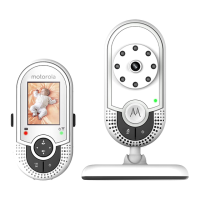
This User's Guide provides you with all the information you need to get
the most from your product.
Before you can use the baby monitor, we recommend you insert and fully
charge the battery in the parent unit, so that it continues to work if you
disconnect it from the power supply to carry it to another location. Please
read the Safety Instructions on page 7 before you install the units.
Got everything?
• Parent unit
• Camera unit(s)
• Rechargeable Ni-MH battery pack
• Power adapter for the Parent unit
• Power adapter(s) for the Camera unit
In multi-camera packs, you will find one or more additional camera
units with power adapter units.
Welcome...
to your new Motorola Baby Monitor!
Thank you for purchasing the Motorola Video Baby Monitor. Now you can
see and hear your baby sleeping in another room or you can monitor your
older children in their playroom.
Please retain your original dated sales receipt for your records. For
warranty service of your Motorola product, you will need to provide a copy
of your dated sales receipt to confirm warranty status. Registration is not
required for warranty coverage.
For product related questions, please call:
US and Canada 1-888-331-3383
Email: support@motorolamonitors.com


 To Next Page
 Loading...