Need help?
Do you have a question about the Motorola MDC300 and is the answer not in the manual?
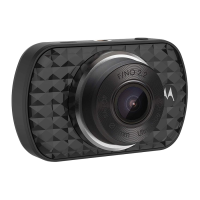
Details of all buttons, ports, display, and indicators on the dashboard camera.
Critical safety advice regarding device installation, operation, and driver visibility.
User responsibility to check local laws concerning dash cam use and privacy concerns.
Guidance on mounting the dashboard camera and managing the power cable in the vehicle.
Steps for inserting an SD card, formatting, and understanding automatic recording upon power connection.
Details on continuous recording, event saving, and loop recording functionality.
Instructions on navigating between Video, Playback, and Mass Storage modes.
Explanation of icons and status indicators displayed on the screen during video recording.
Description of how to navigate and view video and photo files in Playback mode.
How to use parking mode for recording events when the car is parked and the engine is off.
Accessing and navigating the main settings menu for device configuration.
Configuring video resolution, loop recording, G-sensor sensitivity, and park mode.
Options for managing recorded files, including deleting and protecting videos and photos.
 General
| Product color | Black |
|---|---|
| G-shock sensor | Yes |
| GPS (satellite) | No |
| Number of cameras | 1 |
| Maximum frame rate | 30 fps |
| Main camera resolution | 1920 x 1080 pixels |
| Main camera viewing angle | 150 ° |
| Main camera sensor resolution | 2.19 MP |
| Display diagonal | 3 \ |
| Built-in storage media | - |
| Compatible memory cards | MicroSD (TransFlash) |
| Maximum memory card size | 32 GB |
| Quantity per pack | 1 pc(s) |
| Power source type | USB |

 To Next Page