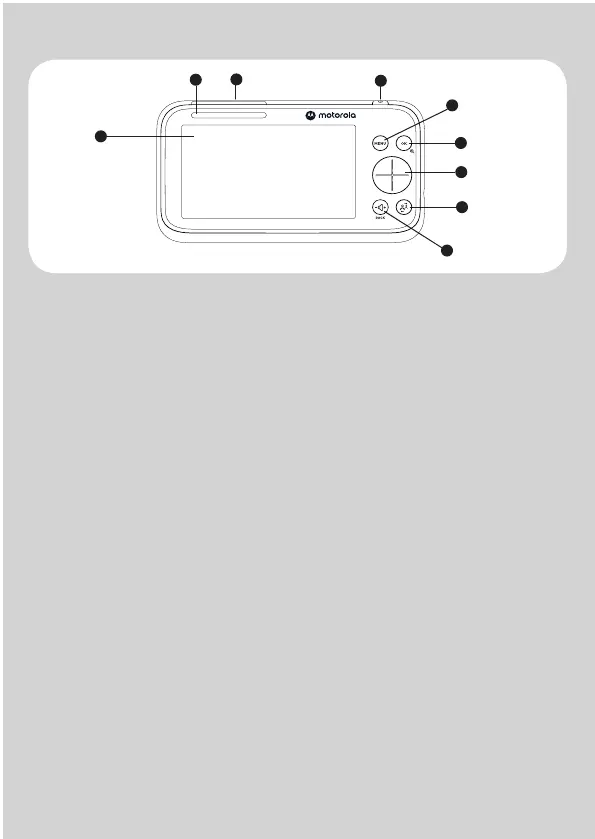
Overview of the Parent Unit
1
2
3
4
5
6
7
8
9
1. Display (LCD screen)
2.
3.
Audio Level LEDs (Green, Green, Amber, Red, Red)
4.
Navigation Button
- Press Left/Right to pan the camera left or right.
- Press Up/Down to tilt the camera upward or downward.
- Press Left and Right to select parent unit volume level.
- Press Up/Down/Left Right to adjust menu settings and to access
menu options when menu is active.
5.
Menu Button
OK/Zoom Button
- Press to
confirm a selection.
- Press to toggle Zoom in and Zoom out.
6.
7.
Talk Back Button
Press and hold to talk to your baby.
8.
Volune/Back Button
Press to open / close the Menu options.
9.
- Press for the parent unit volume selection.
- Press to exit the menu or back to the previous menu.
Charging LED
- Red when the parent unit is ON.
- Purple when electrical outlet connected.
- Blue when off and connected to electrical outlet.
Parent Unit ON/OFF and Screen ON/OFF Button
- Press and hold to switch the parent unit ON/OFF.
- Single press to switch the screen ON/OFF.


 To Next Page
 Loading...