EasyManua.ls Logo

Motorola pro - Phone Interaction and Navigation; Keys, Connectors, and Screen Operation

Motorola pro
64 pages
Print Icon
To Next Page IconTo Next Page
To Previous Page IconTo Previous Page
Loading...
2 Your phone
Your phone
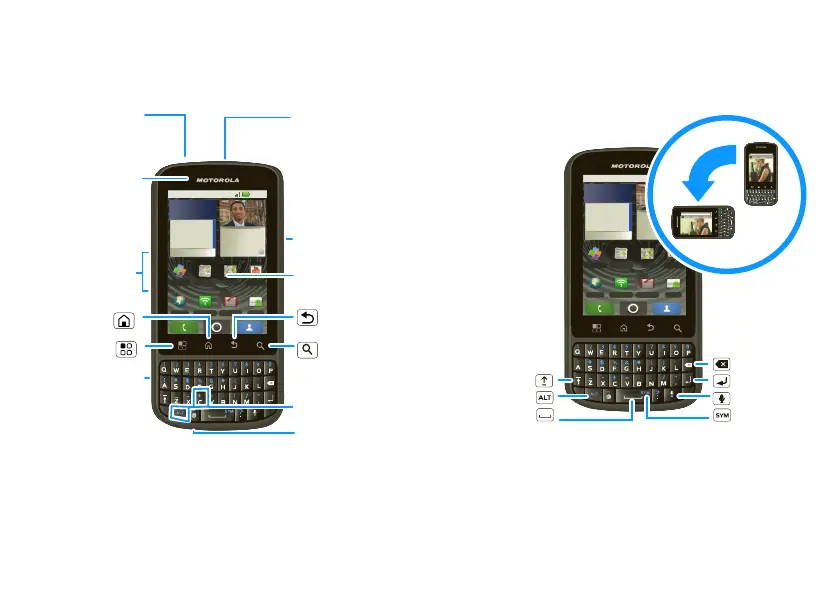
the important keys & connectors
11
THU
NOV
15:30 pm
Monthly review
Main conference
Juan Sarmiento
Call me when you’re
out of the meeting
11 minutes ago
11:35
Quickoffice
Browser 3G Mobile Market
News and
Messaging
Maps
YouTube
Power Key
Press=Sleep
/Wake up.
Hold=Turn on/off.
3.5mm
Headset
Jack
Home Key
Back
Key
Microphone
Menu Key
Micro USB
Connector
Charge or
connect to PC.
Notification
LED
On=Charged.
Flashing=New
notification.
Volume Keys
Search
Key
Programmable
Key
Touchscreen
International
calling, press
ALT + C.
Note: Your phone might look a little different.
11
THU
NOV
15:30 pm
Monthly review
Main conference
Juan Sarmiento
Call me when you’re
out of the meeting
11 minutes ago
11:35
Quickoffice
Browser 3G Mobile Market
News and
Messaging
Maps
YouTube
http://www.motorola.com
Delete
Enter
Shift
Space
Symbols
Alternate
For some features, when you
turn your phone, the screen
adjusts for you.
Voice

Related product manuals