6 Touchscreen & keys
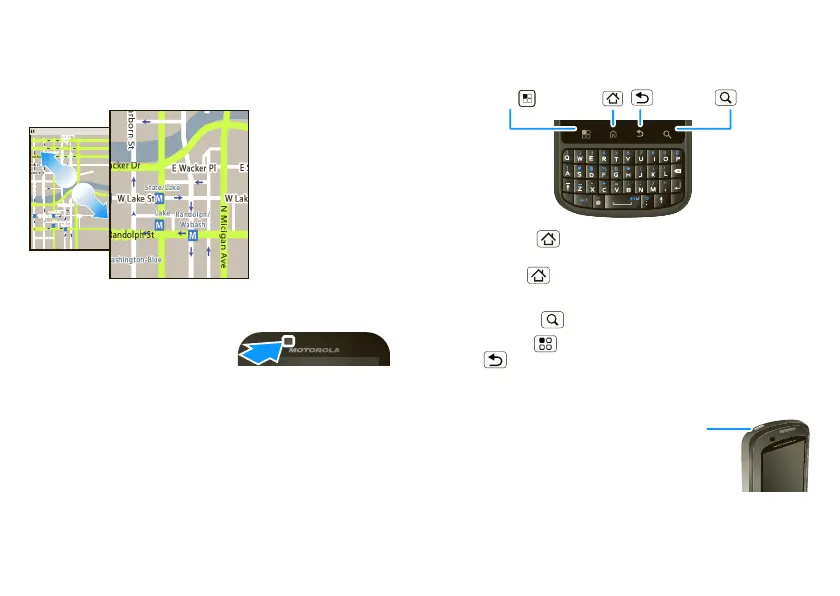
You can also zoom in or out by pinching your fingers
together or moving them apart on the screen.
Phone covers
68014490001-A
Your touchscreen might stay
dark during calls if the sensor
just above it is covered. Don’t
use covers or screen protectors (even clear ones) that
cover this sensor.
Screen protectors can also interfere with touchscreen
performance.
E Ohio St
Randolph
Messaging
N Clark St
Wacker Dr
M
N Rush St
N Wabash Ave
N Dearborn St
E Grand Ave
N Micigan Ave
N Micigan Ave
W Lake St W Lake St
E Wacker Pl
State/Lake
Grand Red
Lake
Randolph/
Wabash
Washington-Blue
E S WaterSt
M
M
M
M
E Randolph St
Ontario St
E Ontario St
Pull your fingers
apart to zoom in.
Key tips
Menu, home, back, search
Touch Home to close any menu or app and return
to the home screen. In the home screen, touch and
hold Home to show the last few apps you used,
then touch an app to open it.
Touch Search for text search.
Touch Menu to open menu options, or touch
Back to go back.
Sleep & wake up
To save your battery, prevent
accidental touches, or when
you want to wipe smudges off
your touchscreen, put the
touchscreen to sleep by
pressing the Power Key. To
Home Key
Back Key
Menu Key
Search Key












 To Next Page