EasyManua.ls Logo

Motorola SLVR L7 - User Manual

Motorola SLVR L7
104 pages
Print Icon
To Next Page IconTo Next Page
Loading...
1
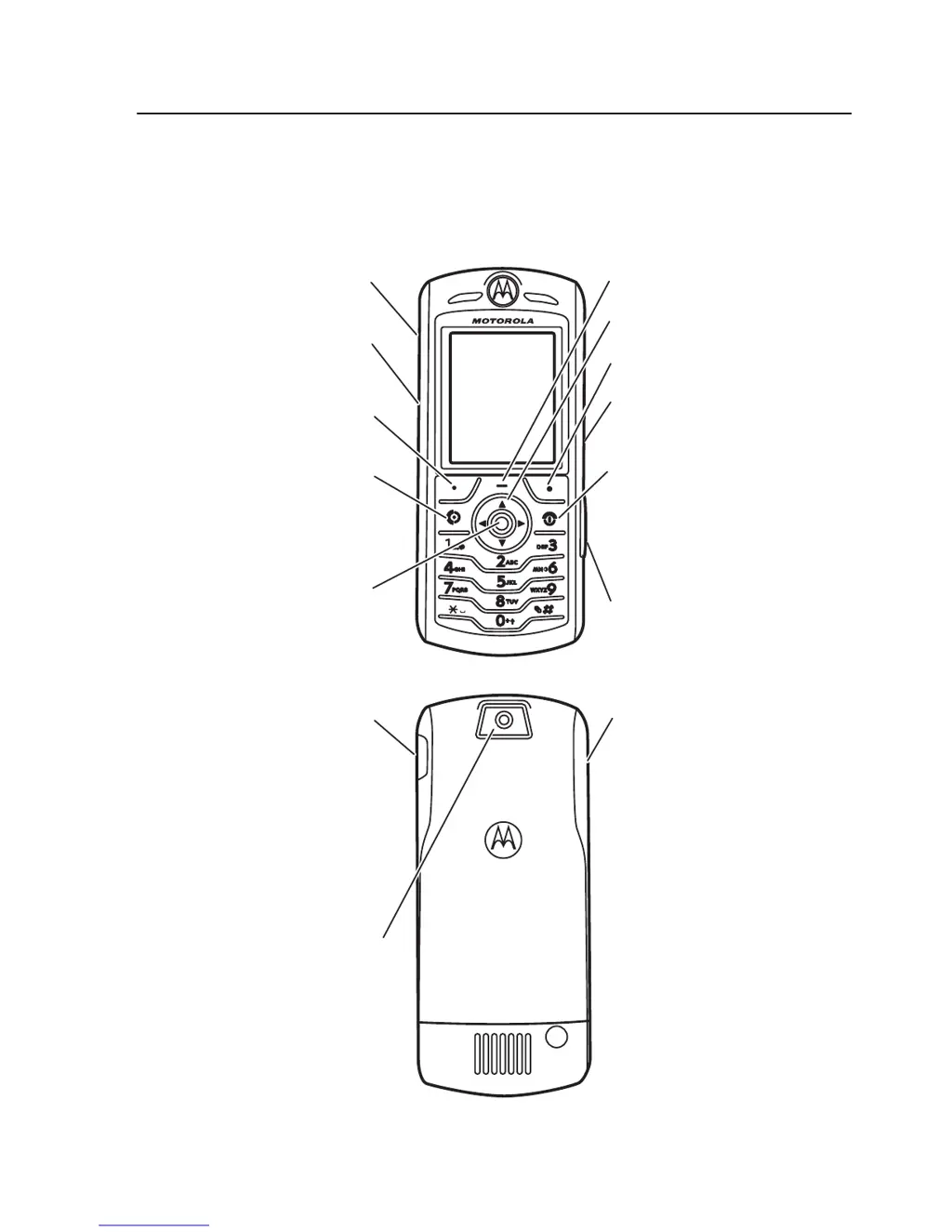
HELLOMOTO
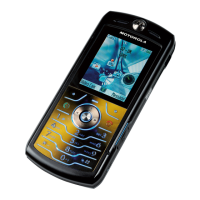
Introducing your new Motorola SLVR
L7
GSM wireless
phone. Heres a quick anatomy lesson.
Left Soft Key
Navigate menus.
Select menu
items.
Volume Keys
Smart Key
Voice Dialing
Right Soft Key
Turn on & off,
hang up, exit
menus.
Insert memory
card.
Make & answer
calls.
Open menus.
Camera
Volume Keys
Charge up and
connect phone
accessories

Table of Contents

Other manuals for Motorola SLVR L7

Questions and Answers

  • K
    kimberlymorenoAug 12, 2025
    Why won't my Motorola SLVR L7 turn on?
    • M
      Michael EricksonAug 12, 2025
      Your Motorola Cell Phone might not be turning on due to several reasons: * The battery may be completely discharged or defective. Try recharging the battery with an appropriate charger. If it doesn't recharge, replace the battery. * The battery terminals could be open or misaligned. Inspect the terminals on both the battery and the phone, realigning if necessary. If issues persist, consider replacing the battery. * A defective transceiver board can also cause this issue. In this case, replace the transceiver board.
  • T
    taveryAug 15, 2025
    What to do if my Motorola SLVR L7 has poor reception?
    • E
      Erin MarshallAug 15, 2025
      If your Motorola Cell Phone has poor reception, calls frequently drop, or the audio is weak or distorted, the issue might be: * A defective antenna. Check the connection between the antenna and the transceiver board. If the connection is good, try replacing the antenna. * A defective transceiver board. Replace the transceiver board.
  • C
    Cynthia BarnesAug 23, 2025
    Why is the transmit audio weak on my Motorola SLVR L7?
    • K
      Kathleen WoodAug 23, 2025
      If people have difficulty hearing you when you speak on your Motorola Cell Phone, it could be due to: * A defective microphone. Replace the microphone. * A defective transceiver board. Replace the transceiver board.
  • C
    Catherine Murillo DDSAug 27, 2025
    Why is the incoming call alert distorted on my Motorola SLVR L7 Cell Phone?
    • G
      grandallAug 27, 2025
      Distorted incoming call alerts on your Motorola Cell Phone may be due to: * A defective alert transducer. Temporarily replace it with a known good one. * A faulty transceiver board. Replace the transceiver board.
  • S
    Shannon McguireAug 31, 2025
    How to fix a Motorola Cell Phone vibrator that is not working?
    • O
      olsonjohnAug 31, 2025
      If the vibrator feature on your Motorola Cell Phone is not functioning, it could be: * A defective vibrator. Replace the vibrator. * A defective transceiver board. Replace the transceiver board.
  • S
    stephanie19Sep 3, 2025
    What to do if the internal charger is not working on Motorola SLVR L7?
    • H
      hbrownSep 3, 2025
      If the internal charger on your Motorola Cell Phone isn't working, it's likely due to a faulty charger circuit on the transceiver board. Test batteries in the desktop charger and check the LED display. If those are charging properly, replace the transceiver board assembly.
  • C
    Chris HendersonSep 7, 2025
    What causes an erratic display on a Motorola SLVR L7?
    • L
      Leslie JohnstonSep 7, 2025
      An erratic display on your Motorola Cell Phone could be caused by: * A defective display module. Temporarily replace the display module with a known good one. * A defective transceiver board. Replace the transceiver board.
  • J
    Jennifer CrawfordSep 10, 2025
    How to fix weak audio from earpiece speaker on Motorola SLVR L7?
    • D
      Derek Orr Jr.Sep 12, 2025
      If the audio from your Motorola Cell Phone's earpiece speaker is weak or distorted, it could be due to: 1. Defective connections to or from the transceiver board. Check the connection from the earpiece to the transceiver board. 2. A defective earpiece speaker. Temporarily replace the speaker with a known good one, ensuring a good connection. Then, place a call to check if the audio has improved. 3. A defective transceiver board. Replace the transceiver board.

Summary

Introduction to Your Phone

Anatomy of the Phone

Identifies key physical components and buttons of the phone, including keys and ports.

Essentials

About This Guide and SIM Card

Explains how to use the manual and the function of the SIM card.

Battery Management

Covers battery installation, charging, and tips for optimal performance and care.

Basic Operations: Power, Calls, Number

Instructions for turning the phone on/off, making/answering calls, and viewing the phone number.

Main Attractions

Using iTunes for Music

Guide to downloading, transferring, and playing music via iTunes on the phone.

Camera, Video, and Sounds

Steps for capturing photos, recording videos, and managing sound options.

Memory Card and Bluetooth Connectivity

Managing memory cards, installing them, and using Bluetooth for pairing and data transfer.

Basics

Display, Menus, and Navigation

Understanding the phone's screen layout, status indicators, and menu system.

Text Entry and SMS Creation

How to create text messages using different entry modes like iTAP and Tap.

Customizing Phone Settings

Adjusting audio profiles, time, date, wallpaper, and display appearance.

Calls Management and Voicemail

Handling calls, checking call history, and managing voicemail messages.

Address Book and Other Features

Managing contacts, advanced calling, and other phone functionalities.

Safety, Support, and Warranty

Service and Repairs

Contact information for customer support and repair services.

SAR Data and RF Exposure Information

Details on Specific Absorption Rate and government requirements for RF exposure.

Safety Precautions and Warnings

Important safety information regarding RF energy, product use, and hazards.

Motorola Limited Warranty

Explains the terms, coverage, and exclusions of the product warranty.

Smart Practices While Driving

Guidelines for safe and responsible mobile phone use while driving.

Motorola SLVR L7 Specifications

General IconGeneral
Network TechnologyGSM
2G bandsGSM 850 / 900 / 1800 / 1900
GPRSClass 10
EDGEClass 10
StatusDiscontinued
Dimensions113.5 x 49 x 11.5 mm (4.47 x 1.93 x 0.45 in)
Weight96 g (3.39 oz)
SIMMini-SIM
TypeTFT, 256K colors
Phonebook1000 entries
Internal5 MB
CameraVGA, 640 x 480 pixels
Alert typesVibration; Downloadable polyphonic, MP3 ringtones
LoudspeakerYes
3.5mm jackNo
WLANNo
RadioNo
MessagingSMS, MMS, Email
BrowserWAP 2.0/xHTML
GamesYes + downloadable
JavaYes, MIDP 2.0
BatteryRemovable Li-Ion 820 mAh battery
Operating SystemProprietary
Resolution176 x 220 pixels
Call records20 dialed, 20 received, 20 missed calls
Bluetoothv1.2
USBminiUSB
ColorsSilver, Black

Related product manuals