EasyManua.ls Logo

Motorola TZ900 - User Manual

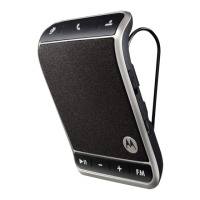
Motorola TZ900
3 pages
Print Icon
To Next Page IconTo Next Page
Loading...
User Manual for Bluetooth 3.0 Car Kit
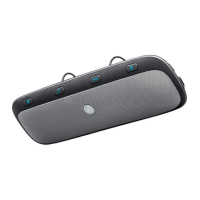
TZ900 - Sunvisor Mount
Specifications:
- Bluetooth: v3.0 + EDR
- Bluetooth range: up to 10m
- Battery: 3.7V, 650mAh rechargeable
- Charging time: about 3 hours
- Working time: up to 17 hours
- Standby time: about 1000 hours
- Dimensions: about 200mm x 65mm x 18mm
Question and Answer IconNeed help?

Do you have a question about the Motorola TZ900 and is the answer not in the manual?

Overview

The TZ900 is a Bluetooth 3.0 Car Kit designed for sunvisor mounting, offering hands-free communication and music streaming in a vehicle.

Function Description

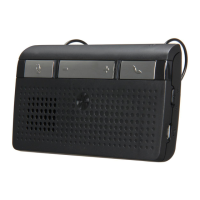
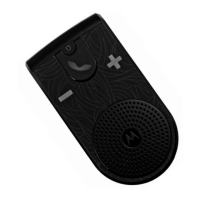
The device serves as a car kit, enabling users to make and receive calls, and stream music from their phone via Bluetooth. It features several buttons for various functions:

  • On/Off button (1): Powers the device on or off.
  • Private talking button (2): Allows the user to switch to private talking mode during a call. In standby mode, pressing this button activates voice dialing.
  • Play/pause phone music button (3): Used to stream music from a connected phone. Pressing it once starts music playback, and pressing it again pauses it.
  • Answer the call button (4): Used to answer incoming calls. A double-click on this button redials the last phone number.
  • Hang up/reject the call button (5): Used to end an ongoing call or reject an incoming call. Long pressing this button rejects a call.
  • Volume +/- button (6): Adjusts the volume. When playing music, a long press on the '+' button controls music playback (likely fast forward or next track, though the manual specifies "music playback" for '+', and "play the next song" for '-').

Important Technical Specifications

  • Bluetooth Version: v3.0 + EDR (Enhanced Data Rate), ensuring a stable and efficient wireless connection.
  • Bluetooth Range: Up to 10 meters (approximately 33 feet), providing flexibility for device placement within the car.
  • Battery: 3.7V, 650mAh rechargeable battery, offering a good balance of power and longevity.
  • Charging Time: Approximately 3 hours for a full charge.
  • Working Time: Up to 17 hours of continuous use on a single charge, making it suitable for long journeys.
  • Standby Time: An impressive approximately 1000 hours (over 41 days), indicating excellent power efficiency when not in active use.
  • Dimensions: Approximately 200mm x 65mm x 18mm, a compact size that should fit well on most car sunvisors without obstructing vision.

Usage Features

The TZ900 supports pairing with two phones, enhancing its versatility for users who might carry both a personal and a work phone.

Bluetooth Pairing:

  • Phone 1 Connection: To connect the first phone, users need to enable Bluetooth on their phone, search for "TZ900" in the list of available devices, and select it. The pairing password is "0000".
  • Phone 2 Connection: To pair a second phone, the user must press and hold the "answer the call" button (4) for 3 seconds to activate the re-pairing status. Then, search for "TZ900" on the second phone and enter the password "0000". After this, pressing the off button (1) completes the process. Once phone 1 is turned on, the Bluetooth car kit automatically pairs both phones, suggesting a multi-point connection capability.

Call Management:

  • Answering/Ending Calls: Calls can be answered using button 4 and ended or rejected using button 5.
  • Redialing: Double-clicking button 4 redials the last phone number.
  • Voice Dialing: In standby mode, pressing button 2 activates voice dialing, allowing users to initiate calls using voice commands.
  • Private Talking: During a call, pressing and holding button 2 for 3 seconds allows the user to switch to private talking mode, routing the audio through the phone's earpiece rather than the car kit's speaker.

Music Streaming:

  • Playback Control: Button 3 is used to start and stop music streaming from the connected phone.
  • Track Navigation: The volume buttons also serve as track navigation controls; a long press on the '+' button is for music playback (likely fast forward or next track), and pressing the '-' button plays the next song.

Maintenance Features

Charging:

  • Before initial use, the device requires a full recharge.
  • During the charging process, a red indicator light remains constantly on.
  • Once the charging is complete, the red light turns off, signaling that the device is ready for use. This clear visual indicator helps users know when their device is fully charged.

Motorola TZ900 Specifications

General IconGeneral
BrandMotorola
ModelTZ900
CategoryAutomobile Accessories
LanguageEnglish

Related product manuals