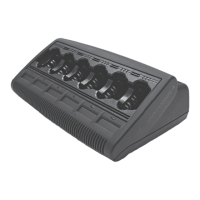
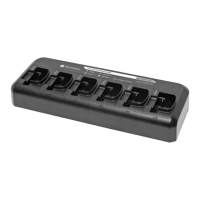
The Motorola IMPRES Adaptive Multi-Unit Charger is a sophisticated charging device designed for Motorola high-tier radios, offering advanced battery management capabilities. Unlike conventional chargers, this unit performs automatic recondition cycles when used with IMPRES smart batteries and employs a unique negative pulse/rapid charge algorithm. This tri-chemistry unit is universal, capable of charging both smart and standard batteries, thereby maximizing battery operation time and cycle life when paired with IMPRES Smart Batteries. The charger is field repairable, but only by qualified service technicians authorized by Motorola.
Function Description:
The primary function of the IMPRES Adaptive Multi-Unit Charger is to charge and maintain Motorola radio batteries. Its adaptive nature means it can intelligently manage battery health, including automatic reconditioning for IMPRES smart batteries. The charger supports a tri-chemistry design, allowing it to charge various battery types. When equipped with the Charger Display Module (CDM), it provides valuable information to the user regarding battery maintenance and care, including charge status, battery capacity, and estimated time to completion.
Important Technical Specifications:
- Battery Compatibility: Universal tri-chemistry, compatible with Motorola high-tier radio smart and standard batteries.
- Charging Algorithm: Unique negative pulse/rapid charge algorithm.
- Reconditioning: Automatic recondition cycles for IMPRES smart batteries.
- Field Repairability: Yes, by qualified Motorola service technicians.
- Power Cord Options:
- US/NA Power Cords: 3087791G01
- European Power Cord: 3087791G04
- UK/British Power Cord: 3087791G07
- Australian/New Zealand Power Cord: 3087791G10
- Argentina Power Cord: 3087791G13
- Korea Power Cord: 3087791G16
- Maximum Ambient Temperature: 40°C (104°F).
- Wall Mount Compatibility: Utilizes the same wall mount unit as the NTN4796 Multi Unit Charger (NLN7967).
- Charger Display Module (CDM): P/N RLN5382, compatible with various WPLN41xx series chargers.
Usage Features:
- Automatic Reconditioning: For IMPRES smart batteries, the charger automatically initiates reconditioning cycles to optimize battery life and performance.
- Tri-Chemistry Support: The charger can handle different battery chemistries, making it versatile for various Motorola batteries.
- Adaptive Charging: The unit adjusts its charging process based on battery type and condition, ensuring efficient and safe charging.
- Charger Display Module (CDM): When installed, the CDM provides real-time information on battery status, including:
- Charger power-up status (SINGLE FLASH GREEN, IMPRES).
- No battery in pocket status (OFF, NO BATTERY).
- Non-IMPRES battery status (Defined by Charge State, NON-IMPRES, BATTERY).
- IMPRES and Software Versions (IMPRES, SW xx.yy; aa.bb).
- IMPRES Battery Kit # and Serial # (KIT#, SN: --------).
- IMPRES Battery Kit # and Chemistry (KIT#, -----CHEMISTRY).
- Forecasted # of Cycles prior to Automatic Recondition (----CYCLES, TO RECONDITION).
- Charger Waiting to Charge (HOT BATTERY, COLD BATTERY, LOW VOLTAGE).
- Rapid Charge Mode (Steady RED, RAPID CHARGE).
- Trickle Charge Mode (Flashing GREEN, TRICKLE CHARGE).
- Charge Complete (Steady GREEN, CHARGE COMPLETE).
- Discharge/Reconditioning Mode (Steady YELLOW, DISCHARGE).
- Calibrating an IMPRES Battery (Steady YELLOW, RED, Flashing YELLOW or GREEN, Calibrating, Battery; Steady GREEN, Battery, Calibrated).
- Battery Capacity Data (----% RATED CAP., ----MAH --.-V).
- Estimated Time to Charge Complete (EST COMPLETE IN, --HRS, --MIN).
- Display Text Orientation: The CDM display text can be flipped 180 degrees for desk or wall mounting by inserting a paper clip into a pinhole below the display.
- Safety Guidelines: Users are instructed to turn off the radio when charging, use the equipment only in dry locations, connect to an appropriately fused and wired supply, disconnect from line voltage by removing the main plug, ensure the socket outlet is close and accessible, and keep the cord away from potential damage or stress.
Maintenance Features:
- Repairable Unit: The charger is designed to be repairable, with individual pocket PCBs and power supplies available as replacement parts (PCB replacement part number RLN5325).
- Replacement Parts Availability: A comprehensive list of replacement parts is provided, including:
- Fuse: 6571489S01
- Cover: 0987739G01
- Main Board Replacement Kit: RLN5325
- Top Housing Replacement Kit: RLN5330 (includes all parts except the Fan)
- Astro/Saber Battery Adapter: 4385922B01
- Eric Battery Adapter Kit (6-adapters per kit): RLN5212
- Screws:
- #10-3/8 in. Screw, Base-to-Top Housing (6 places): 0371239S01
- #20-3/8 in. Screw, Main Board-to-Base (3-per board) and Rubber Feet-to-Base (4-places): 0387775G01
- #10-3/4 in. Screw, Fan-to-Housing (2 places): 0387775G02
- Fan, 60mm, MUC: 5987634G01
- Rubber Foot, IMPRES MUC: 7587636G01
- Bezel, LCD, IMPRES MUC: 1587630G01
- Required Tools for Maintenance:
- Torque Driver capable of delivering 8 and 10 in-lbs.
- #10 Torx Bit (P/N 6680387A74 for CDM installation).
- #20 Torx Bit (P/N 6680387A76 for CDM installation).
- Disassembly and Reassembly Procedures: Detailed instructions are provided for:
- Separating the Housing from the Base.
- Accessing and replacing a defective PC Board, including disconnecting and reconnecting power, pocket, and communication harnesses, and securing the board with specific screws and torque settings.
- Replacing a defective rubber foot, top housing, and/or fan, including removing and inserting the fan with specific screws and torque settings.
- ESD Precautions: Users are advised to wear an ESD device to prevent electrical damage during maintenance.
- Fuse Replacement: Only fuses of the same type and rating listed on the charger label should be used.
- CDM Test Mode: After CDM installation, a test mode can be initiated to ensure proper functionality by plugging in the charger, inserting a paper clip into a pinhole to access the toggle button, holding it for five seconds, and observing the display cycle through a series of test screens.
- Software Updates: For charger software versions 1.2 or earlier, the IMPRES multi-unit charger should be returned to the Rockford Support Center for re-flashing.

 Need help?
 General





 To Next Page