72
EN
These accessories are also provided with grip areas for ease of handling while preparing food.
Never exceed the MAX level (2L) indicated on the bowl.
For liquid preparations, it is advisable not to exceed the (1.5L) level
indicated on the bowl.
For steam cooking, it is advisable not to exceed the (0.7L) level
indicated on the bowl
USING THE APPLIANCE
Connect the appliance, put the switch C15 to 1, and the LCD screen C2 will display all the settings as “ 0 ” (See Fig.10)
AUTOMATIC PROGRAMME MODE
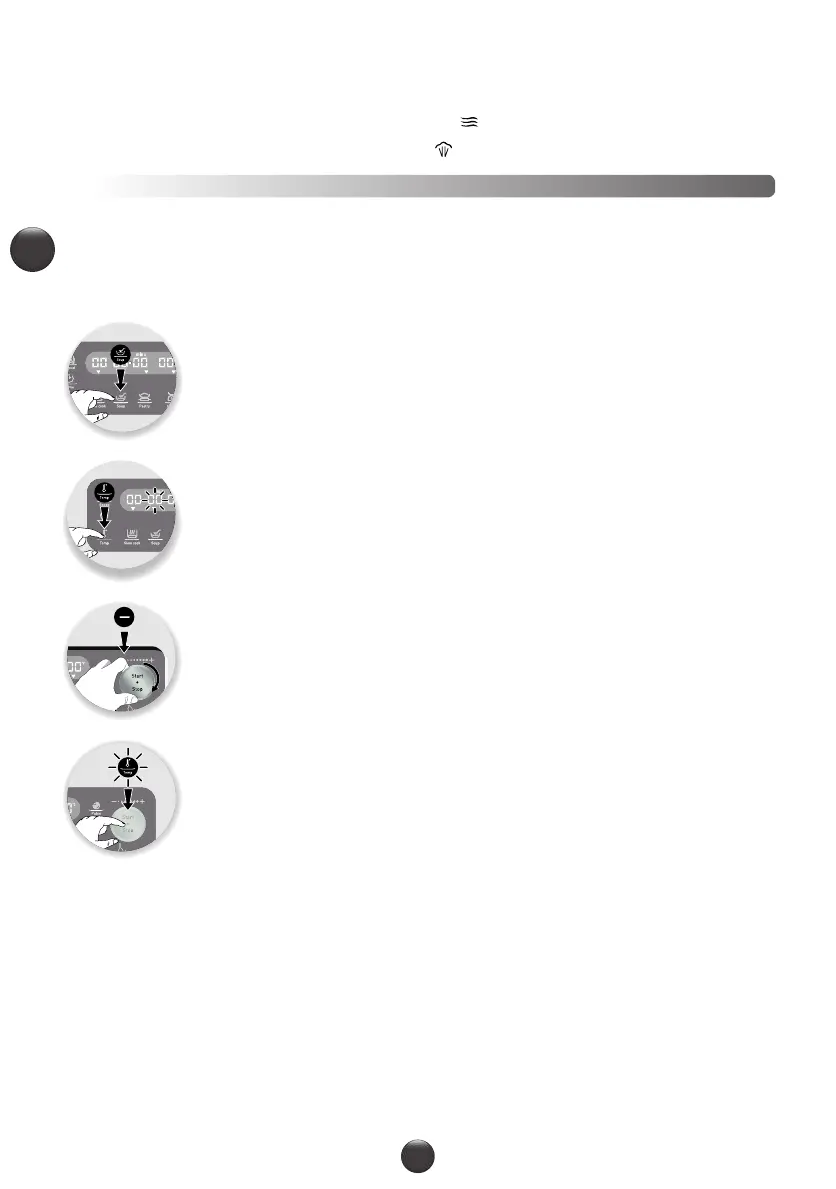
1- Press the programme of your choice and the default settings of the programme will be
displayed.
2- The pre-programmed settings can be changed. You can change the time, temperature and
speed (refer to the table on the following page) by pressing on the setting that you want to
change (C3 or C4 or C5)
3- Adjust the parameter(s) using the selection dial +/- (C14).
4- When you have finished changing all your settings, press the "Start" (C13) button to start
the programme.
5- When the programme is finished, the appliance will beep 5 times.
At the end of the sauce programme, the motor continues to run to prevent the preparation from sticking to the bottom
of the bowl.
If you want to stop this mode, press the "Stop” button for 2 seconds.
When the automatic programme is started, you have the option of stopping the appliance at any time by pressing the "Stop”
button. The automatic programme is then in pause mode and you have the option to restart it by pressing "Start” again. If
you have the wrong programme and would like to cancel, press the "Stop" button for 2 seconds to start from scratch.



 To Next Page