75
EN
MANUAL MODE
1- Press directly on the selector representing the setting that you have chosen to adjust, i.e. the
speed selector (C3) or the cooking temperature selector (C5) or the time selector (C4), and the
selected setting ashes on the screen.
2- Next, adjust the parameter(s) using the +/- selector (C14). For safety reasons, it is not
possible to adjust a temperature without setting a cooking time.
3- When you have finished adjusting your settings, press the “Start” button (C13). When your
appliance starts up, a white light will come on around the START / STOP button to indicate that
the programme has started. You can then stop the appliance at any time by pressing the“stop”
button. Programming is then in pause mode, with the white light blinking.You have the option
of restarting again by pressing "start". If you have selected the wrong programming and would
like to cancel, press the "Stop" button for 2 seconds to start from scratch.
4- When the programme is completed, the appliance beeps 5 times.
2 Pulse functions
To use Pulse (intermittent), enable and stop the function by simply pressing on the "pulse” selector. For this, the LCD
screen also assists you by showing you the time of use. When the function has begun, you have the option of stopping
the appliance at any time by pressing on the "stop” button. The function is then in pause mode and you have the option
to restart again by pressing "start".
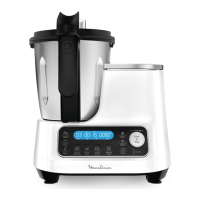
Manual use of the control panel:
This mode allows you to customise the preparation settings according to your liking.
“Speed” Button (C3): select the engine speed, up to 12
progressive and continuous speeds.
“Temp” Button (C5): Select the cooking temperature of
30° to 120°.
“Time” button (C4): Select the operating duration of up
to 2 hours of continuous use.
“Pulse” button (C12): to give a quick boost without
adjusting the settings.
START/STOP BUTTON: This button has 4 functions:
– To start or stop a preparation: START/STOP (C13)
– To increase or decrease the settings by turning the +/-
selector button (C14) in either direction.
– To pause a preparation once the appliance has been
started.
– To reset the selected parameters by pressing for
2seconds.



 To Next Page