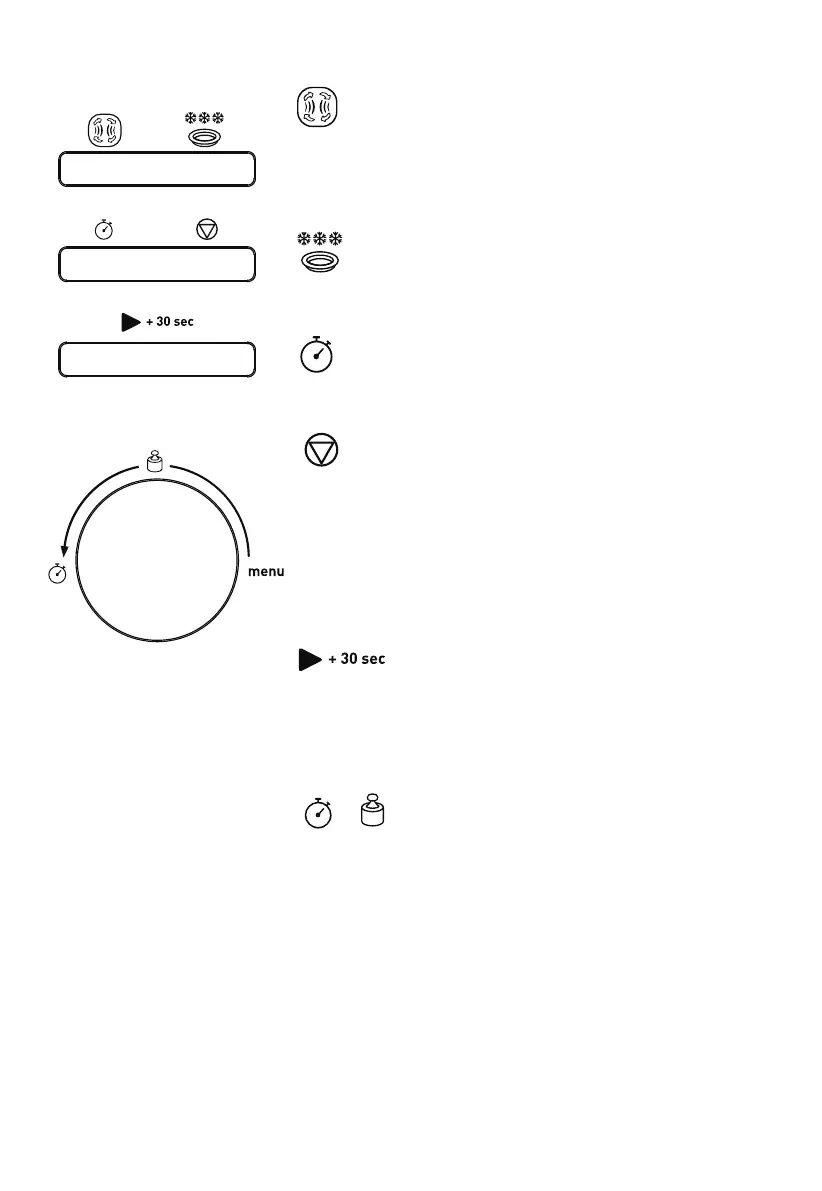
CONTROL PANEL
Microwave/Grill/Convection/Combination cooking
Press this button to set microwave power level, a grill
cooking programme, a convection cooking programme or
select one of four combination cooking settings.
Defrosting by weight or time
Press this button to defrost food by weight or time.
Clock/Kitchen timer
Press this button to set the clock time or kitchen timer.
Stop/Clear
Press to cancel setting or reset the oven before setting
a cooking programme.
Press once to temporarily stop cooking or press twice
to cancel cooking.
It is also used for setting child lock.
Start/+30Sec./Confirm
Press to start a cooking programme or set speed
cooking programme.
Press to confirm the setting.
/ / menu (dial)
Rotate this dial to select auto cook menus or enter time
or weight.
Downloaded from www.vandenborre.be






 To Next Page