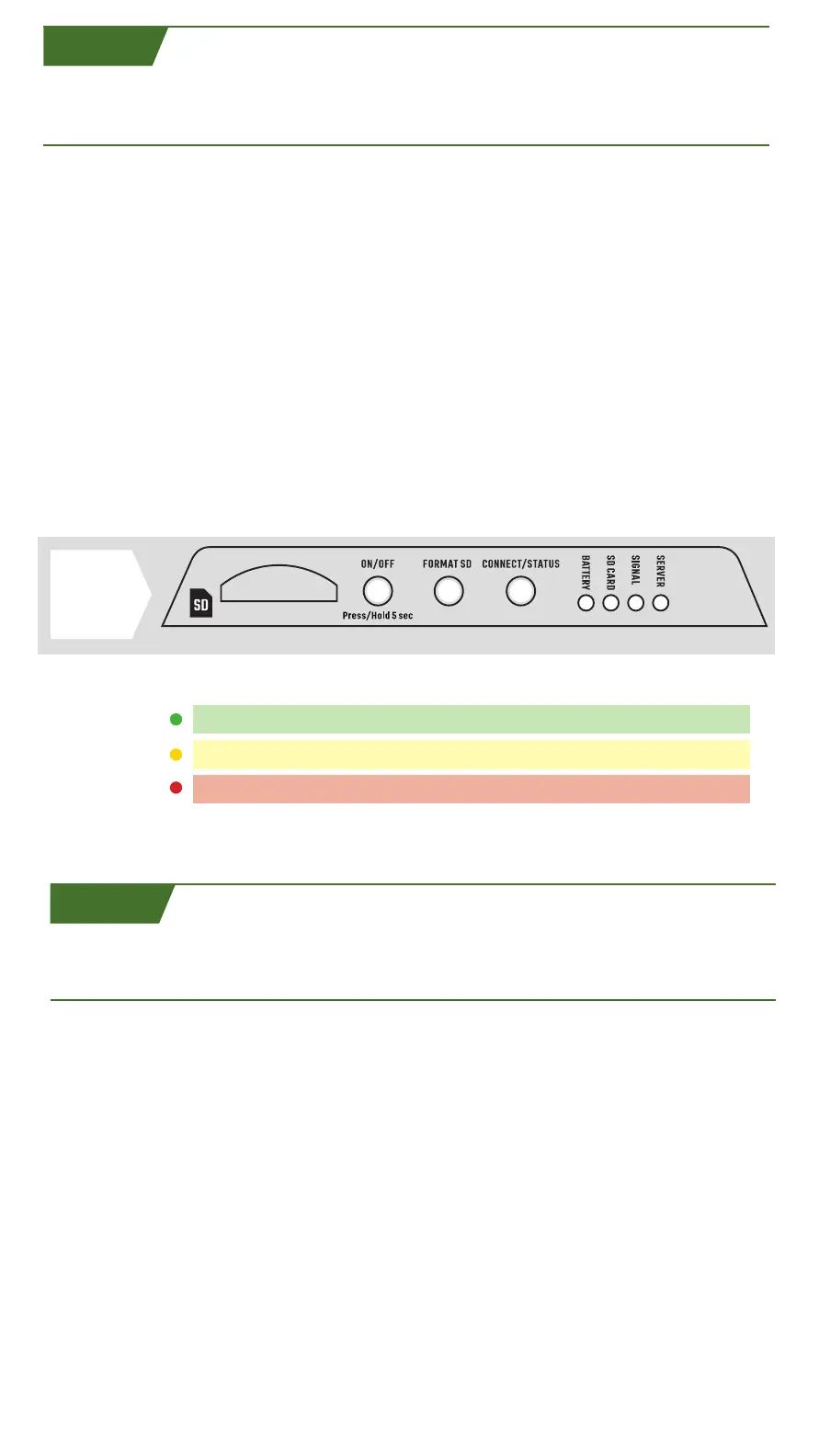
THIS
CONTROL PANEL
IS LOCATED
INSIDE CAMERA
LATCH.
LED COLOR DEFINITIONS AND SOLUTIONS
LED COLOR INDICATORS
• The BATTERY and SD CARD LEDs will illumintae to show status. Green BATTERY
LED indicates power is full and green SD CARD LED indicates card is good. The LED
indicators can also be yellow or red. refer to the table below for color definitions.
• SIGNAL LED will flash yellow while acquiring signal and turn solid green if signal
is good, yellow if signal is ok, and red if signal is bad.
• SERVER LED will flash yellow while connecting to Moultrie Mobile and turn solid
green once connected. This could take some time, be patient.
NOTE: Only LEDs illuminate. If switch or buttons appear to be illuminated, it is due to
illumination from surrounding LEDs.
NOTE: To display the status of the SINGAL, BATTERY, SD CARD or SERVER, you can
briefly press CONNECT/STATUS button. Camera will attempt connection to Moultrie
Mobile and display LED status.
TRANSMIT TEST IMAGE
PRESS AND HOLD CONNECT/STATUS BUTTON FOR 5 SECONDS.
- Status LEDs will illuminate to display status, refer to table in Section D6
for color definitions.
- SIGNAL and SERVER LEDs will flash yellow until connection is established,
then illuminate to indicate status. See table in Section D6 for color definitions.
• Test image is taken and successfully transmitted once the server LED illuminates
green and then all LEDs turn off.
IMPORTANT: We strongly recommend you confirm receipt of test picture by logging
in to your Moultrie Mobile account via the app or website.
MANUALLY TRANSMIT IMAGES
You have the option to transmit any photos captured since the last connection
by briefly pressing and realeasing the CONNECT/STATUS button. Once the
transmission is complete, all LEDs will turn off.
NOTE: Upload frequency setting is not affected by manual image transmission.
SERVER
GREEN CONNECTED GOOD SIGNAL GOOD CARD 100% - 50%
CONNECTING WEAK SIGNAL FULL/LOCKEDCARD 49% - 21%
NO CONNECTION NO SIGNAL BAD/NO CARD 20% - 0%
YELLOW
RED
SIGNAL SD CARD BATTERY
D7
D6


 To Next Page