Page 5
M-990i (Gen2) Digital Game Camera
Page 16
M-990i (Gen2) Digital Game Camera
QUICK START INSTRUCTIONS
B
Use the steps below as a guide to quickly set up your camera so it will function using the factory
default settings.
STEP 1
Open camera cover. Press the battery chamber release button. Install eight (8) AA size alkaline or
lithium batteries with polarities as indicated in the Battery Tray. Re-install the Battery Tray and insert
your SD card. We recommend that you erase the SD card (ERASE IMAGES) inside the camera before
taking pictures: this will not only erase all images, but will also format your SD card for use in the
camera.
STEP 2
Insert SD Memory Card until you hear an audible click. Camera will not operate without SD Card.
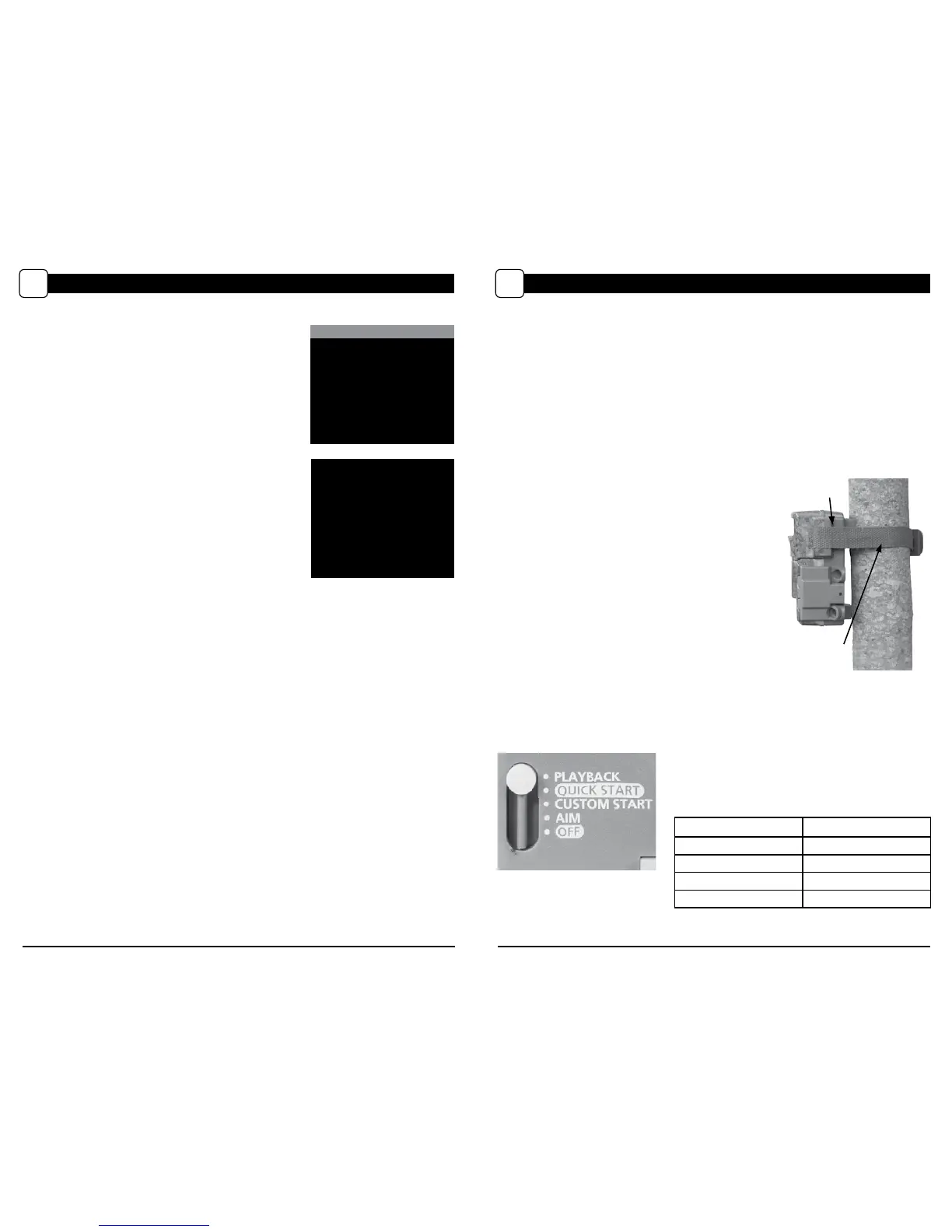
Slide the power switch to Quick Start. Press the Left button to set the time and date.
STEP 3
Mount camera in desired location using a mounting
strap. NOTE: Camera must be attached to a stable
object for motion detection to function properly.
Mounting camera on an unstable structure may
result in excess image captures with no subject
(false triggers).
STEP 5
Close cover. The camera will operate using Default settings. You may also customize the settings if
desired in Custom Start.
STEP 4
Switch camera to Aim. Aim camera using motion
detection to determine target area. Walk in front of the
camera at the desired distance and the camera LED will ash
showing the covered area. Switch camera to Quick Start.
Setting Run Mode
When you choose Quick Start, the only settings that
you will be able to change will be Date and Time, allowing
for rapid setup. Other settings are:
Eyelet
Mounting
Strap
OPTION SETTING
Mode Motion Detect
Detection Delay 30 seconds
Multi-Shot 3-Triggered
Photo or Video Photo
PLAYBACK MODE
L
PLAYBACK
Press OK to begin viewing
images
Press
5
for Playback tips
^
Play Video
< Previous Next >
Delete File
v
OK
Single/Matrix
View
Playback
To view images or videos on your camera’s screen, slide the
Mode Switch to the Playback position
. From the Main Screen,
you can view images, play videos or delete les.
Playback Tips
Pressing the Up button will show a quick review of the
Playback commands. The commands are:
Up - Play Video
Left - Previous le
Right - Next le
OK - Toggles between Single View and Matrix View
Down - Delete le


 To Next Page