Page 4
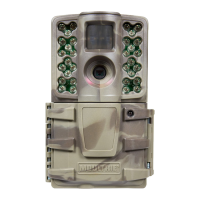
M-990i (Gen2) Digital Game Camera
Page 17
M-990i (Gen2) Digital Game Camera
PLAYBACK / QUICK START / CUSTOM START / AIM / OFF
Aim - When Aim is ON and the PIR Motion Sensor detects motion, the Status Indicator’s red LED on
the front of the camera will come on and remain lit as long as motion is detected.
MENU BUTTON
The Menu Button selects Camera Setup or Main Screen. When camera mode is selected, the LEFT and
RIGHT buttons navigate through the menu options. The Menu Button is also used to wake-up the
camera and turn on the display when the camera is in power saving (or sleep) mode.
OK, UP/DOWN and LEFT/RIGHT BUTTONS
The OK button selects the item to be changed. The UP/DOWN and LEFT/RIGHT buttons are used
to step through and modify the menu options. Pressing the OK button again, selects the option
indicated on the display. The OK button is also used to manually take a picture.
BATTERY COMPARTMENT
The camera is powered by eight (8) AA alkaline or lithium batteries. Push the battery compartment
release button to eject the battery tray. Install batteries as indicated on the engravings on the battery
tray, taking care to note the correct polarity.
See Important Battery Information section on the back page of this manual.
SD CARD SLOT
Accepts up to a 32GB SD Card
(Class 4 or higher)
for photo and video storage.
NOTE: A
Class 4 or higher
SD Card must be installed for the camera to operate (sold separately).
USB PORT
Download still pictures and video onto your computer by connecting a micro-B to USB cable
(not included) to the USB port.
EXTERNAL POWER PORT
Accepts the Moultrie PowerPanel, Moultrie AC Adapter or Moultrie Battery Box accessories
(sold separately) only. Refer to www.moultriefeeders.com for more information.
NOTE: The use of any other power source will void your warranty and possibly harm your camera.
CAMERA OVERVIEW (cont.)
A
Memory & Storage
Your camera supports external SD memory cards ONLY and will accept up to a 32GB card
(Class 4 or higher). Using large memory cards can slow the camera response. The camera
cannot capture any photo or video without external memory. Please insert an SD memory card
to operate camera. Estimates are based on the most common types of memory cards that can be
purchased at electronic stores, office supply stores, or online. Estimates may vary based on camera
settings or environmental conditions.
Important
Always turn the unit o when inserting or removing an SD memory card to avoid damage and ensure
that the camera properly updates the memory information.
Photo Mode
SD Card Size: 2 GB 16 GB
ENHANCED 4224 x 2376 1500 12000
HIGH 2688 x 1512 3800 30400
MED 1920 x 1080 7500 60000
LOW 1280 x 720 19000 152000
Video Mode
SD Card Size: 2 GB 16 GB
HD 1280 x 720 (based on 10 sec video) 110 880
VGA 640 x 480 (based on 10 sec video) 230 1840
Actual capacity will vary based on image properties.
Specications
Operational Mode Motion Detect / Time Lapse / Motion + Time Lapse
Resolution 10.0 MP
Still Resolutions JPEG
Low 1280 x 720, Med 1920 x 1080,
High 2688 x 1512, Enhanced 4224 x 2376
Video Resolutions VGA- 640 x 480, HD 1280 x 720
SD Memory Card Up to 32 GB SD card, Class 4 or higher (not included)
Format JPEG - Still pictures, AVI - Video clips
Power Supply 8 AA Alkaline or Lithium batteries (not included)
CAMERA SPECIFICATIONS
M


 To Next Page
 Loading...