16
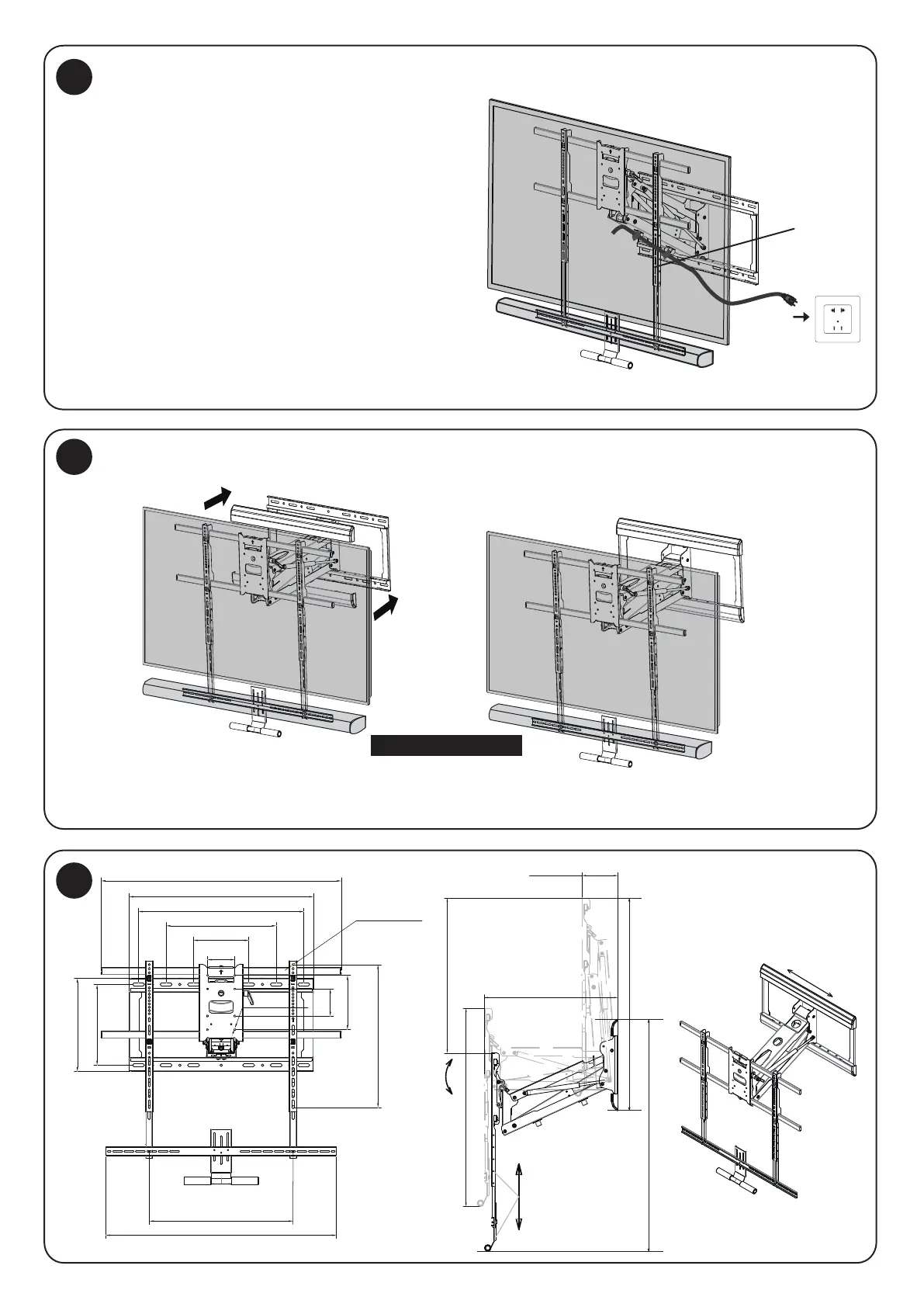
Cables can be run through the cable management
clips on the underside of the mount arm to prevent
the cables from hanging freely.
Install the decorative Cover Plates (#AA-1) onto the top and bottom of the Wall Plate.
Note: Leave enough slack in the cables
to accommodate or the range of motion of the mount.
20
21
22
cable
Pull in the cover plates
100mm [3.9″]
100mm [3.9″]
200mm [7.9″]
527mm [20.7″]
298mm [11.7″]
680mm [26.8″]
203.2mm [8.0″]
406.4mm [16.0″]
609.6mm [24.0″]
344mm [13.5″]
Ø8.3mm [Ø0.3″]
830mm [32.7″]Max
850mm [33.5″]
Ø6.5mm [Ø0.3″]
886mm [34.9″]
Move
Cable Management
Install the Cover Plates
+10°/-5°
UP
Down
250mm[9.8″]
655.5mm [25.8″]
145mm [5.7″]
570mm [22.4″]
735mm [28.9″]~985mm [38.8″]
878mm [34.6″]
876mm [34.5″]Min~1126mm[44.3]Max


 To Previous Page