a
DIGITAL LCD FULL DOT MATRIX
TOUCH-SCREEN MULTI-FUNCTION MODELS
Includes Movado BOLD Touch 2 models
Movado patented watch design powered by precise
digital quartz technology. These models feature full dot
matrix LCD displays. Their innovative touch-screen dials
light to display multi-function information at the swipe of
a finger: Time in two formats, World Time, Stopwatch,
Countdown Timer, Step Counter and Auto Calendar. US
PAT. NO. D735,589
LEGEND:
D – Full dot matrix digital display
L – Unlock key
Dial Icons/Abbreviations:
– Start
– Stop
– Reset
– Stopwatch/Count-down Timer ON
– Stopwatch/Count-down Timer OFF
DST – Daylight Savings Time
MS – Metric System: Kilometers
BS – U.S. (British Commonwealth) System: Miles
OPERATING INSTRUCTIONS
OVERVIEW
• The LCD display remains on when the watch is running
• The Movado dot at 12 o’clock is the “unlock key”
• Lightly touch and hold the Movado dot for 2 seconds
to unlock the display so you can adjust settings or
switch between modes
• When turned “ON” in settings, the EL backlight will
illuminate for two seconds each time the display is
unlocked
After you have unlocked the display:
• Touch and hold the center of the screen for 2 seconds
to access/change settings or set steps goal
• Swipe up and down to switch between operational
modes
• Swipe left and right for alternate displays within a
mode
• Tap the top right side of the dial to turn backlight on
for two seconds (if turned “ON” in settings)
SETTING MODE
1. Touch and hold center of screen for 2 seconds to
access Setting Mode.
2. Touch “SETTINGS”, swipe up or down, then tap
word to select item to be set: “TIME”, “DATE”,
“CITY”, “UNIT” (MS or BS), “DISPLAY”, “SOUND” or
“BACKLIGHT”.
Time Setting
1. Touch “TIME” to enter Time-Setting Mode.
2. Touch “12/24 HOUR” to access 12/24 HOUR
time choice; tap your choice to select it.
3. Swipe left to return to main time screen.
4. Touch “CURRENT TIME” to adjust time setting; touch
digits representing HOUR; swipe up or down to
adjust; tap selected value to set; repeat sequence for
MINUTE and SECONDS.
5. Swipe left to return to main time screen; swipe left
again to return to Settings list.
FIGURE AFIGURE A
L
D

 Need help?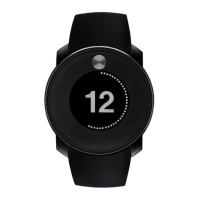

 To Next Page
 General





