
 Need help?
Do you have a question about the Movado BOLD MOTION and is the answer not in the manual?
Describes the button (1) and crown (2) functions and the watch's different display views.
Explains the procedure to set the watch's hour and minute hands using the crown.
Instructions on how to download and install the Movado BOLD app from the app store.
Step-by-step guide to connect the Movado BOLD Motion watch to your smartphone via Bluetooth.
Details on how to customize watch notifications and preferences using the phone application.
Describes the default analog display mode where no lights are illuminated.
Explains how the watch lights indicate the current time as set by the phone app.
Details how lights illuminate clockwise to show progress towards the daily step goal.
Describes default vibration patterns for incoming calls, messages, emails, and calendar events.
Details how incoming calls are signaled and how to decline a call by pressing the watch button.
Explains how calendar events are signaled by the watch, including timing and vibration.
Describes how text and social media messages are indicated on the watch with lights and vibrations.
Explains how email alerts are shown on the watch, including vibration patterns and priority.
Describes alerts for social media app notifications, including priority and vibration.
Covers notifications from third-party apps and how to set their priority and vibration.
Explains the automatic alert for low digital battery, indicated by dimming lights and vibration.
Instructions on enabling/disabling and declining incoming call notifications via the app.
Guides on enabling/disabling and setting priority for message notifications from specific apps.
Steps to enable/disable and set priority for email notifications from specific applications.
Instructions for enabling/disabling and selecting specific calendar event notifications.
How to enable/disable and set priority for notifications from other third-party apps.
Instructions on enabling/disabling and viewing daily, weekly, or monthly step goal progress.
How to check the digital battery status via the phone app and automatic low battery notifications.
Guide to adding, removing, and managing up to 12 favorite contacts for filtered notifications.
Explains custom notifications for calls or messages from favorite contacts based on list position.
How to enable or disable receiving notifications exclusively from your favorite contacts.
How to check the Bluetooth connection status on both the watch and the phone app.
Information on the watch's two batteries, charging, and when to seek professional battery replacement.
Instructions for cleaning the watch and charger contact pins with a lint-free cloth and isopropyl alcohol.
Guidance on how to clean and care for the watch strap to preserve its elasticity and quality.
 General
| Brand | Movado |
|---|---|
| Model | BOLD Motion |
| Type | Smartwatch |
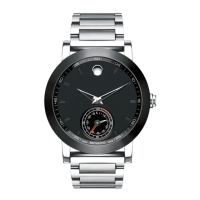
| Case Material | Stainless Steel |
| Dial Color | Black |
| Band Width | 22mm |
| Clasp | Deployment Clasp |
| Water Resistance | 30 meters (3 ATM) |
| Compatibility | iOS and Android |
| Movement | Quartz |
| Crystal | Sapphire Crystal |








 To Next Page

