7
MOVADO BOLD MOTION USER GUIDE
Calendar event notification
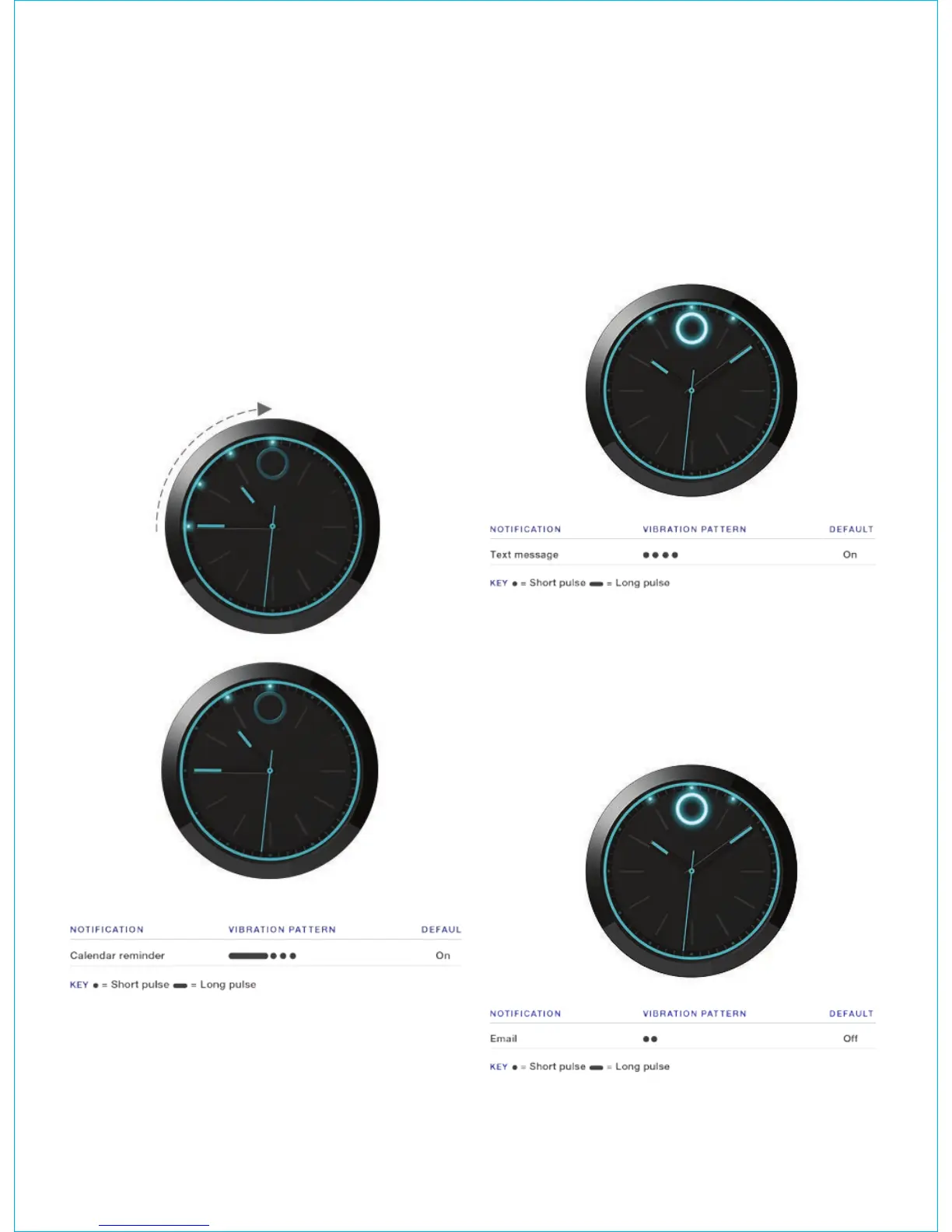
By default, before a calendar event, the watch first
illuminates to indicate that there is an event in 15
minutes, and then illuminates to show time of the event.
For example, a calendar event is scheduled for 11
o’clock. At 10:45, the lights from 9 o’clock through 12
o’clock illuminate to indicate the scheduled event occurs
in 15 minutes. Then, the 11 o’clock light illuminates to
indicate the hour of the event, and the 12 o’clock light
illuminates to indicate the minute of the event.
The watch vibrates four times, one long pulse followed
by three short pulses.
Message notification
When you receive a text or social media private message,
the Movado dot and top three lights pulse quickly. By
default, message notifications are set to high priority and
the watch vibrates four times using short pulses by default.
If message notifications are set to low priority, the watch
vibrates twice using short pulses.
Email notification
When you receive an email, the Movado dot and top
three lights pulse slowly. By default, email notifications
are set to low priority and the watch vibrates twice using
short pulses. If email notifications are set to high priority,
the watch vibrates four times using short pulses.









 To Next Page