values are saved if pressin
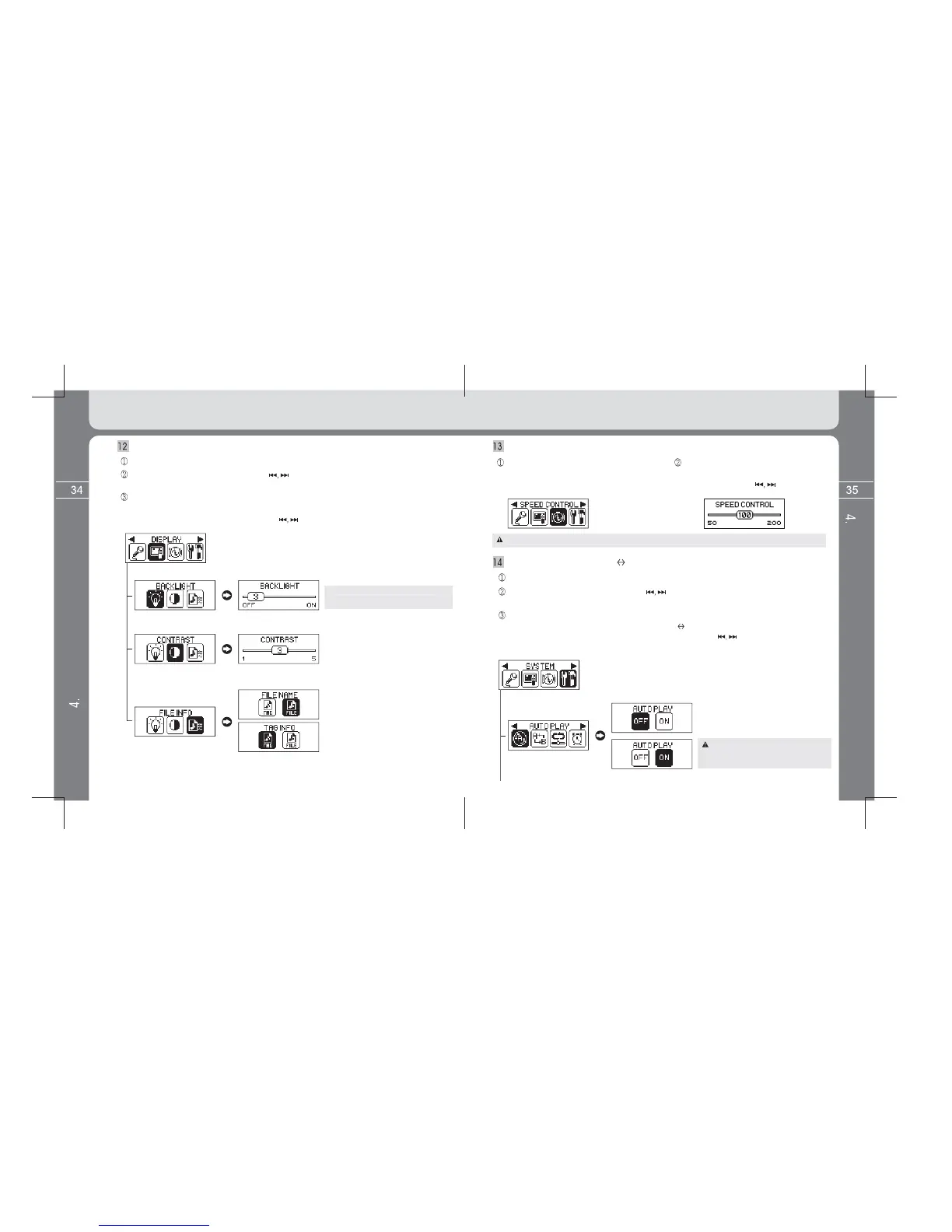
BACKLIGHT, CONTRAST, FILE INFO
Select the DISPLAY icon by using the button and enter into the sub menu of Display
by pressing the MENU button once again shortly.
Setting values are saved if pressing the MENU button shortly after entering into the
desired Menu among SYSTEM (AUTO PLAY, A B, RESUME, SLEEP, AUTO
POWER OFF, FADE, INFO) and then setting value by the button in the above
method.
Setup SYSTEM (AUTO PLAY, A B, RESUME, SLEEP, AUTO POWER OFF, FADE, INFO)
Select the SYSTEM icon by using the button and enter into the sub menu of
system by pressing the MENU button once again shortly.
Setup DISPLAY (BACKLIGHT, CONTRAST, FILE INFO)
Enter into the MENU screen by pressing and holding the MENU button.
[ BACKLIGHT time setting ]
However, consumption of batter
increases
and thus has an effect on pla
to ON.
[ LCD contrast settin
Select file information to be displa
ed in the
LCD 2 line while pla
s ID3 TAG information.
* File name: Displa
s file name.
However, in case of chan
to TAG INFO
from FILE NAME, chan
so, there is failure in case of non
lish.
Setup SPEED CONTROL
Select the SPEED CONTROL icon after
entering into the Menu screen by
pressing and holding the MENU button.
Play speed is changed if pressing the
MENU button shortly after setting play
speed by using the button.
Enter into the Menu screen by pressing and holding the MENU button.
Automatic play is done for last files heard
before powering off. Automatic play is not
done if the file is deleted.
[ Setting of automatic play when powering on ]
* OFF: File is played only when pressing the
PLAY button after powering on.
* ON: File is automatically played if powering on.
Detailed Information on Music Mode
Detailed Information on Music Mode
For files whose pla
usted, sample rate is applied to MP3 file of less than 22.05kHz.


 To Next Page
 Loading...






