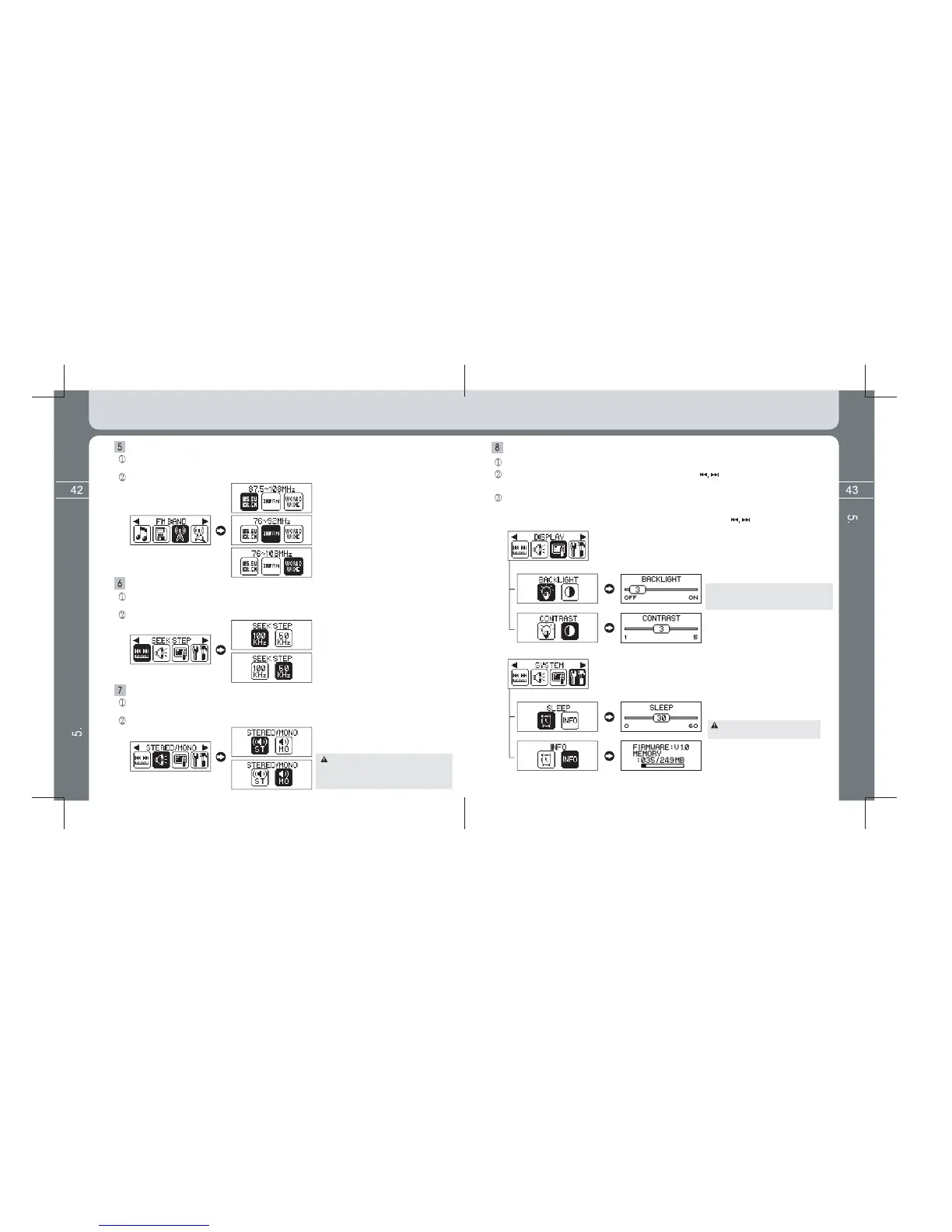
Setting values are saved if pressing the MENU button shortly
after entering into the
desired
DISPLAY menu (BACKLIGHT, CONTRAST) or SYSTEM menu (SLEEP, INFO)
in the a
utton.
Select the DISPLAY or SYSTEM icon by using the button and enter into the sub
menu of Display or System by pressing the MENU button again shortly.
Setup FM BAND (Frequency Band)
Select the FM BAND icon after entering into the Menu screen by pressing and
holding the MENU button.
Setup frequency band receivable depending on every area in the world.
However, where FM broadcasting itself
is MONO broadcasting, it is heard in
MONO mode even if changing to
STEREO mode in Menu setup.
Setup DISPLAY (BACKLIGHT, CONTRAST) / SYSTEM (SLEEP, INFO)
Enter into the Menu screen by pressing and holding the MENU button.
[BACKLIGHT time setting]
(OFF, 3 ~ 30 seconds, ON)
However, consumption of battery increases
and thus has an effect on playing time if
setting to ON.
[LCD contrast setting]
(1~5 step)
[Power Off time reservation function]
(0 ~ 60 minutes)
[Product information display]
Displays Firmware Version, Used Memory,
Total Memory information.
Detailed Information on FM TUNER Mode
Detailed Information on FM TUNER Mode
Sleep setup values are not saved
after power off.



 To Next Page