DCA70SSIU4F 60 HZ GENERATOR DSE8610 MKII • OPERATION MANUAL — REV. #0 (08/11/22) — PAGE 23
OUTPUT TERMINAL PANEL FAMILIARIZATION
120 VAC GFCI Receptacles
There are two 120 VAC, 20-amp GFCI (Duplex NEMA
5-20R) receptacles provided on the output terminal panel.
These receptacles can be accessed in any voltage
selector switch position. Each receptacle is protected by a
20-amp circuit breaker. These breakers are located directly
above the GFCI receptacles. Remember the load output
(current) of both GFCI receptacles is dependent on the
load requirements of the U, V, and W output terminal lugs.
Pressing the reset button resets the GFCI receptacle after
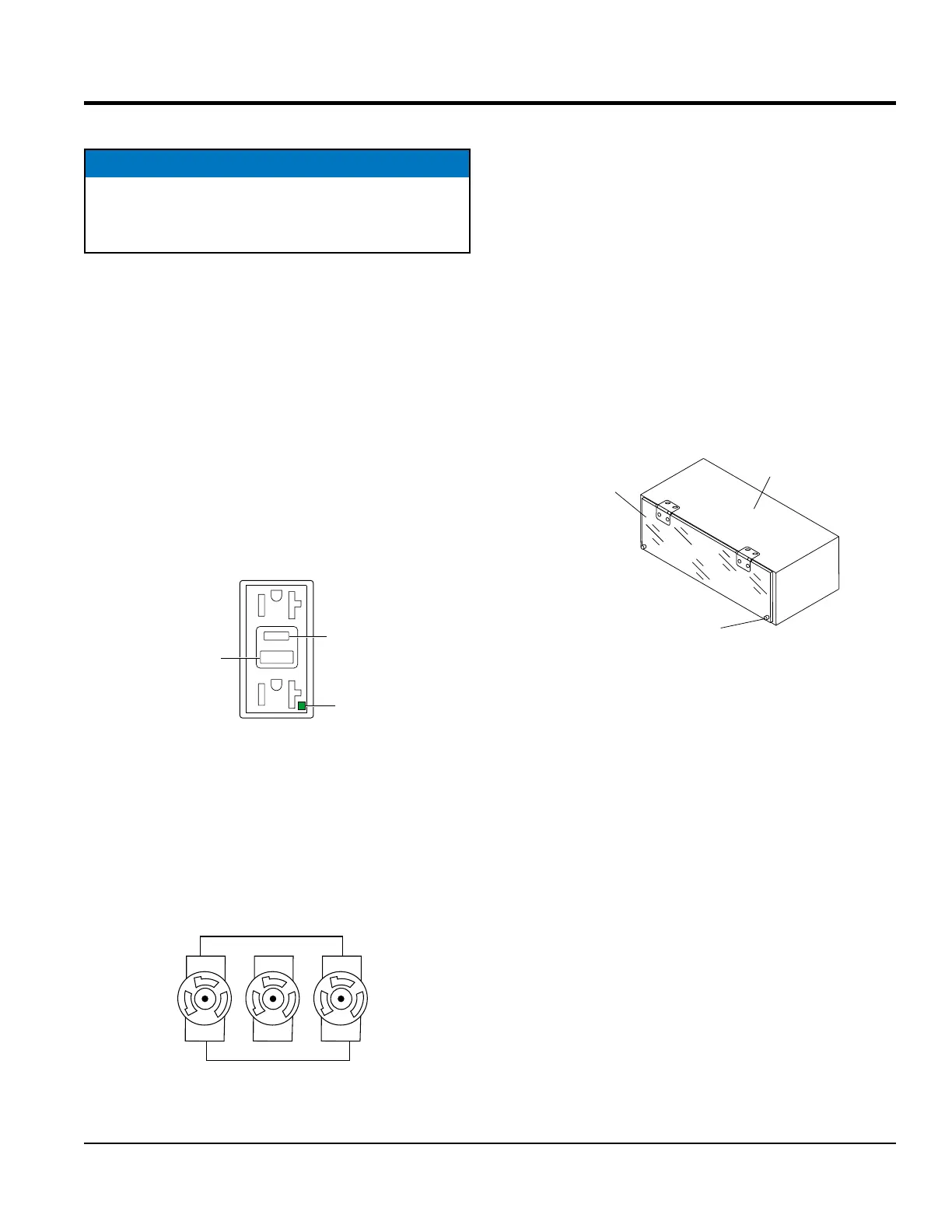
being tripped. Pressing the test button (See Figure 8) in
the center of the receptacle will check the GFCI function.
Both receptacles should be tested at least once a month.
Reference the maintenance section in this manual for
further testing of the GFCI receptacle.
Figure 8. 120 VAC GFCI Receptacle
Twist-Lock Dual-Voltage 240/120 VAC Receptacles
There are three 240/120V, 50-amp, auxiliary twist-lock
(CS-6369) receptacles (Figure 9) provided on the
output terminal panel. These receptacles can only be
accessed when the voltage selector switch is placed in the
single-phase 240/120V position.
Figure 9. 240/120V Twist-Lock Auxiliary
Receptacles
NOTICE
It is recommended that the GFCI receptacles be tested
when the generator is initially uncrated. The receptacles
should then be tested daily at startup.
TEST
BUTT
RESET
ON
STATUS
LED
RECEPTACLES
SINGLE-PHASE 240/120 VAC
Each auxiliary receptacle is protected by a 50-amp circuit
breaker. These breakers are located directly above the
GFCI receptacles. Remember the load output (current) on
both receptacles is dependent on the load requirements of
the output terminal lugs.
Removing the Plastic Face Plate
(Hard Wire Hookup Panel)
The Output Terminal Lugs are protected by a plastic face
plate cover (Figure 10). Unscrew the securing bolts and
lift the plastic terminal cover to gain access to the terminal
enclosure.
After the load wires have been securely attached to the
terminal lugs, reinstall the plastic face plate.
Figure 10. Plastic Face Plate
(Output Terminal Lugs)
PLASTIC
TERMINAL
COVER
HARD WIRE
HOOKUP PANEL
SECURING
BOLTS



 To Next Page