DCA70SSIU4F 60 HZ GENERATOR DSE8610 MKII • OPERATION MANUAL — REV. #0 (08/11/22) — PAGE 37
GENERATOR START-UP PROCEDURE (MANUAL MODE)
14. Listen for any abnormal noises. If any abnormalities
exist, shut down the engine and correct the problem.
Also check the generator for any fluid leaks and
controller display for any possible errors.
15. Make sure the voltage and frequency are set to the
desired setting.
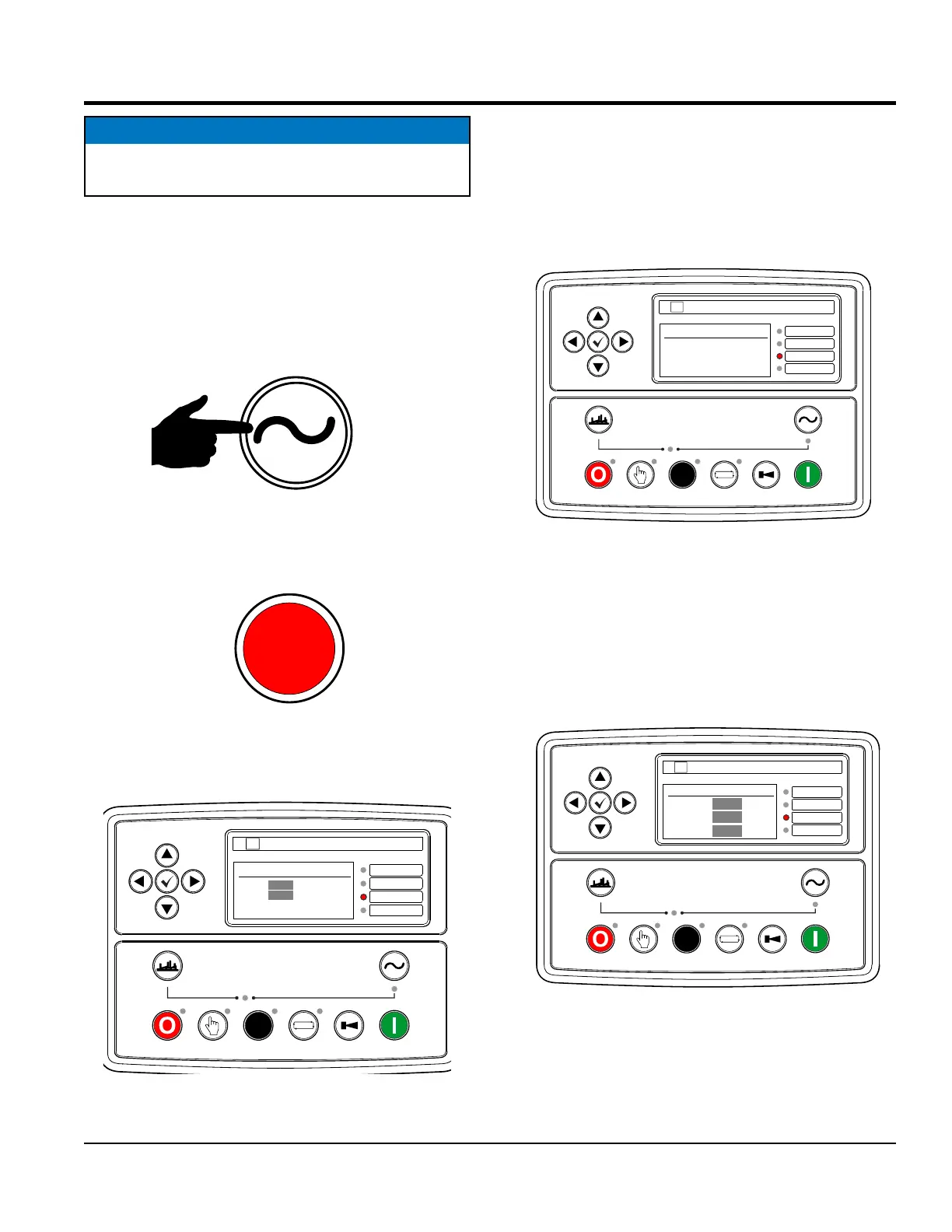
16. Press the contactor CLOSE button (Figure 46).
Figure 46. Contactor Close Button
(Manual Mode)
17. Verify that the contactor CLOSED lamp (Figure 47)
is lit (RED).
Figure 47. Contactor Closed Lamp
18. Next, verify that the main status screen (Figure 48)
is displayed.
Figure 48. Main Status Screen
NOTICE
In cold weather conditions let the engine idle longer
before use.
DSE 8610 MKII-U2
AUTO
COMMON ALARM
REMOTE START
BASELOAD
MAIN CONFIG
On Load
L-N
L-L
0 A
60.0 Hz
0.0 kW
---- pf
XXX V
XXX V
DEEP SEA ELECTRONICS
DSE
Frequency Verification
Press the right arrow button twice and verify that the
"Generator" screen is displayed, then press the down
arrow button three times and verify that the 60-cycle
output frequency is displayed in HERTZ as shown in
Figure 49.
Figure 49. Frequency Screen
Voltage Verification
From the main status screen, press the right arrow button
twice and verify that the "Generator" screen is displayed,
then press the down arrow button one time and verify
that the generator’s voltage output is displayed in VOLTS
as shown in Figure 50.
Figure 50. Output Voltage Screen
DSE 8610 MKII-U2
AUTO
COMMON ALARM
REMOTE START
BASELOAD
MAIN CONFIG
Generator Frequency
60.0 Hz
DEEP SEA ELECTRONICS
DSE
DSE 8610 MKII-U2
AUTO
COMMON ALARM
REMOTE START
BASELOAD
MAIN CONFIG
Generator Voltage
L1-N
L1-N
L1-N
XXX V
XXX V
XXX V
DEEP SEA ELECTRONICS
DSE



 To Next Page