EasyManua.ls Logo

Mr12volt P2000-3GGMD - User Manual

Mr12volt P2000-3GGMD
11 pages
Print Icon
To Next Page IconTo Next Page
Loading...
Mr12Vot MOST CarPlay interface for MMI 3G 3G+
Quick User Guide
Model No : P2000-3GGMD, P2000-3G7MD
A3, A4, A5, A6, A7, Q3, Q5, Q7
1 - All you need to know before Installation
2 - Product Features
3 - Main Feature Operations
4 - Car Settings
5 - Sound Settings
6 - USB Supported Formats & Other Specs
7 - FAQ
Question and Answer IconNeed help?

Do you have a question about the Mr12volt P2000-3GGMD and is the answer not in the manual?

Overview

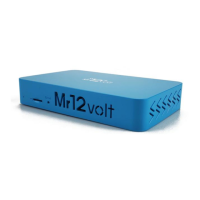
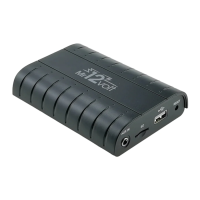
The Mr12Volt MOST CarPlay interface is a device designed to integrate Apple CarPlay and Android Auto functionality into Audi MMI 3G and 3G+ systems. It emulates a CD changer function of an Audi MMI radio and connects through the MOST bus of the system. This device is compatible with MMI 3G Basic, 3G High, and 3G Plus systems.

Function Description:

The Mr12Volt interface provides a comprehensive suite of features to enhance the in-car entertainment and connectivity experience. Its primary function is to enable CarPlay and Android Auto, allowing users to access navigation, music, communication, and other apps directly from their car's display. Beyond this, it offers various multimedia playback options, camera inputs, and sound processing capabilities.

Key Features:

  • CarPlay: Supports both wired and wireless CarPlay connections. For wired CarPlay, a genuine Apple USB cable is required.
  • Android Auto: Supports both wired and wireless Android Auto connections. For wired Android Auto, a genuine USB cable is required.
  • Mirroring: Allows users to mirror their iPhone or Android phone screen onto the car's display. For iPhone mirroring, Bluetooth and Wi-Fi connection must be disabled initially, and then the device connects to a specific wireless network. For Android phones, the "MLink" application needs to be installed, and both Bluetooth and Hotspot connections are required.
  • Music & Video Playback: Supports playback of music and video files through a USB flash drive.
  • Bluetooth HF & Music Streaming: Enables hands-free calling and audio streaming via Bluetooth. The device connects to the Audi factory Bluetooth system for calls, and for music streaming, it connects directly to the Mr12Volt Bluetooth.
  • Reverse Camera Input: Supports AHD720P resolution for reverse cameras. Users can select between OE Camera (factory camera) or AfterMarket 360 (aftermarket camera).
  • Front Camera Input: Provides an input for a front camera.
  • Passenger Side L/R Camera Input: Useful for blind spot monitoring.
  • Reverse Grid Line: Displays dynamic guidelines on the reverse camera feed.
  • Digital Sound Processor (DSP): Features a 15-band equalizer for sound adjustment, allowing for customization of bass, mid, and treble frequencies.
  • Software Update: The device supports software updates, ensuring compatibility and access to new features.

Technical Specifications:

  • Model Numbers: P2000-3GGMD, P2000-3G7MD.
  • Supported Audi Models: A3, A4, A5, A6, A7, Q3, Q5, Q7.
  • USB Support: USB2.0, Hard disk memory.
  • USB File System: FAT32.
  • Supported Music Formats: MP3, WMA, AAC, AC3, DTS, OGG, FLAC, APE, AMR.
  • Supported Video Formats: mkv, mp4, avi, wmv, rmvb, rm, mpg, mpeg, ts, dat, asf, flv, vob.
  • Supported Photo Formats: BMP, JPG, GIF, PNG.
  • USB Charging: Supports phone charging through the USB connector at 500mAh.
  • Audio: Supports Hi-Resolution Loss-less Apple music Wireless.
  • Microphone: Does not support the integration of the OEM microphone. A 3.5mm jack microphone is supplied with the package and must be installed.

Usage Features:

  • Installation: The device is designed for relatively straightforward installation, with no coding required for the MMI software version. It works with or without a CD changer. If a CD changer is fitted, it will be disabled, and the Mr12Volt interface will connect in its place.
  • CarPlay/Android Auto Connection:
    • Wireless: Search for the Mr12volt_xxxx Bluetooth device and pair. Then, turn on Wi-Fi and use CarPlay/Android Auto.
    • Wired: Connect a genuine USB cable to the USB connector.
  • Mirroring:
    • iPhone: Disable Bluetooth & Wi-Fi, then enter the Mirroring menu on the car display and choose iPhone. Connect to the wireless network "carplay_xxxx" (PW is 88888888). Go to iPhone Control Center, select Screen Mirroring, and select Mirroring again.
    • Android Phone: Install the "MLink" application. Ensure both Bluetooth and Hotspot are connected. Open the MLink app and turn on Bluetooth and Hotspot.
  • Bluetooth Hands-free: When a call is incoming, an answer/reject button will appear on the display, or use the MMI/i-Drive/Rotary button. The Audi factory Bluetooth HF and Mr12volt Bluetooth can be connected at the same time.
  • Car Settings:
    • Reverse Camera: Select between OE Camera (factory) or AfterMarket 360 (aftermarket).
    • Reverse Condition: Detects through CAN bus when reverse is engaged (Gear Position) or through a 12V reverse light signal (Reverse state).
    • Starting Front View: Front camera timer setting (5s, 10s, 30s).
    • Dedicated Right View: L/R Side camera setting (Blind Spot camera), activated via CAN bus or 12V L/R light.
    • Reverse Track: Option to turn ON/OFF a Parking Grid (for AfterMarket camera only).
    • Reverse Radar: Option to turn ON/OFF a Reverse Sensor (for AfterMarket Reverse sensor only).
  • Sound Settings: Access the 15-band equalizer to adjust bass, mid, and treble frequencies. Factory default is flat.

Maintenance Features:

  • Software Updates: The device supports software updates, which can be downloaded from the manufacturer's website (www.mr12volt.com) under the SUPPORT section (P2000 mirroring). This allows for bug fixes, performance improvements, and the addition of new features.
  • No Coding Required: The device is designed to be plug-and-play, meaning no complex coding is needed for the MMI software version, simplifying installation and maintenance.
  • Factory Reset: While not explicitly detailed, software updates often include options for factory resets if needed for troubleshooting.

Important Notes:

  • The Mr12Volt interface does not support the integration of the OEM microphone. A 3.5mm jack microphone is supplied with the package and must be installed for hands-free calling.
  • The device does not support folder management when browsing USB music and video files.
  • For optimal performance and compatibility, it is recommended to use genuine Apple USB cables for CarPlay and to ensure the "MLink" application is properly installed for Android mirroring.
  • When connecting to wireless CarPlay or Android Auto, ensure that the phone's Bluetooth and Wi-Fi settings are correctly configured as per the instructions.

Mr12volt P2000-3GGMD Specifications

General IconGeneral
BrandMr12volt
ModelP2000-3GGMD
CategoryAutomobile Accessories
LanguageEnglish

Related product manuals