mrcool.com
Page 26
Unit Installation
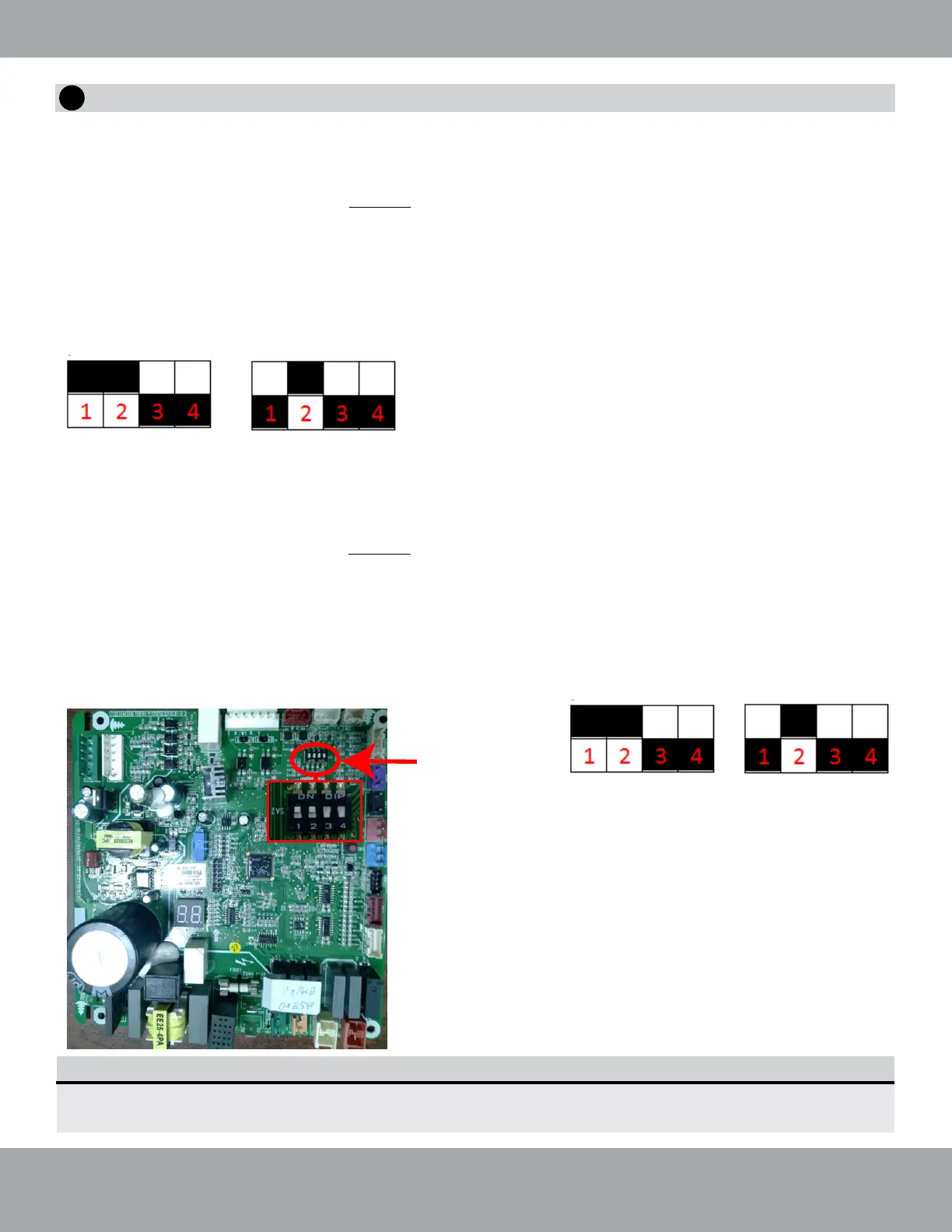
Fig. 2.24
Location of
Dip Switch on
Condenser
Main Board
DEFAULT 3 TON
2 TON SETTING
Fig. 2.23
Fig. 2.25
Follow these instructions during unit installation in order to enable a Universal
®
Series 3 ton condenser and
air handler split system to operate at 2 ton capacity.
1. Make sure the unit is powered off. DO NOT attempt this conversion while the unit is powered on.
2. Locate the capacity dip switch on the condenser main board. The capacity dip switch is circled on the
photo below.
3. The default position of the capacity dip switch is 1 & 2 ‘Up’ and 3 &4 ‘Down’. Up being a switch push
toward the letters (ON DIP). Down being a switch pushed toward the numbers (1 2 3 4).
4. The default position of the capacity dip switch is 36k.
5. To activate the 24k capacity, flip capacity dip switch 1 from the Up position to the Down position.
Converting Unit From 3 Ton to 2 Ton
NOTE
Refer to the Universal Air Handler Installation Manual for Dip Swith Instructions and settings
to convert the Universal Air Handler from 3 ton to 2 ton, or 5 ton to 4 ton.
Converting Unit From 5 Ton to 4 Ton
Follow these instructions during unit installation in order to enable a Universal® Series 5 ton condenser and
air handler split system to operate at 4 ton capacity.
Fig. 2.26
DEFAULT 5 TON
4 TON SETTING
Fig. 2.27
1. Make sure the unit is powered off. DO NOT attempt this conversion while the unit is powered on.
2. Locate the capacity dip switch on the condenser main board. The capacity dip switch is circled on
the photo below.
3. The default position of the capacity dip switch is 1 & 2 ‘Up’ and 3 & 4 ‘Down’. Up being a swit
pushed toward the letters (ON DIP). Down being a switch pushed toward the numbers (1 2 3 4).
4. The default position of the capacity dip switch is 60k.
5. To activate the 48k capacity, flip capacity dip switch 1 from the Up position to the Down position.
6
Condenser Field Conversion



 To Next Page