Need help?
Do you have a question about the MSA SingleLine SCOUT and is the answer not in the manual?
Manual must be read and observed for safe use, including national regulations.
MSA accepts no liability for inappropriate use; warranties void if not used per manual.
Use of lung governed demand valves with short medium pressure lines is mandatory to reduce snagging risk.
Procedure for disassembling the SingleLine gauge using a Torx spanner and screwdriver.
Steps for assembling the device, including battery installation and tightness check.
Procedure for powering on the device, including electronic and pressure tightness tests.
Procedure for safely powering off the device in a pressure-free state.
Describes acoustic signals indicating pressure thresholds during operation.
Details how the device indicates battery status through LEDs and acoustic signals.
How to manually trigger an alarm call on the device.
Procedure for canceling active alarms on the device.
Explains the function of the safety key for motion detection and RIT missions.
How to activate the gauge lighting by lifting the device.
Instructions for cleaning the device, with warnings against organic cleaning materials.
Device is largely maintenance-free; visual inspections recommended. No user repairs.
Details battery status monitoring, low battery indicators, and battery replacement guidelines.
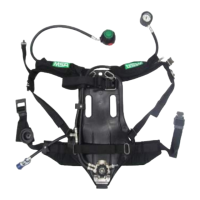
The SingleLine SCOUT is a personal monitoring unit designed to enhance the safety and functionality of respiratory protective devices. It provides real-time operating data and signals danger conditions both visually and acoustically, ensuring the user is constantly aware of their status. The device is an integral part of an applicable MSA SCBA, connecting at the end of its SingleLine.
The primary function of the SingleLine SCOUT is to monitor the proper operation of the respiratory protective device. It displays current operating data and alerts the user to danger conditions through visual and acoustic signals. Key components include a pressure gauge, a coupling for the lung-governed demand valve, and an acoustic warning device (signal whistle). This whistle activates a continuous warning signal when the cylinder pressure drops below 55 ± 5 bar. An optional second connection allows for the attachment of an additional lung-governed demand valve, such as for a rescue kit or RespiHood.
The device automatically triggers an alarm if the user remains motionless for a period, and it also offers the capability for manual alarm activation. In the event of a pressure alarm, a motionless alarm, or a manually triggered alarm, bright red LEDs, referred to as "buddy lights," flash on both sides of the device, making the user visible from the outside. The SingleLine SCOUT is equipped with an internal data memory capable of storing operational data for over 30 sessions, each with up to 20 minutes of working time.
Switching On: To activate the SingleLine SCOUT, the compressed air cylinder must be opened. If the pressure exceeds 15 bar, the device will start up. Upon startup, an electronic component check is performed: all LEDs flash once, an acoustic signal sounds, and the gauge LEDs light up green, indicating the device is ready for use. If only red LEDs light up and no acoustic signal sounds, it indicates an electronic damage, and the device should not be used.
An optional high-pressure tightness test can be performed within 30 seconds after the self-test is confirmed by pressing the manual alarm button. After allowing 8 to 12 seconds for stabilization, the cylinder valve is closed, and the alarm button is double-clicked. The device then measures the pressure drop over 60 seconds, with red and yellow LEDs flashing during the test. If the pressure drop is less than 10 bar within 60 seconds, the device's tightness is confirmed by an acoustic sound and green gauge LEDs flashing. Air is then slowly released using the lung-governed demand valve until the warning whistle sounds, after which the lung-governed demand valve is closed, and the cylinder valve is reopened for SCBA use. It's crucial that the pressure drop does not exceed 10 bar in 60 seconds; otherwise, the device is not tight and should not be used. If the pressure is below 15 bar, the SingleLine SCOUT will not start, and if only red LEDs light up without an acoustic signal, it may indicate low pressure or battery capacity.
Switching Off: The device can only be switched off when it is in a pressure-free state, meaning the measured pressure is less than 15 bar. To do this, the valve(s) of the compressed air cylinder(s) are closed, and the compressed air breathing apparatus is vented via the lung-governed demand valve. An acoustic signal will sound between 60 and 0 bar. The pressure alarm is then switched off by pushing the alarm button twice. Finally, pushing the alarm button twice again will cause an acoustic signal to sound, and the device will switch off.
Pressure Status Message: During operation, the device provides acoustic signals at specific pressure thresholds: a single beep for the 1st pressure threshold, a double beep for the 2nd pressure threshold, and a signal whistle followed by a repeated double beep (until confirmed with a double press below 15 bar) at 60 bar. These thresholds are customizable using the MSA A2 Software.
Battery Life Indication: The battery status is indicated by the device. When batteries are sufficient, the device starts in SCOUT Mode, and the green battery life indication blinks for 100 ms every 45 seconds. If the batteries are empty, in standby, the red battery life indication LED blinks for 100 ms every 30 seconds. During startup, if batteries are empty, the device will not start properly, all red LEDs, including the battery life indicator, will light up, and an acoustic signal will sound. If the battery power level cannot be measured, the device will not start. In all cases of empty or unmeasurable battery power, the batteries must be exchanged. Date and time settings should be updated after battery exchange using MSA A2 Software.
Initiating Manual Alarm Calls: During use, a manual alarm can be initiated by pushing the manual alarm button until the alarm sounds and buddy lights turn on.
Canceling Alarms: Alarms can be canceled by pushing the alarm button twice, which will turn off the alarm.
Using a Safety Key: The SingleLine SCOUT can be used with a safety key (10186697). The device automatically detects if a key is placed in its holder. If a key is detected during startup, motion detection is deactivated and can be reactivated by removing the key. All warnings and alarms related to the motion detector are deactivated when the key is in place. The key can also be used during Rapid Intervention Team (RIT) missions to mute device alarms while they are active by pushing the key into the holder. Pressure warnings and pressure alarm sounds will still occur.
Illuminating the Gauge: The gauge lightning turns on when the gauge is lifted from the chest over an angle of 90°.
Cylinder Pressure Display: The cylinder pressure is displayed via an integrated analog gauge and an internal pressure sensor. The current pressure can be read from the imprinted scale on the gauge. The filling level of compressed air cylinders is displayed in three stages using three LEDs on each side of the gauge when the device is lifted from the user's chest. These thresholds are standard but can be customized using MSA A2 Software.
Reading out Device Data: Data from the SingleLine SCOUT can be read out using the MultiTAG-USB (125 kHz/13.56 MHz/NFC). Settings can be modified and reloaded to the device using the MSA A2 Software on a PC.
Cleaning: For SingleLine SCOUT devices produced before July 2021, components should be cleaned after each operation, and if heavily contaminated, with a damp cloth (tepid water) and a mild detergent. The device does not need to be removed from the pneumatics for cleaning. For units produced after July 2021, specific instructions for washing related to M1 SCBA should be followed. It is crucial not to use organic cleaning materials such as nitro thinners, alcohol, white spirit, or petrol, as this can lead to serious personal injury or death.
General Maintenance: The device is largely maintenance-free, but regular visual inspections are recommended to check for faults or damage. Any faults necessitate replacement of the device, as repairs must only be carried out by the manufacturer or an authorized repair service.
Exchanging Batteries: Batteries may need to be exchanged before first service due to storage and delivery times. The device monitors battery charge status, and low battery conditions are indicated by a blinking red LED in standby or by the device not starting properly with all red LEDs and an acoustic signal. If battery power cannot be measured, the device will not start. Only approved batteries should be used, and non-approved or old batteries will be flagged during startup. Batteries should only be removed for exchange when indicated as low. Date and time settings must be updated after battery exchange using MSA A2 Software. It is recommended to change batteries at least once a year or when indicated by the LED or display. The device is designed for 500 hours of operational time or 1 year of standby, though operational time may vary with incident conditions and usage.
Start without Pressure: A long press of the manual alarm button in standby activates the device in full alarm without pressure.
Service Mode: Pressing the manual alarm button for more than 10 seconds in standby activates the service mode. This mode can be used with MSA A2 Software to change device settings and read out log memory.
 General
| Sensor Type | Electrochemical |
|---|---|
| Operating Temperature | -20°C to +50°C |
| Gas Detected | Oxygen (O2), Carbon Monoxide (CO), Hydrogen Sulfide (H2S) |
| Device Type | Single-gas detector |
| Display | LCD |
| Alarms | Audible, visual, and vibration |
| Humidity Range | 15% to 90% RH (non-condensing) |
| Certifications | ATEX |
| Battery Life | Up to 2 years (typical use) |


 To Next Page