3-20
MS-7005 Micro ATX Mainboard
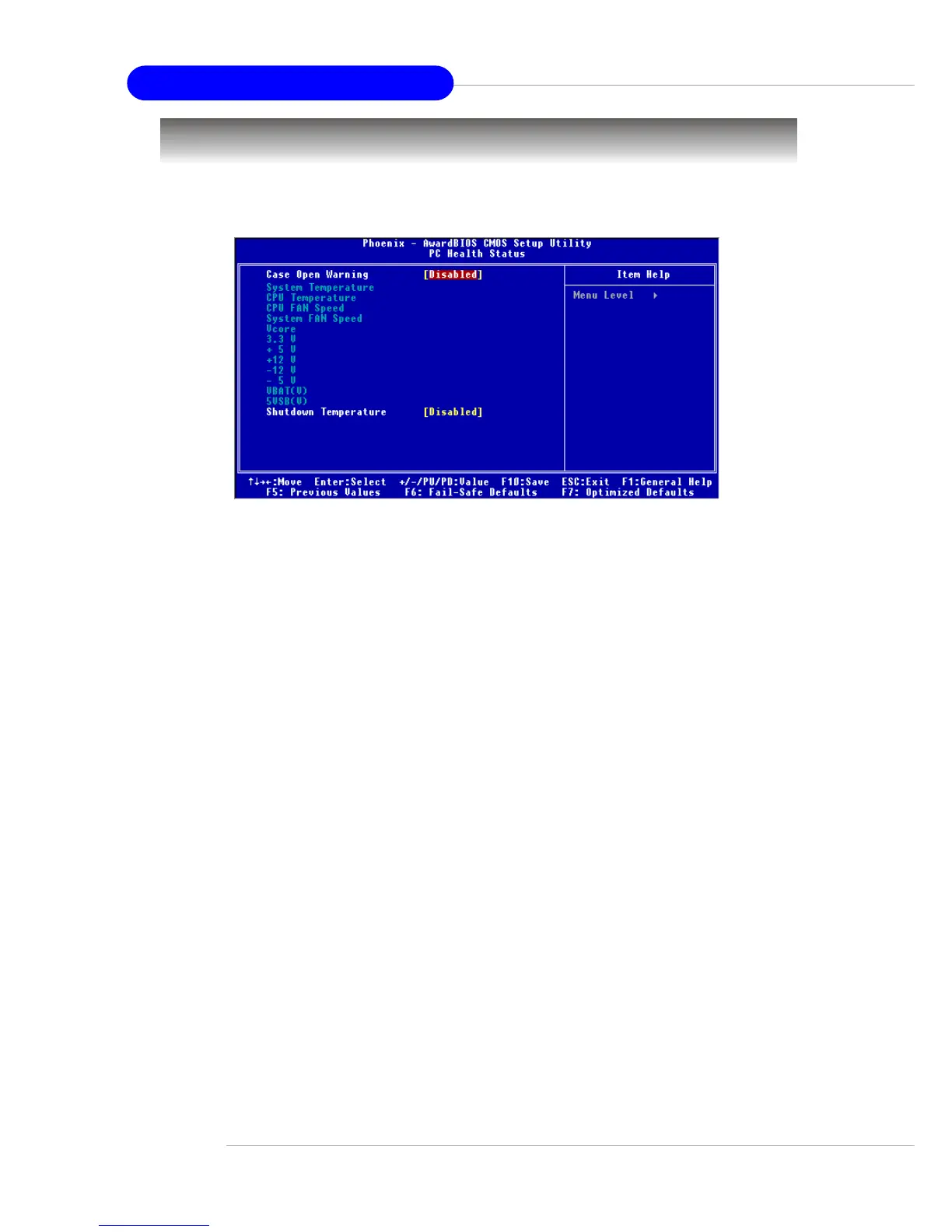
PC Health Status
This section shows the status of your CPU, fan, overall system status, etc.
Monitor function is available only if there is hardware monitoring mechanism onboard.
Case Open Warning
The field enables or disables the feature of recording the chassis intrusion status
and issuing a warning message if the chassis is once opened. This item is available
only when your mainboard has JCI1 jumper. To clear the warning message, set the
field to [Reset]. The setting of the field will automatically return to [Enabled] later.
Settings: [Enabled], [Reset], [Disabled].
System/CPU Temperature, CPU/System Fan Speed, Vcore, 3.3 V, +5 V, +12
V, -12 V, -5 V, VBAT(V), 5VSB(V)
These items display the current status of all of the monitored hardware devices/
components such as CPU voltages, temperatures and all fans’ speeds.
Shutdown Temperature
If the CPU temperature reaches the upper limit preset in this setting, the system will be
shut down automatically. This helps you to prevent the CPU overheating problem.
This item is available only when your OS supports this function, such as Windows
ME/XP.



 To Next Page