12
Rear I/O Panel
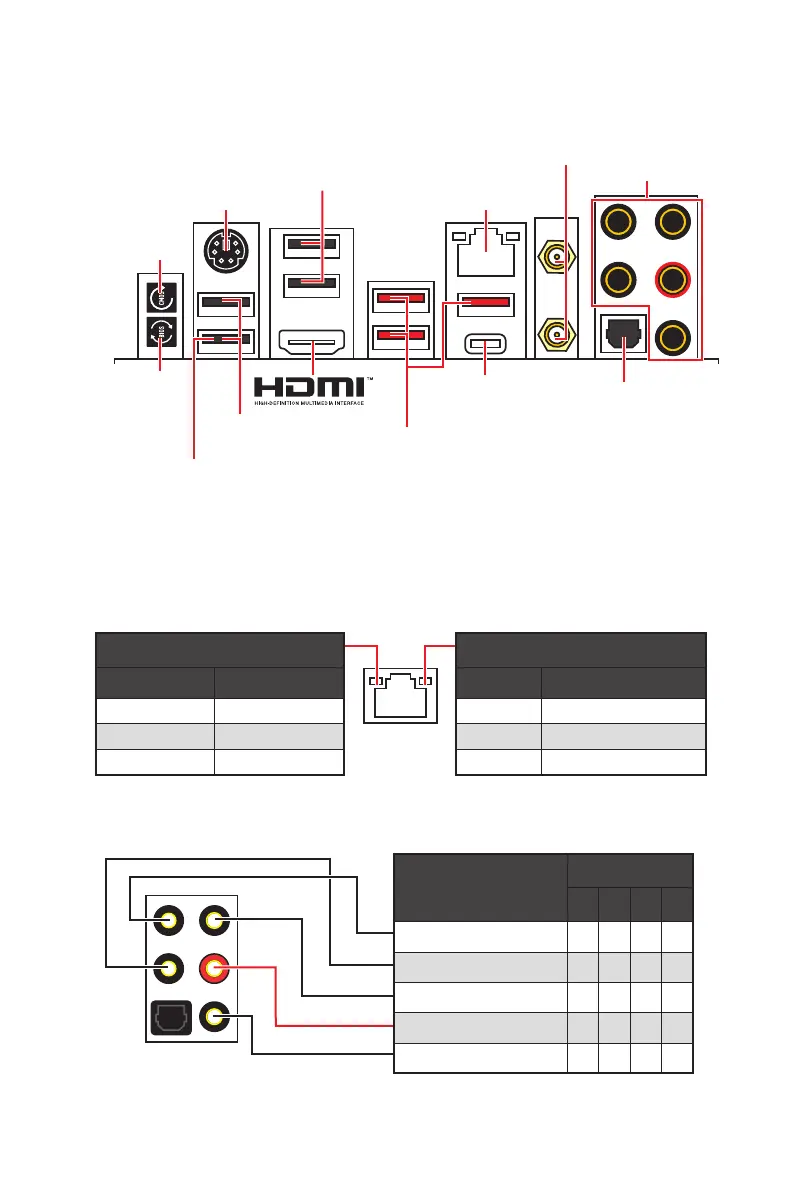
Audio Ports Configuration
Rear I/O Panel
Link/ Activity LED
Status Description
Off No link
Yellow Linked
Blinking Data activity
Speed LED
Status 2.5 Gbps LAN
Off 10 Mbps
Green 100/ 1000 Mbps
Orange 2.5 Gbps
LAN Port LED Status Table
Audio Ports
Channel
2 4 6 8
Rear Speaker Out
Line-In/ Side Speaker Out
Line-Out/ Front Speaker Out
Mic In
Blank
Flash BIOS Port/ Button - Please refer to page 46 for Updating BIOS with Flash
BIOS Button.
Clear CMOS Button
button for about 5-10 seconds to reset BIOS to default values.
USB 3.2 Gen 2
USB 3.2 Gen 2
Flash BIOS Port
2.5 Gbps LAN
USB 2.0 Type-A
USB 2.0 Type-A
Flash BIOS
Button
Button
Wi-Fi Antenna
connectors
Audio Ports
Optical S/PDIF-Out



 To Next Page
 Loading...