A
A
A
p
p
p
p
p
p
e
e
e
n
n
n
d
d
d
i
i
i
x
x
x
A
A
A
T
T
T
C
C
C
P
P
P
/
/
/
I
I
I
P
P
P
C
C
C
o
o
o
n
n
n
f
f
f
i
i
i
g
g
g
u
u
u
r
r
r
a
a
a
t
t
t
i
i
i
o
o
o
n
n
n
f
f
f
o
o
o
r
r
r
W
W
W
i
i
i
n
n
n
d
d
d
o
o
o
w
w
w
s
s
s
9
9
9
5
5
5
/
/
/
9
9
9
8
8
8
This section introduces you how to install TCP/IP protocol into your personal computer. And suppose you have been
successfully installed one network card on your personal computer. If not, please refer to your network card manual.
Moreover, the Section B.2 tells you how to set TCP/IP values for working with this NAT Router correctly.
A.1 Install TCP/IP Protocol into Your PC
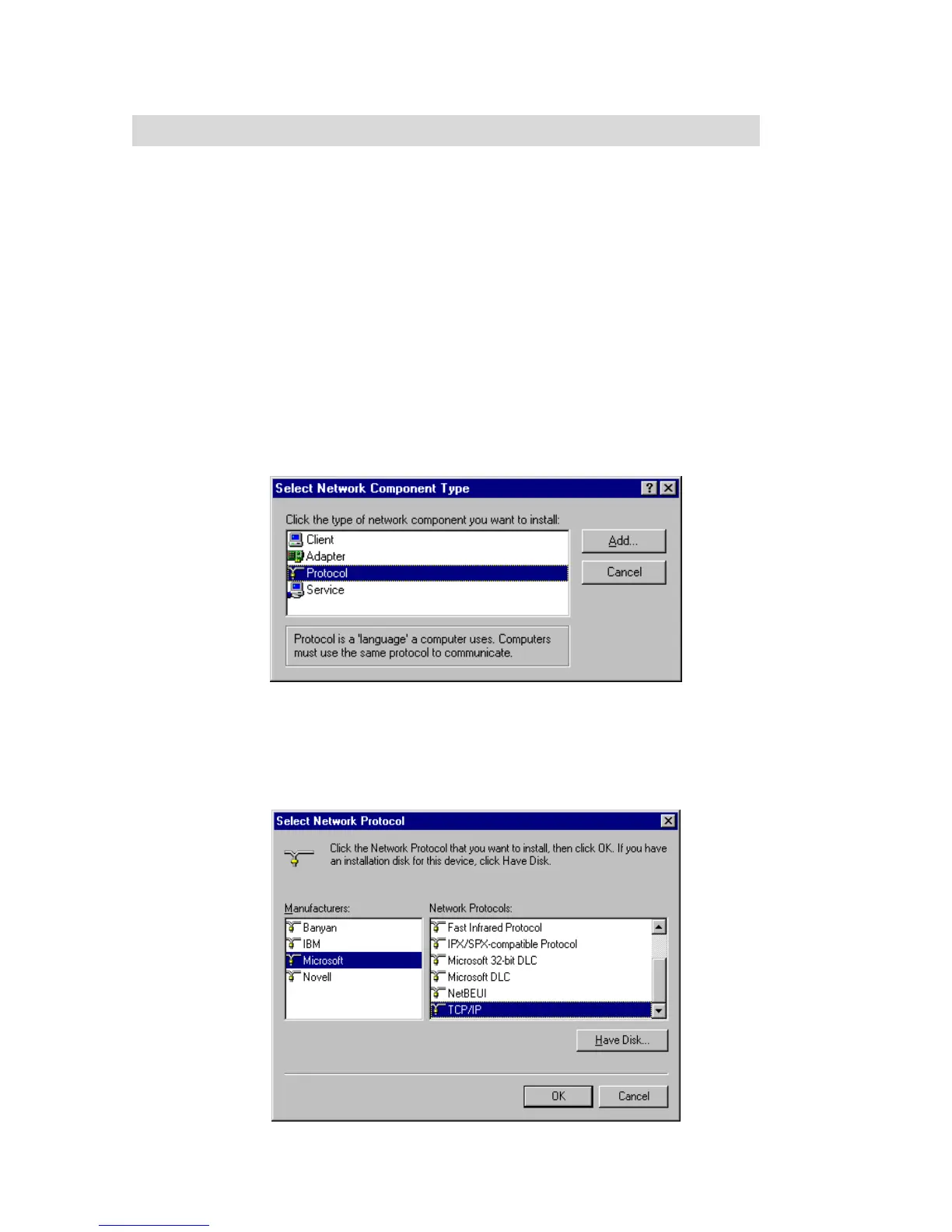
1. Click Start button and choose Settings, then click Control Panel.
2. Double click Network icon and select Configuration tab in the Network window.
3. Click Add button to add network component into your PC.
4. Double click Protocol to add TCP/IP protocol.
5. Select Microsoft item in the manufactures list. And choose TCP/IP in the Network Protocols. Click OK button
to return to Network window.



 To Next Page