25636 2/18 | 85-000869_INST_C
MINIAC GPS-322 CYCLING COMPUTER INSTRUCTIONS
6400 WEST 105TH STREET // BLOOMINGTON, MN 55438 // 1-855-883-6563 // WWW.MSWBIKE.COM
Thank you for purchasing an MSW Miniac GPS-322 Cycling Computer!
Thank you for your purchase! At MSW
®
we believe having essential
accessories makes a good bike ride great. The 22 function MINIAC GPS 322
cycling computer is loaded with features that will add to any ride experience.
WARNING: Cycling can be dangerous. Bicycle products should be installed
and serviced by a professional mechanic. Never modify your bicycle
or accessories. Read and follow all product instructions and warnings including
information on the manufacturer’s website. Inspect your bicycle before every
ride. Always wear a helmet.
For additional product and safety information go to: www.mswbike.com/safety.
COMPATIBILITY AND INTENDED USE
The Miniac GPS-322 function list includes: GPS Technology, Auto Wake-Up,
Backlight On/Off, Actual Temperature, Riding Data File Storage, PC Link
Connection, Device Battery Life Indicator, Clock, Trip Time, Trip Distance,
Total ODO, Speed Comparison, Current / Average /Maximum Speed, Actual
Altitude, Altitude Gain / Loss, Total Altitude, Maximum Altitude, Trip Climb,
Current / Average / Maximum Gradient.
The MSW Miniac GPS-322 is intended for use on roads and
paved trails as well as ASTM Condition 2 use. This includes
smooth paved roads, unpaved and gravel roads, and trails with
moderate grades where loss of contact with ground may occur
but drops are less than 6" (15cm).
The Miniac GPS-322 head unit mounting bracket is compatible with most
handlebar diameters.
INSTALLATION
ITEM CHECKLIST
HOW TO MOUNT THE BRACKET
Use the rubber pad to tighten the bracket on the handlebar or stem with the
rubber ties.
Place the computer on the bracket and secure it by turning it clockwise.
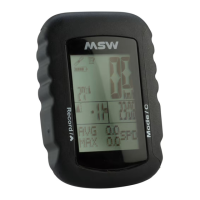
COMPUTER MAIN DISPLAY
& BUTTON FUNCTION
TURN ON/ OFF
Press Record button and Select button for three seconds to turn on/off
the device.
WAKE UP AND SLEEP
Auto Wake Up: When there is any speed or vibration, the computer will
wake up.
Auto Sleep: After six minutes without any speed or vibration, computer will
go to sleep.
These two tenons
have to be on the
left and right side
of the bracket.
Rubber Pad
GPS - 322 Micro USB CableBracket
Rubber Ties x 4
Bracket
Bands stretch around
the stem or bar
Rubber Pad
Computer
Bracket
Rubber Pad
Rubber Ties
Set Button
Altitude
Gradient / Temperature
Functions
Record Button
Clock
Select Button
GPS Indicator
Battery
ALT Loss ALT Gain
Maximum ALT
Total ALT
These two tenons
have to be on the
left and right side
of the bracket.
Rubber Pad
GPS - 100 Micro USB CableBracket Rubber Ties x 4
Bracket
Bands stretch around
the stem or bar
Rubber Pad
Computer
Bracket
Rubber Pad
Rubber Ties
Set Button
Altitude
Gradient / Temperature
Functions
Record Button
Clock
Select Button
GPS Indicator
Battery
GPS - 333
These two tenons
have to be on the
left and right side
of the bracket.
Micro USB CableBracket
Bracket
Bands stretch around
the stem or bar
Rubber Pad
Rubber Pad
Set Button
Mode Button
Functions
Cadence / Altitude
Gradient / Temperature
Record Button
Touch Button / Select Button / Enter
Clock / Heart Rate / Power
GPS Indicator
Battery
Computer
Bracket
Rubber Pad
Rubber Ties x 4
Rubber Ties
These two tenons
have to be on the
left and right side
of the bracket.
Rubber Pad
GPS - 322 Micro USB CableBracket
Flash 3 Sec. Turn Off
Rubber Ties x 4
Bracket
Bands stretch around
the stem or bar
Rubber Pad
Computer
Bracket
Rubber Pad
Rubber Ties
Set Button
Altitude
Gradient / Temperature
Functions
Record Button
Clock
Select Button
GPS Indicator
Battery
ALT Loss ALT Gain
Maximum ALT
Total ALT
These two tenons
have to be on the
left and right side
of the bracket.
Rubber Pad
GPS - 322 Micro USB CableBracket
Flash 3 Sec. Turn Off
Rubber Ties x 4
Bracket
Bands stretch around
the stem or bar
Rubber Pad
Computer
Bracket
Rubber Pad
Rubber Ties
Set Button
Altitude
Gradient / Temperature
Functions
Record Button
Clock
Select Button
GPS Indicator
Battery
ALT Loss ALT Gain
Maximum ALT
Total ALT
Figure 3
These two tenons
have to be on the
left and right side
of the bracket.
Rubber Pad
GPS - 322 Micro USB CableBracket
Flash 3 Sec. Turn Off
Rubber Ties x 4
Bracket
Bands stretch around
the stem or bar
Rubber Pad
Computer
Bracket
Rubber Pad
Rubber Ties
Set Button
Altitude
Gradient / Temperature
Functions
Record Button
Clock
Select Button
GPS Indicator
Battery
ALT Loss ALT Gain
Maximum ALT
Total ALT
For off-road
riding and
jumps less than
6" (15cm)


 To Next Page
 General