EasyManua.ls Logo

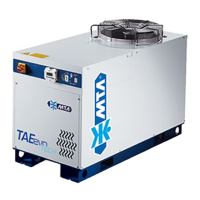
MTA TAEevo015 - User Manual

MTA TAEevo015
47 pages
Print Icon
To Next Page IconTo Next Page
Loading...
Painting systems & machines
2FC IMPIANTI SRL
Via G. Marconi 20/1
35010 Villanova di CSP (PD) - Italia
Water chillers
1.5.1 Water chillers

Questions and Answers

  • M
    Michael FlynnSep 12, 2025
    What to do if my MTA TAEevo015 Chiller displays Alarm ACF1,ACF2,ACF3, ACF4,ACF5?
    • F
      Felicia BrownSep 12, 2025
      If your MTA Chiller displays Alarm ACF1,ACF2,ACF3, ACF4, or ACF5, this indicates a configuration error. Try turning the unit off and then on again. If the problem persists, contact the nearest service center.
  • K
    kevinballSep 14, 2025
    What to do if my MTA Chiller displays Alarm EE?
    • J
      Joyce KirkSep 14, 2025
      If your MTA Chiller displays Alarm EE, it means that the processor is not memorizing the data correctly. Try turning the unit off and then on again. If this does not resolve the issue, contact the nearest service center.

Summary

Chapter 2 Safety

2.1 General Safety Precautions

Essential safety guidelines for handling, operation, and maintenance personnel.

2.3 Lifting and Carriage Precautions

Procedures and precautions for safely lifting and moving the unit.

2.4 Installation Precautions

Specific safety measures required during the unit's installation process.

2.6 Maintenance and Repair Precautions

Safety protocols for performing maintenance and repair work on the unit.

Chapter 4 Description

4.1 Components Overview

Lists and briefly describes the main components of the water chiller units.

4.7 Pump Description

Details on the types of pumps used, their management, and seals.

Chapter 5 Installation

5.2 Positioning Guidelines

Recommendations for optimal placement and environmental conditions for the unit.

5.3 Antifreeze Protection

Instructions for adding antifreeze to protect against freezing during stoppages.

5.6 Electrical Connections

Procedures and regulations for connecting the unit to the power supply network.

Chapter 7 Electronic Board

7.1 Display and Controls

Explanation of the display zones, icons, and button functions for unit operation.

7.2 Function of Buttons

Detailed description of button functions for interacting with the electronic controller.

7.8 Programming by Keyboard

Guide to accessing and modifying user and service parameters for unit configuration.

7.12 Function Menu Operations

Steps for navigating the function menu to display alarms, reset them, and manage data.

Chapter 9 Operation and Maintenance

9.3 Unit Access Procedures

Instructions on how to access internal components for service and maintenance.

9.5 Maintenance Schedule

A detailed schedule of routine operations and checks for unit upkeep.

Chapter 10 Trouble Shooting

Chapter 12 Alarms

12.1 Alarm Codes and Actions

Detailed list of alarm codes, their causes, actions, and reset procedures.

MTA TAEevo015 Specifications

General IconGeneral
BrandMTA
ModelTAEevo015
CategoryChiller
LanguageEnglish

Related product manuals