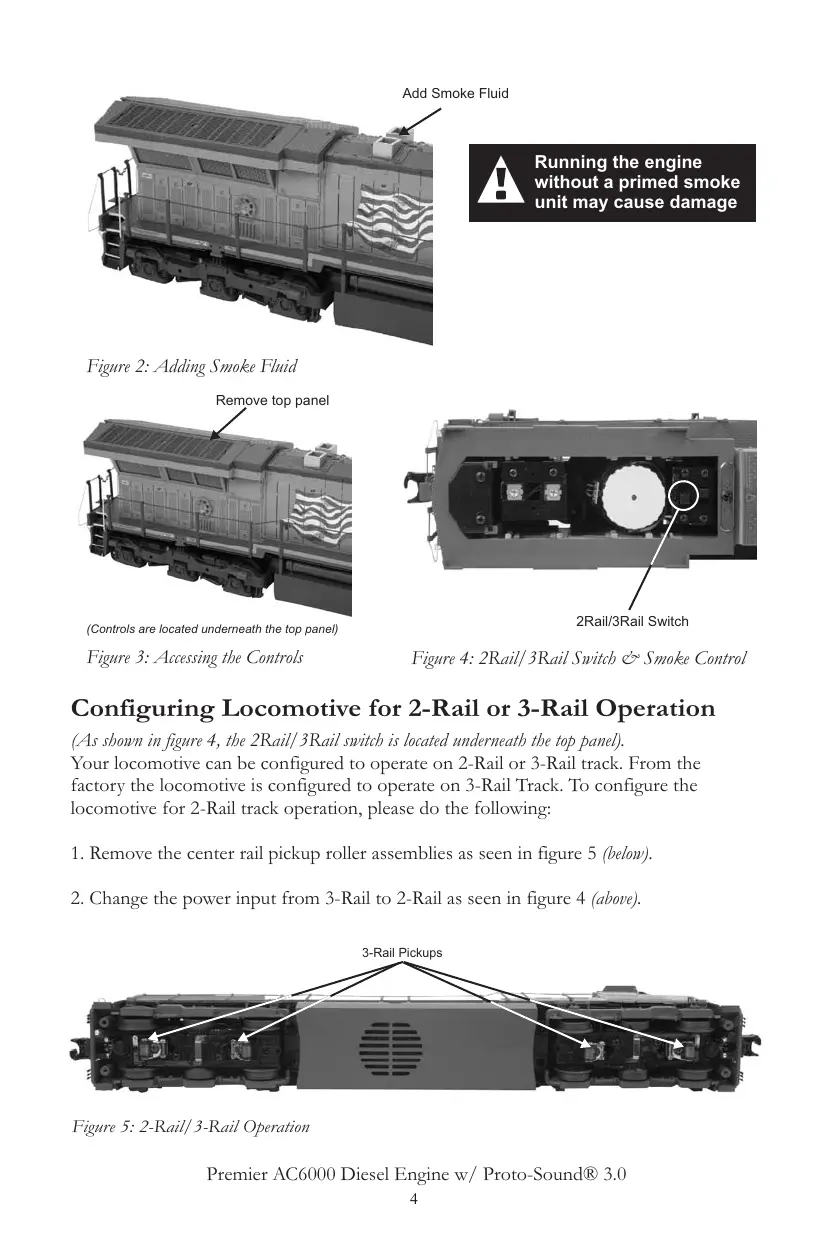
Running the engine
without a primed smoke
unit may cause damage
Figure 2: Adding Smoke Fluid
Figure 4: 2Rail/3Rail Switch & Smoke Control
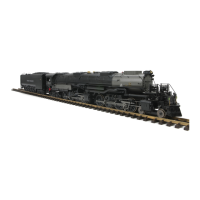
Figure 3: Accessing the Controls
Configuring Locomotive for 2-Rail or 3-Rail Operation
(As shown in figure 4, the 2Rail/3Rail switch is located underneath the top panel).
Your locomotive can be configured to operate on 2-Rail or 3-Rail track. From the
factory the locomotive is configured to operate on 3-Rail Track. To configure the
locomotive for 2-Rail track operation, please do the following:
1. Remove the center rail pickup roller assemblies as seen in figure 5 (below).
2. Change the power input from 3-Rail to 2-Rail as seen in figure 4 (above).
Figure 5: 2-Rail/3-Rail Operation
3-Rail Pickups
2Rail/3Rail Switch
(Controls are located underneath the top panel)
Remove top panel
Add Smoke Fluid
4
Premier AC6000 Diesel Engine w/ Proto-Sound® 3.0
All manuals and user guides at all-guidesbox.com


 To Next Page