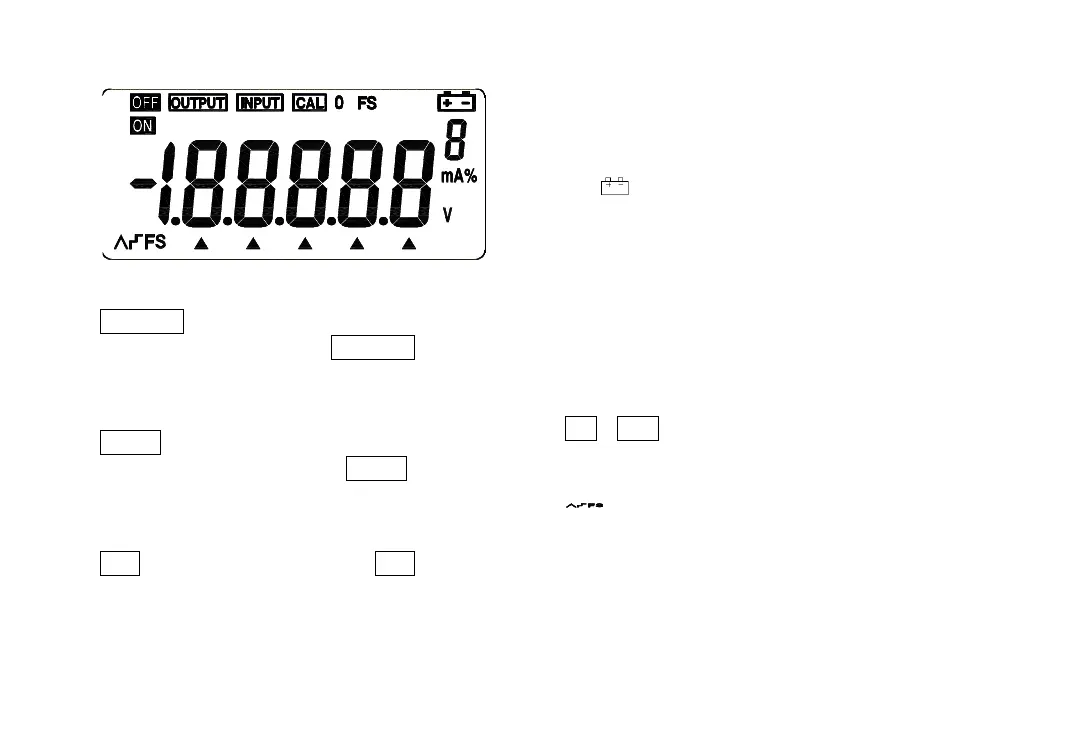
Illustration of LCD Display Area
OUTPUT : Press the key 〔OUTPUT / IN /
SW〕 when the symbol OUTPUT appears. It
denotes that the Instrument is in a state of
output.
INPUT : Press the key 〔OUTPUT / IN /
SW〕 when the symbol INPUT appears. It
denotes that the Instrument is in a state of
input.
CAL : When the symbol CAL appears, it
denotes that the Instrument is in a state of
calibration.
0 FS : When the symbol ‘O’ or ‘FS’ appears
during the calibration, it denotes that the zero
point or the full scale point is being calibrated.
: When this symbol appears, it denotes
that the battery is nearly used up and needs
replacing.
: When this symbol appears, it denotes
that the output digits need setting.
V、mA 、% : These symbols denote the units
of both present input and output values.
ON、OFF : These symbols denote the turn-on or
turn-off of any input / output signals.
:These symbols denote the high and low-
speed auto-ramp, auto-step ramp.


 To Next Page