Section D. Operation Instruction Belarus – 90/92 Operation Manual
39
The beginning of tractor movement
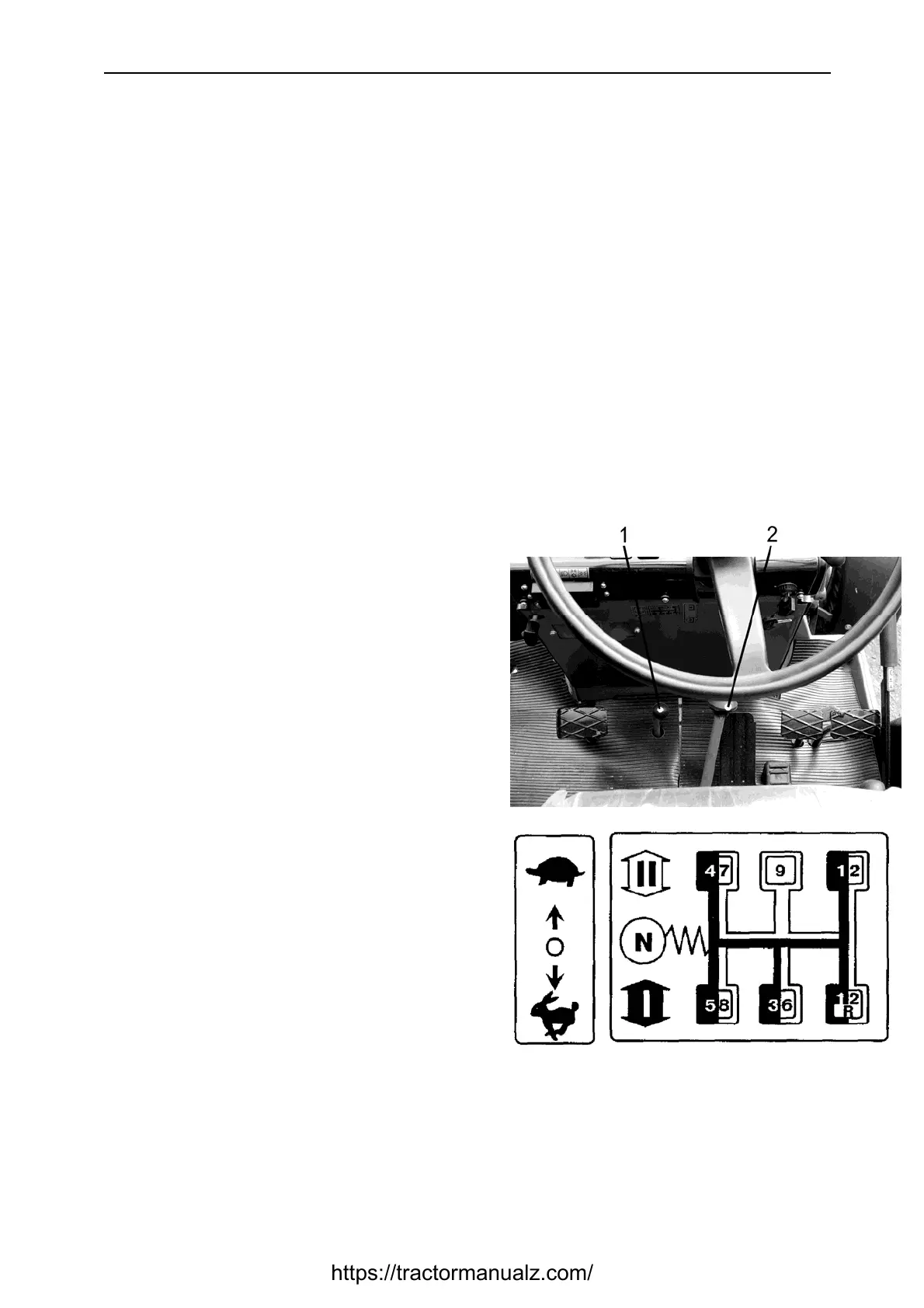
ATTENTION! When selecting required
movement speed use the gear shifting
diagram.
To put tractor in motion do the following:
• Press clutch pedal to the full;
• Shift lever (2) to the extreme left
position and pull or push it to select
I or II mode, correspondingly;
• Turn lever back to “neutral” position
and then further to the right, select
the required gear and pull or push
the lever (2) to set selected speed.
• Push or pull lever (1) to the required
extreme position.
*)
Disengage the parking brake and
increase slightly fuel distribution,
smoothly release the clutch pedal.
After the movement of the tractor
increase fuel distribution.
Avoid starting movement at large traction
load (like deep plough in soil).
ATTENTION! Always press pedal clutch
before putting on required range or gear
of gear box.
Keep the foot off the clutch pedal in the
process of tractor operation, as this will
result in clutch slippage, overheating and
ultimate failure.
*)
Pull back – top gear, push forward –
speed reducing for the tractors with
reducing gear.
https://tractormanualz.com/



 To Next Page