7
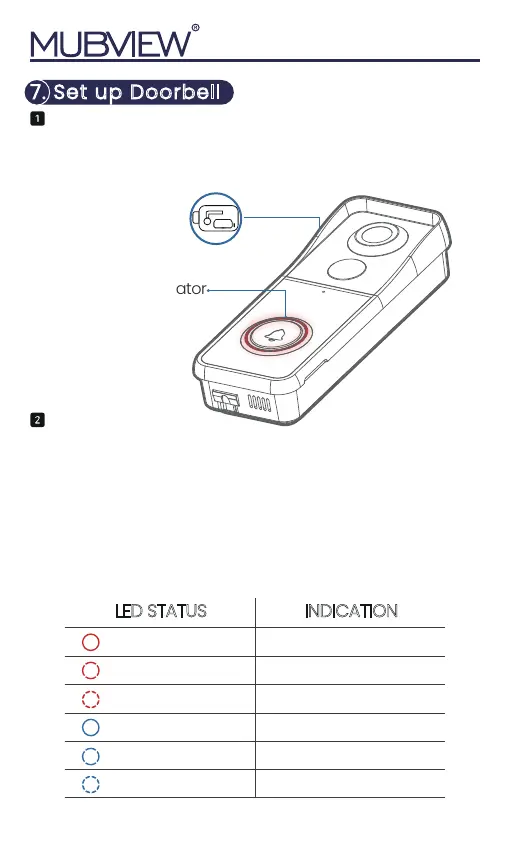
LED Indicator
Press your doorbell to activate, and you will see the
LED indicator flashes red (once per second). If not
press and hold reset button for 5 seconds to
restore factory defaults.
· Please operate the setup near your Wi-Fi router.
· Make sure your phone connect to a 2.4GHz Wi-Fi.
· Make sure the doorbell is turned on and its indicator
LED is flashing red. If not, press and hold RESET for 5
seconds.
· Ensure the Wi-Fi signal is good, and the Wi-Fi
password is correct.
Tips
7. Set up Doorbell
Solid red Device is abnormal
Ready for Wi-Fi configuration
Connecting to Wi-Fi
Device is online
LiVe-viewing doorbell cam
Firmware upgrading
Flash red (once/sec)
Flash red (twice/sec)
Solid blue
Flash blue (once/sec)
Flash blue (twice/sec)
LED STATUS INDICATION
Rest Button
RESET
DC5V


 To Next Page