4MUDITA BELL - USER GUIDE
This manual will help you familiarize yourself with Mudita Bell, so you can begin your journey to better sleep.
Hello,
USER MANUAL
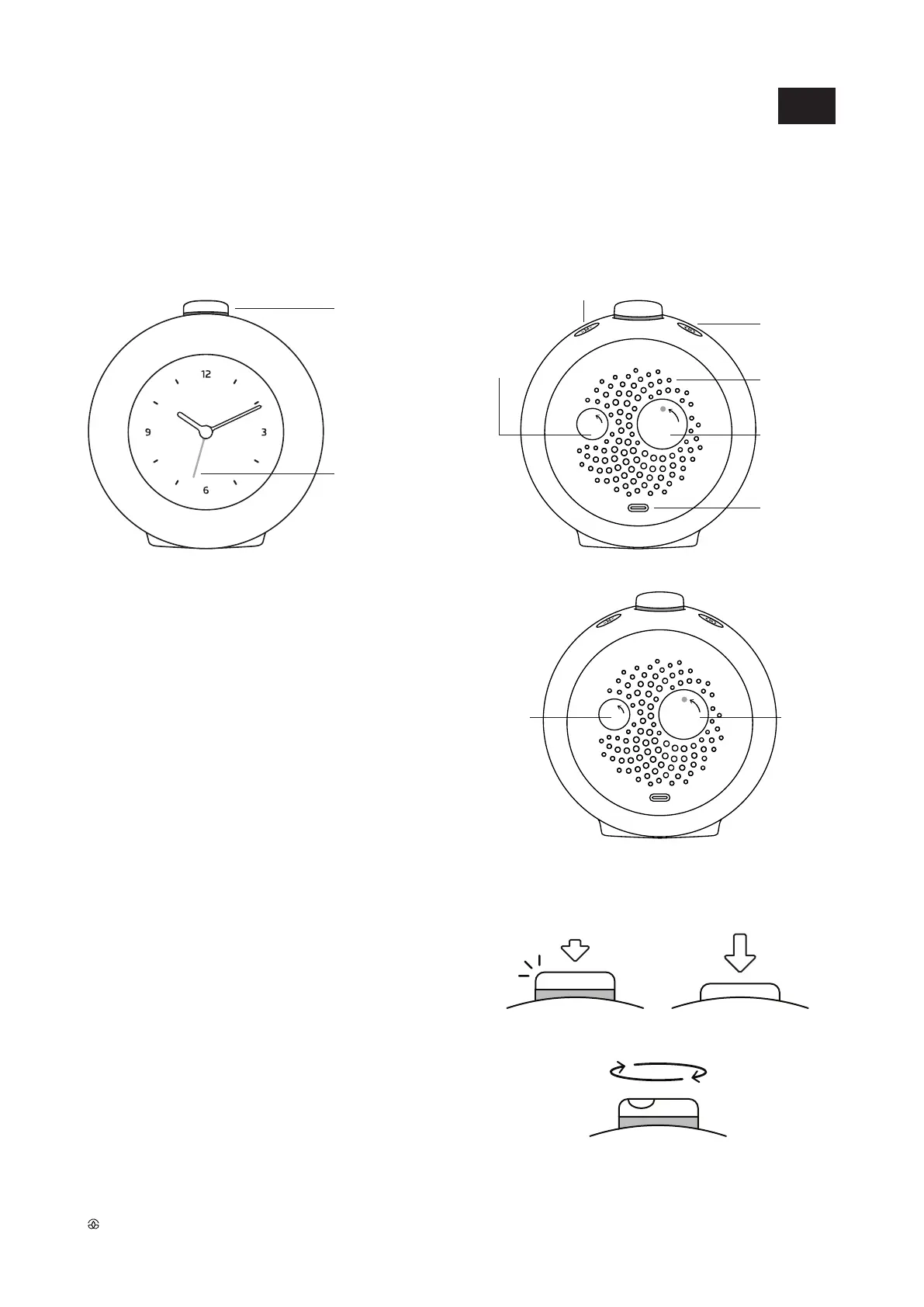
LOUDSPEAKER
ALARM KNOB
TIME KNOB
USB-C
MAIN BUTTON
FRONT LIGHT BUTTON
SETTINGS BUTTON
ALARM HAND
To set the current time, or alarm time, turn the time knob
or alarm knob on the back of the clock in the direction
of the arrow.
NOTE: Always turn the knob in the direction of the pointing
arrow, in order to avoid damaging the mechanism.
Time and alarm time settings
ALARM KNOB
TIME KNOB
LIGHT CLICK DEEP PRESS
ROTATE
Navigation with the main button
Light click
• Light click accepts the selection, and moves forward.
• For the light click, use a slight push and feel the gentle click
sound.
Deep press
• Deep press activates and deactivates the alarm.
• For deep press, use a bit more pressure than for light click.
As a result, the main button will change position,
causing the orange band to be either visible or not.
Rotate
• Rotating the main button navigates the settings and adjusts
light intensity.
EN



 To Next Page