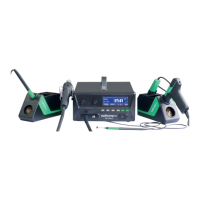
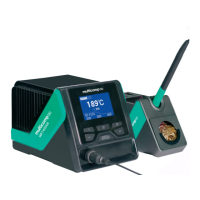
The Multicomp Pro MP740068 Soldering Station and MP740069 Dual Soldering Station are professional-grade tools designed for precise and efficient soldering tasks. These stations are engineered to provide reliable performance for a wide range of applications, from intricate electronics work to general repairs.
Function Description
The core function of these devices is to provide a controlled heat source for soldering. They achieve this by heating a soldering iron tip to a user-defined temperature, allowing solder to melt and create electrical or mechanical connections. The MP740068 is a single-channel soldering station, meaning it operates with one soldering iron at a time, while the MP740069 is a dual-channel station, capable of operating two soldering irons simultaneously. This dual-channel capability offers increased efficiency for users who frequently switch between different tip sizes or temperatures, or for collaborative work.
Both models feature a control station that serves as the central hub for temperature management and system settings. The control station includes a clear LCD display that shows critical information such as actual tip temperature, set temperature, and various status indicators. Users can easily adjust temperature settings using intuitive controls, ensuring optimal heat for different types of solder and components. The stations are designed to be earthed, providing an essential safety measure during operation.
Usage Features
The Multicomp Pro soldering stations prioritize user convenience and safety. Upon initial use, a slight smoke may be observed from the heating element as it dries out; this is normal and temporary. The stations are intended exclusively for electrical work, and acidic solder should be avoided as it can damage the iron tip.
Connecting the soldering iron is straightforward: the plug on the iron's lead connects to a socket on the front of the station. The iron(s) should always be placed in their designated holders when not in active use. Power is supplied via a mains lead connected to the rear of the station, and the unit is turned on using a switch also located at the rear. The LCD illuminates upon power-up, and after a brief self-test displaying the system version, it shows the last set temperature for each channel.
Temperature control is a key feature. Users can increase or decrease the desired temperature using "Up" and "Down" buttons. For quick access, three preset temperatures (200°C, 300°C, 400°C by default) can be selected with dedicated buttons. These preset values are customizable within the settings menu. The display provides real-time feedback on both the actual and set tip temperatures, along with indicators for the soldering tool model and whether the temperature is locked.
The dual-channel MP740069 model allows for independent control of each soldering iron. Users can select the channel they wish to configure by short-pressing the "Menu" button. This flexibility is invaluable for tasks requiring different temperatures or tip types simultaneously.
Safety is paramount. Users are explicitly warned not to touch the soldering tip or surrounding metallic parts until they have completely cooled down. The product should never be used near flammable items, and the power must be turned off when not in use. Before storage, the product should be allowed to cool to room temperature. It is also crucial not to connect or disconnect the soldering tool while in channel setting parameter mode to prevent damage.
The stations incorporate several advanced system settings to enhance functionality:
- System Parameter Setting: Accessed by pressing and holding the "Menu" button, this menu allows for configuration of various system-wide parameters. A passkey can be set to prevent unauthorized changes to settings, including temperature options. If a passkey is active, it must be entered using the "Up" and "Down" buttons before modifications can be made.
- Channel Setting: This menu allows for specific adjustments to each channel. The tool must be connected to the channel before its settings can be displayed. Users can modify default settings and restore factory defaults for individual channels.
- Temp Offset: This feature allows users to compensate for discrepancies between the actual tip temperature and the displayed temperature. The compensation range is -50°C to +50°C (-90°F to +90°F), enabling precise calibration.
- Standby Temp: Users can define the temperature the iron maintains when the system enters standby mode. The lowest standby temperature is 150°C (302°F), and the highest is 300°C (572°F). If the actual operating temperature falls below the user-set standby temperature, the product will enter standby mode.
- Standby Delay: This function allows the product to automatically enter standby state after a user-defined period of inactivity (1-120 minutes). By default, this feature is off.
- Shutdown Delay: Similar to standby delay, this feature enables the product to automatically shut down after a period of inactivity (1-120 minutes). This is also off by default.
- Shortcut Temp: The three quick-access preset temperatures can be adjusted within this setting, subject to the defined temperature lower and upper limits.
- Fix Temp: When activated, this mode locks the tip temperature at a preset value, preventing adjustments from the main interface.
- Temp UL (Upper Limit) and Temp LL (Lower Limit): These settings define the highest and lowest temperatures that the user can configure in the main working interface. The upper limit can be set up to 480°C (896°F), and the lower limit down to 150°C (302°F). The upper limit must always be higher than the lower limit.
The stations also feature a grounding function, utilizing a 3.5mm grounding plug. This provides four grounding modes: hard ground, equipotential bonding, floating connection, and soft ground, ensuring proper electrostatic discharge protection.
Maintenance Features
Proper maintenance ensures the longevity and optimal performance of the Multicomp Pro soldering stations. Cleaning should only be performed when the iron is switched off and at room temperature. The irons and the control station can be cleaned with a damp cloth and a small amount of liquid detergent if necessary. It is crucial never to submerge the soldering iron in liquid or allow any liquid to enter the case. Harsh chemicals, abrasives, or solvents should be avoided as they can damage the soldering iron or station.
The troubleshooting section provides guidance for common issues:
- E-1 Thermal Fuse: Indicates an open circuit in the heating element, suggesting a need to check connections or replace the element.
- E-2 Sensor Alarm: Signals damage to the heater thermal sensor, requiring replacement of the heater element.
- E-9 Non-Compliant Tool Connected: This alarm indicates that the connected iron is not compatible with the station.
These maintenance guidelines and troubleshooting tips help users keep their soldering stations in excellent working condition, ensuring continued reliability for all soldering tasks.


 To Next Page
 General