EasyManua.ls Logo

MULTISPAN MS-1208 - User Manual

MULTISPAN MS-1208
4 pages
Print Icon
To Next Page IconTo Next Page
Loading...
SET ENT
ENT
CH1
CH2
CH3
CH4
CH5
CH6
CH7
CH8
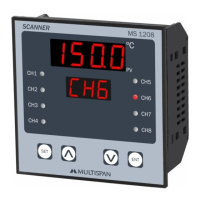
MS 1208
ºC
SCANNER
0 0 0 0
CH 1
www.multispanindia.com
Page - 1
MS-1208
OPERATING MANUAL
8 CHANNEL TEMP. SCANNER
MS-1208
Power Supply
Operating
Temperature
Relative
Humidity
100 to 250V AC,50/60 Hz, Approx 4VA
0°C To 55°C
Up to 95% RH Non Condensing
Model
Display
Size (mm)
Panel Cutout
Range
Input
96 (H) X 96 (W) X 50 (D) mm
92 X 92 mm
J Type: 0 To 600°C/K Type: 0 To 1200°C/
PT-100: -99 To 400°C (DP Selectable)
J,K,PT-100/3W Selectable
MS-1208
Technical Specification
Connection Diagram
Protection
Level
(As per request)
IP-65 (Front side) As per IS/IEC 60529 : 2001
UPPER:- 4 Digit 7 seg 0.56”, red LED Display
LOWER:- 3 Digit 7 seg 0.4”, red LED Display
- - -- -
-- -
18
14
19
13
20
12
21
11
22
10
23
24
1 2 3 4
5 6 7 8 9
16
17
15
+++
+ + +++
T/C T/C T/CT/CT/C
PT-100/3W PT-100/3W PT-100/3WPT-100/3WPT-100/3W
T/CT/C T/C
PT-100/3WPT-100/3W PT-100/3W
CH-1 CH-4 CH-5CH-3CH-2
CH-6CH-8
8 CHANNEL SCANNER (J,K, PT-100)
Range: ‘J’ : 0 To 600°C
‘K’ : 0 To 1200°C
PT-100/3W : -99 To 400°C (DP Selectable)
CH-7
AUX. SUPPLY
100 To
250V AC
~
100
250V AC
~
50/60 HZ
4VA
AUX. SUPPLY
100 To
250V AC
~
~
50/60 Hz
4VA
!
100
250V AC
L
N
1) Do all connection as shown in connection diagram.
2) To enter in parameter menu, press set key.
Configure: 1. Scan time
2. Sensor Selection ( J, K or PT-100 Selectable)
3. Skip or unskip channel
4. DP selection for pt-100 only.
3) If needed to add offset, press + together for 5 Sec.
Set offset for each channel if required.
Off set range will be -25°C to + 25°C.
4) Press & Hold Key for continuous scrolling or manual scrolling.
5) In hold mode use & Key to select next channel.
Procedure
Question and Answer IconNeed help?

Do you have a question about the MULTISPAN MS-1208 and is the answer not in the manual?

Summary

Technical Specification

Model

Specifies the model name and its key features.

Display

Details the types and sizes of LED displays used.

Unit Dimensions

Provides the physical size of the temperature scanner in millimeters.

Panel Cutout

Specifies the required dimensions for panel mounting.

Input Signal Types

Lists the selectable sensor input types: J, K, and PT-100/3W.

Temperature Ranges

Defines the operational temperature ranges for each sensor type.

Power Supply Requirements

States the voltage, frequency, and power consumption.

Protection Level

Indicates the IP rating for front side protection according to standards.

Operating Temperature

Specifies the ambient temperature range for operation.

Relative Humidity

Defines the non-condensing humidity limits for operation.

Procedure Overview

Connection and Configuration Steps

Guides on making connections and configuring scan time, sensor, and channels.

Offset Setting and Scrolling

Details how to set channel offsets and navigate through channels.

Connection Diagram

Wiring and Terminal Layout

Illustrates the terminal connections for sensors and power supply.

Key Operation and Configuration

Basic Configuration Menu

Steps to enter the menu and configure scan time, sensor type, and channel skip.

Decimal Point Setting

Instructions on setting the decimal point for display.

Offset Setting Procedure

Details on accessing and adjusting offset values for each channel.

Safety and Installation Guidelines

General Safety Precautions

Emphasizes adherence to safety instructions for personnel and the instrument.

Warning Guidelines

Provides crucial warnings regarding electric shock and wiring practices.

Installation Guidelines

Covers requirements for panel mounting and terminal accessibility.

Mechanical Installation Details

Includes panel cutout dimensions, fitting instructions, and terminal tightening.

Maintenance

Outlines cleaning procedures and restrictions on component replacement.

Summary

Technical Specification

Model

Specifies the model name and its key features.

Display

Details the types and sizes of LED displays used.

Unit Dimensions

Provides the physical size of the temperature scanner in millimeters.

Panel Cutout

Specifies the required dimensions for panel mounting.

Input Signal Types

Lists the selectable sensor input types: J, K, and PT-100/3W.

Temperature Ranges

Defines the operational temperature ranges for each sensor type.

Power Supply Requirements

States the voltage, frequency, and power consumption.

Protection Level

Indicates the IP rating for front side protection according to standards.

Operating Temperature

Specifies the ambient temperature range for operation.

Relative Humidity

Defines the non-condensing humidity limits for operation.

Procedure Overview

Connection and Configuration Steps

Guides on making connections and configuring scan time, sensor, and channels.

Offset Setting and Scrolling

Details how to set channel offsets and navigate through channels.

Connection Diagram

Wiring and Terminal Layout

Illustrates the terminal connections for sensors and power supply.

Key Operation and Configuration

Basic Configuration Menu

Steps to enter the menu and configure scan time, sensor type, and channel skip.

Decimal Point Setting

Instructions on setting the decimal point for display.

Offset Setting Procedure

Details on accessing and adjusting offset values for each channel.

Safety and Installation Guidelines

General Safety Precautions

Emphasizes adherence to safety instructions for personnel and the instrument.

Warning Guidelines

Provides crucial warnings regarding electric shock and wiring practices.

Installation Guidelines

Covers requirements for panel mounting and terminal accessibility.

Mechanical Installation Details

Includes panel cutout dimensions, fitting instructions, and terminal tightening.

Maintenance

Outlines cleaning procedures and restrictions on component replacement.

Overview

The Multispan MS-1208 is an 8-channel temperature scanner designed for monitoring and displaying temperature readings from various sensors. This device is suitable for applications requiring precise temperature oversight and offers a range of configurable features to adapt to different operational needs.

Function Description

The primary function of the MS-1208 is to continuously scan and display temperature values from up to eight independent channels. It supports multiple sensor types, including J-type thermocouples, K-type thermocouples, and PT-100/3W RTDs, making it versatile for a wide array of industrial and laboratory environments. The device features a dual display: a larger 4-digit, 0.56-inch red LED display for the upper reading (likely the current channel's temperature or a specific parameter) and a smaller 3-digit, 0.4-inch red LED display for the lower reading (potentially the channel number or another parameter).

The scanner operates by sequentially reading temperature data from each connected sensor. Users can configure the scan time, which determines how long the device pauses on each channel before moving to the next. This allows for flexible monitoring, from rapid cycling through channels to longer dwell times for more stable readings.

A key feature is the ability to select the sensor type individually for each channel. This means that different types of temperature sensors can be connected simultaneously to the same device, enhancing its adaptability. For PT-100 sensors, the device also allows for decimal point selection, providing greater precision when required.

The MS-1208 incorporates an offset adjustment feature, enabling users to fine-tune the temperature readings for each channel. This is particularly useful for calibrating sensors or compensating for minor inaccuracies in the measurement system, ensuring that the displayed temperatures are as accurate as possible. The offset can be adjusted within a range of -25°C to +25°C.

The device also includes a channel skip/unskip function, allowing users to disable monitoring for specific channels that are not in use. This streamlines the scanning process by focusing only on active channels, potentially speeding up the scan cycle if many channels are skipped.

For user interaction, the scanner provides a "hold mode" that allows users to pause the automatic scanning and manually select a specific channel to view its temperature continuously. This is beneficial for detailed observation of a particular point without interruption from the scanning sequence.

Usage Features

Operating the MS-1208 involves a straightforward procedure, starting with the physical connection of sensors as per the provided wiring diagram. Once connected, the device's configuration is accessed through a menu-driven interface using the front panel keys.

To enter the parameter menu, the "SET" key is pressed. Within this menu, users can configure several critical settings:

  • Scan Time: Adjusting the duration the device spends on each channel.
  • Sensor Selection: Choosing the appropriate sensor type (J, K, or PT-100) for each of the eight channels. This is a crucial step to ensure accurate readings based on the connected sensor.
  • Channel Skip/Unskip: Enabling or disabling individual channels from the scanning sequence.
  • DP Selection: For PT-100 sensors, configuring the decimal point display for enhanced precision.

The offset adjustment feature is accessed by pressing the "SET" and "ENT" keys simultaneously for 5 seconds. This allows for individual offset calibration for each channel, ensuring measurement accuracy across all connected sensors. The offset value can be increased or decreased using the appropriate keys.

Navigation through the menu and parameter settings is intuitive. The "SET" key is generally used to move to the next parameter or channel, while the "UP" and "DOWN" arrow keys (often represented by "SET" and "ENT" in combination or contextually) are used to change parameter values. The "ENT" key, when pressed and held, allows for continuous scrolling or enters the scroll and hold mode, which is useful for quickly reviewing multiple channels or pausing on a specific one. In hold mode, the "UP" and "DOWN" keys can be used to manually select the next or previous channel.

The device is designed for panel mounting, with specific cutout dimensions provided for integration into control panels. This ensures a secure and clean installation. The front panel is rated IP-65, indicating protection against dust and low-pressure water jets, making it suitable for environments where some exposure to elements is possible.

Maintenance Features

The MS-1208 is designed for relatively low maintenance, focusing on cleanliness and proper installation to ensure longevity and reliable operation.

  • Cleaning: Regular cleaning of the equipment is recommended to prevent blockage of ventilating parts. Users should clean the device with a clean, soft cloth. It is explicitly stated that isopropyl alcohol or any other cleaning agent should not be used, likely to prevent damage to the display or casing materials.
  • Installation Considerations: Proper installation is a key aspect of maintenance. The manual emphasizes preparing the panel cutout correctly and fitting the unit securely with the provided clamps. It also advises against installing the equipment near heating sources, caustic vapors, oil, steam, or other by-products that could negatively impact its performance or lifespan.
  • Wiring: Using the specified size of crimp terminals (M3.5 screws) and tightening them to the recommended torque (1.2 N.m) is crucial for secure electrical connections and to prevent issues arising from loose wiring. It is also important not to connect anything to unused terminals.
  • Safety Precautions: The manual highlights several safety precautions that contribute to the device's maintenance and safe operation. These include ensuring the power supply is OFF during wiring to prevent electric shock, using appropriate wiring for power and sensors (e.g., thermocouple compensation wires for extending thermocouple leads, low-resistance wires for RTDs), and installing a circuit breaker or mains switch for easy power control. These measures not only protect the operator but also help prevent damage to the device itself.
  • Internal Components: The manual explicitly states that the fusible resistor must not be replaced by the operator, implying that internal repairs or component replacements should be handled by qualified service personnel. This is a common practice for industrial equipment to ensure safety and proper functioning.

Overall, the MS-1208 is a robust and configurable temperature scanner designed for reliable performance with an emphasis on user-friendly operation and straightforward maintenance practices.

MULTISPAN MS-1208 Specifications

General IconGeneral
Scan Width216 mm
InterfaceUSB 2.0
Scanning MethodCIS (Contact Image Sensor)
Optical Resolution600 dpi
Maximum Document SizeA4

Related product manuals