EasyManua.ls Logo

MULTISPAN PIC-9004 - User Manual

MULTISPAN PIC-9004
4 pages
Print Icon
To Next Page IconTo Next Page
Loading...
OPERATING MANUAL
PIC-9004
www.multispanindia.com
Page - 1
Technical Specification
1) Micro Controller Based, Dual Display
2) Display : UPPER: 6 Digit 7 Segment LED Display 2.15” INCH in Red Color
LOWER: 4 Digit 7 Segment LED Display 2.15” INCH in Green Color
3) Dimension Size : 375 X 160 X 70mm
4) Input : Proximity NPN/PNP Selectable
5) Output : 1 Relay 1C/O,230V AC , 5A
6) Power Supply : 100 To 250V AC (SMPS)
7) Range & Decimal Point selectable
FUNCTION
DISPLAYS
Set Diameter
Set Speed
Password
Set Length
Decimal Point
Time
RANGE
0-9999.99 mm
(Slow : Max , RPM 500)
(Medium : Max, RPM 5000)
(Fast : Max, RPM 15000)
25 Fix
0 to 999999 Meter






9999.99/99999.9/999999
00.1 to 99.9 sec.
Parameter
PIC 9004
.
.
SET
ENT
RST
PIC 9004
METERS
Question and Answer IconNeed help?

Do you have a question about the MULTISPAN PIC-9004 and is the answer not in the manual?

Summary

Technical Specification

Micro Controller Based, Dual Display

Device utilizes a microcontroller for its operations and features a dual display system.

Display Specifications

Upper: 6-digit, 2.15" Red LED. Lower: 4-digit, 2.15" Green LED.

Dimension Size

Physical dimensions of the device are 375 X 160 X 70mm.

Input Type

Supports both NPN and PNP proximity sensors.

Output Specification

Features 1 Relay (1C) rated for 230V AC at 5A.

Power Supply

Operates on 100 to 250V AC via an SMPS.

Range and Decimal Point

Allows selection of measurement range and decimal point position.

Parameter Settings

Password Setting

Configures the device access password, which is fixed at 25.

Set Length

Sets the desired length parameter, ranging from 0 to 999999 meters.

Set Diameter

Configures the diameter for calculations, in millimeters (0-9999.99 mm).

Time Setting

Sets the time parameter, with a range of 00.1 to 99.9 seconds.

Decimal Point Configuration

Allows selection of the decimal point position for displayed values.

Set Speed Configuration

Sets the speed parameter for different modes (Slow, Medium, Fast).

Programming the Length Counter

Set Password

Procedure to set the device password using the SHIFT and UP keys.

Set Length

Procedure to input the desired length value for the counter.

Set Diameter

Procedure to configure the diameter for measurement calculations.

Set Time

Procedure to set the time interval for counter operations.

Set Decimal Point

Procedure for selecting the decimal point position on the display.

Set Speed Selection

Procedure to choose the speed setting (Slow, Medium, Fast) for the device.

Device Operation

Working Principle

Explains how the proximity switch interacts with the material to count.

Measurement Formulas

Provides formulas for calculating material length and speed.

Display Indicators

Describes what the Upper and Lower displays indicate during operation.

Manual and Auto Reset Modes

Details time settings for manual and auto reset modes.

Batch Count and Relay Operation

Explains batch count display and relay energizing conditions.

Power Failure and Restart

Describes memory retention during power failure and restart procedure.

Connection Diagram

Relay Wiring

Illustrates the wiring connections for the device's relay output.

Sensor Input Wiring

Details the connections for NPN and PNP proximity sensor inputs.

Power Input

Shows the terminal connections for the 100-250V AC power supply.

Summary

Technical Specification

Micro Controller Based, Dual Display

Device utilizes a microcontroller for its operations and features a dual display system.

Display Specifications

Upper: 6-digit, 2.15" Red LED. Lower: 4-digit, 2.15" Green LED.

Dimension Size

Physical dimensions of the device are 375 X 160 X 70mm.

Input Type

Supports both NPN and PNP proximity sensors.

Output Specification

Features 1 Relay (1C) rated for 230V AC at 5A.

Power Supply

Operates on 100 to 250V AC via an SMPS.

Range and Decimal Point

Allows selection of measurement range and decimal point position.

Parameter Settings

Password Setting

Configures the device access password, which is fixed at 25.

Set Length

Sets the desired length parameter, ranging from 0 to 999999 meters.

Set Diameter

Configures the diameter for calculations, in millimeters (0-9999.99 mm).

Time Setting

Sets the time parameter, with a range of 00.1 to 99.9 seconds.

Decimal Point Configuration

Allows selection of the decimal point position for displayed values.

Set Speed Configuration

Sets the speed parameter for different modes (Slow, Medium, Fast).

Programming the Length Counter

Set Password

Procedure to set the device password using the SHIFT and UP keys.

Set Length

Procedure to input the desired length value for the counter.

Set Diameter

Procedure to configure the diameter for measurement calculations.

Set Time

Procedure to set the time interval for counter operations.

Set Decimal Point

Procedure for selecting the decimal point position on the display.

Set Speed Selection

Procedure to choose the speed setting (Slow, Medium, Fast) for the device.

Device Operation

Working Principle

Explains how the proximity switch interacts with the material to count.

Measurement Formulas

Provides formulas for calculating material length and speed.

Display Indicators

Describes what the Upper and Lower displays indicate during operation.

Manual and Auto Reset Modes

Details time settings for manual and auto reset modes.

Batch Count and Relay Operation

Explains batch count display and relay energizing conditions.

Power Failure and Restart

Describes memory retention during power failure and restart procedure.

Connection Diagram

Relay Wiring

Illustrates the wiring connections for the device's relay output.

Sensor Input Wiring

Details the connections for NPN and PNP proximity sensor inputs.

Power Input

Shows the terminal connections for the 100-250V AC power supply.

Overview

The PIC-9004 is a Micro Controller Based, Dual Display Length Counter designed for industrial applications requiring precise measurement and control of length and speed. It features a robust design with a large, easy-to-read display and flexible programming options.

Function Description:

The primary function of the PIC-9004 is to measure the total length of material and its speed in meters per minute. It operates by receiving pulses from a proximity switch, which senses the rotation of a roller. Each pulse corresponds to a specific length of material, calculated based on the roller's diameter.

The device offers two main operating modes:

  • Manual Mode: In this mode, the relay remains ON until the RST key is pressed. This is suitable for applications where manual intervention is required to stop the process.
  • Auto Reset Mode: In this mode, the relay turns ON when the total length reaches the set length and remains ON for a user-defined time (00.1 to 99.9 seconds). After this time, the relay turns OFF automatically. This mode is ideal for automated processes where a timed action is needed.

Key calculations performed by the device include:

  • Length of Material per revolution: 3.14 X Diameter (mm)
  • Total Length: { 3.14 X Diameter (mm) X Number of Revolutions } / 1000 (in meters)
  • Total Meters/Minute: { 3.14 X Diameter (mm) X RPM } / 1000

When the pulse comes from the sensor, the upper display indicates the increment in 'Total Length' in meters, and the lower display indicates 'Speed' in meters/minute. If the SET key is pressed in RUN mode, the upper display will show the Batch Count. When the Total Length equals the Set Length, Relay-1 energizes.

Important Technical Specifications:

  • Display:
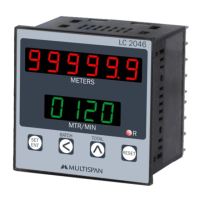
    • UPPER: 6 Digit 7 Segment LED Display (2.15” INCH) in Red Color. This display typically shows the total length or batch count.
    • LOWER: 4 Digit 7 Segment LED Display (2.15” INCH) in Green Color. This display typically shows the speed in meters/minute.
  • Dimension Size: 375 X 160 X 70mm, indicating a substantial and visible unit suitable for industrial panels.
  • Input: Proximity NPN/PNP Selectable. This allows for compatibility with various types of proximity sensors, offering flexibility in sensor choice.
    • NPN PROXY connection: Short Pins 3 & 4, Proxy Connection 4, 5 & 6.
    • PNP PROXY connection: Short Pins 5 & 6, Proxy Connection 3, 4 & 5.
  • Output: 1 Relay 1C/O, 230V AC, 5A. This single relay output can be used to control external devices or machinery based on the set length.
  • Power Supply: 100 To 250V AC (SMPS), providing a wide operating voltage range and stable power delivery.
  • Range & Decimal Point: Selectable, allowing users to customize the display precision and measurement range according to their specific needs.

Usage Features:

The PIC-9004 offers a user-friendly interface for programming various parameters:

  • Password Protection: The device can be secured with a fixed password (25 FIX) to prevent unauthorized changes to settings. To set the password, press the SET and ENT keys. The SHIFT key moves to the next digit, and the UP key increases the digit's value.
  • Set Length: Users can define a target length from 0 to 999999 meters. This is the value at which the relay will activate. The programming procedure is similar to setting the password, using the SET and ENT keys, SHIFT for digit navigation, and UP for value adjustment.
  • Set Diameter: The diameter of the roller can be set from 0-9999.99 mm. This parameter is crucial for accurate length calculations. The programming method is consistent with other settings.
  • Set Time: This parameter is used for the Auto Reset Mode, defining the duration (00.1 to 99.9 seconds) for which the relay remains ON after the set length is reached. For Manual Mode, set time to 00.0 seconds.
  • Decimal Point: The decimal point position can be selected (9999.99, 99999.9, 999999) to adjust the precision of the displayed values.
  • Set Speed: The device allows selection of different speed ranges for optimal performance:
    • SLOW: Max RPM 500
    • MEDIUM: Max RPM 5000
    • FAST: Max RPM 15000 This selection ensures accurate speed measurement across various operational speeds.
  • Saving Settings: All programmed parameters can be saved and exited by pressing the ENT and RST keys simultaneously.

Maintenance Features:

  • Power Failure Data Retention: In the event of a power failure, the last reading is stored in the memory. The counter will resume counting from the last stored value when the instrument is turned ON, ensuring continuity of operation and preventing data loss.
  • Reset Functionality: To restart totalizing or reset the counter, press the RST key. The upper display will show 00000.0, and counting will restart from zero. This is useful for starting new measurement cycles or clearing previous readings.

The PIC-9004 is a reliable and versatile length counter designed to meet the demands of various industrial measurement and control applications, offering precision, ease of use, and robust performance.

MULTISPAN PIC-9004 Specifications

General IconGeneral
BrandMULTISPAN
ModelPIC-9004
CategoryCash Counter
LanguageEnglish

Related product manuals