INSTALLING AND USING THE DEVICE
MultiConnect
®
Cell MTC Cat M1 User Guide 23
Powering Down Your Device
CAUTION: Failing to properly power down the device before removing power may corrupt your device's file
system.
To properly power down your device, use the following sequence :
1. Issue the AT#SHDN command.
2. Wait 30 seconds.
3. Power off or disconnect power.
Applications with Risk of Power Surge
Recommend Adding Power Surge Protection
Along with using the proper shutdown procedure, we recommend adding power surge protection for power up
especially with applications where a potential for power surge exists or the power source is not reliable.
Appropriate power surge protection equipment can safeguard your device. The device itself does not include
power surge protection. For these cases, failure to do so can run the risk of damage to your device.
Installing a SIM Card
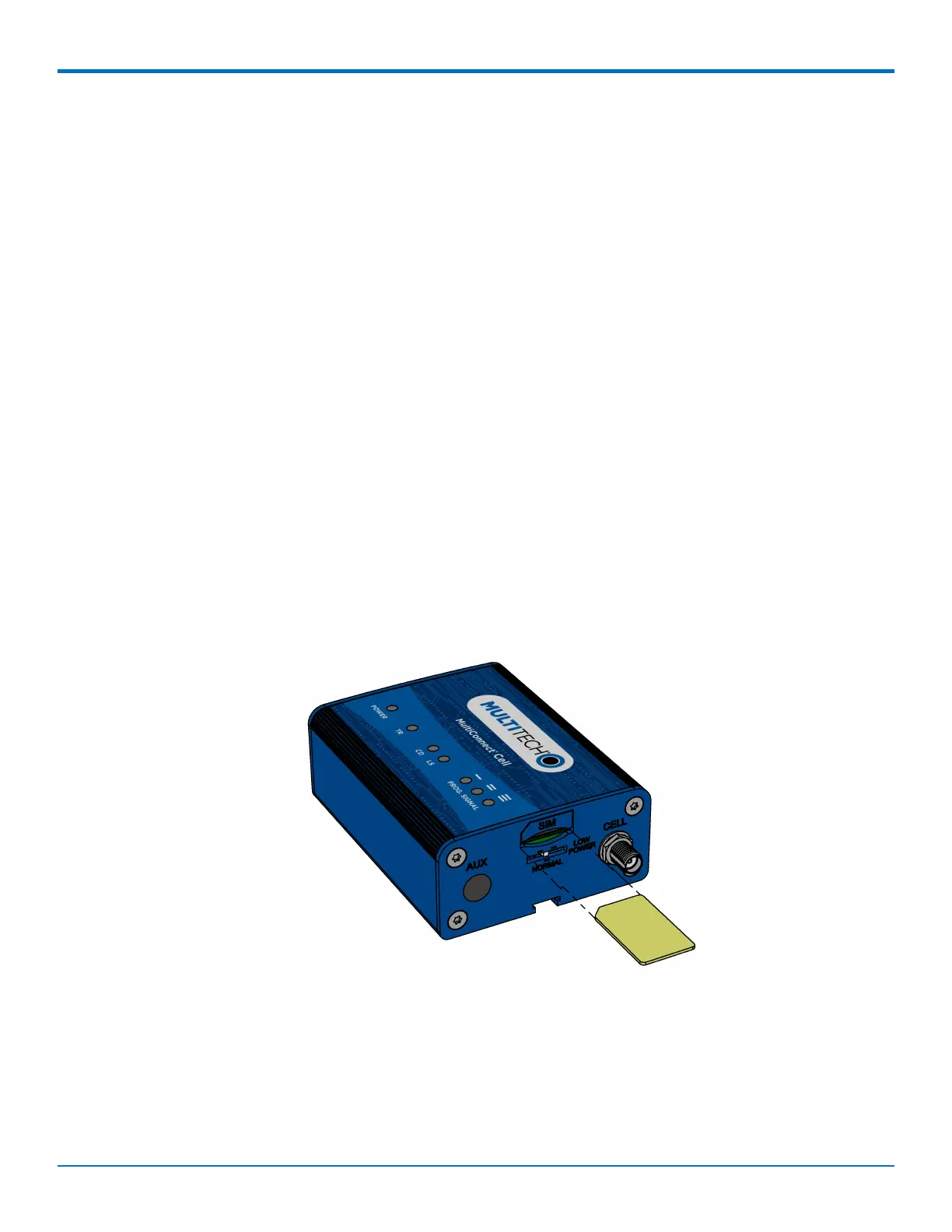
This model requires a SIM card, which is supplied by your service provider. To install the SIM card:
1. Locate the SIM card slot on the side of the modem. The slot is labeled SIM.
2. Slide the SIM card into the SIM card slot with the contact side facing down as shown. When the SIM card
is installed, it locks into place.
Removing a SIM Card
To remove the SIM card, push the SIM card in. The device ejects the SIM card.















 To Next Page