EasyManua.ls Logo

MURO FDVL41 - Functional Description; Tool Specifications; Standard Accessories; Switches and Controls

Default Icon
8 pages
Print Icon
To Next Page IconTo Next Page
To Previous Page IconTo Previous Page
Loading...
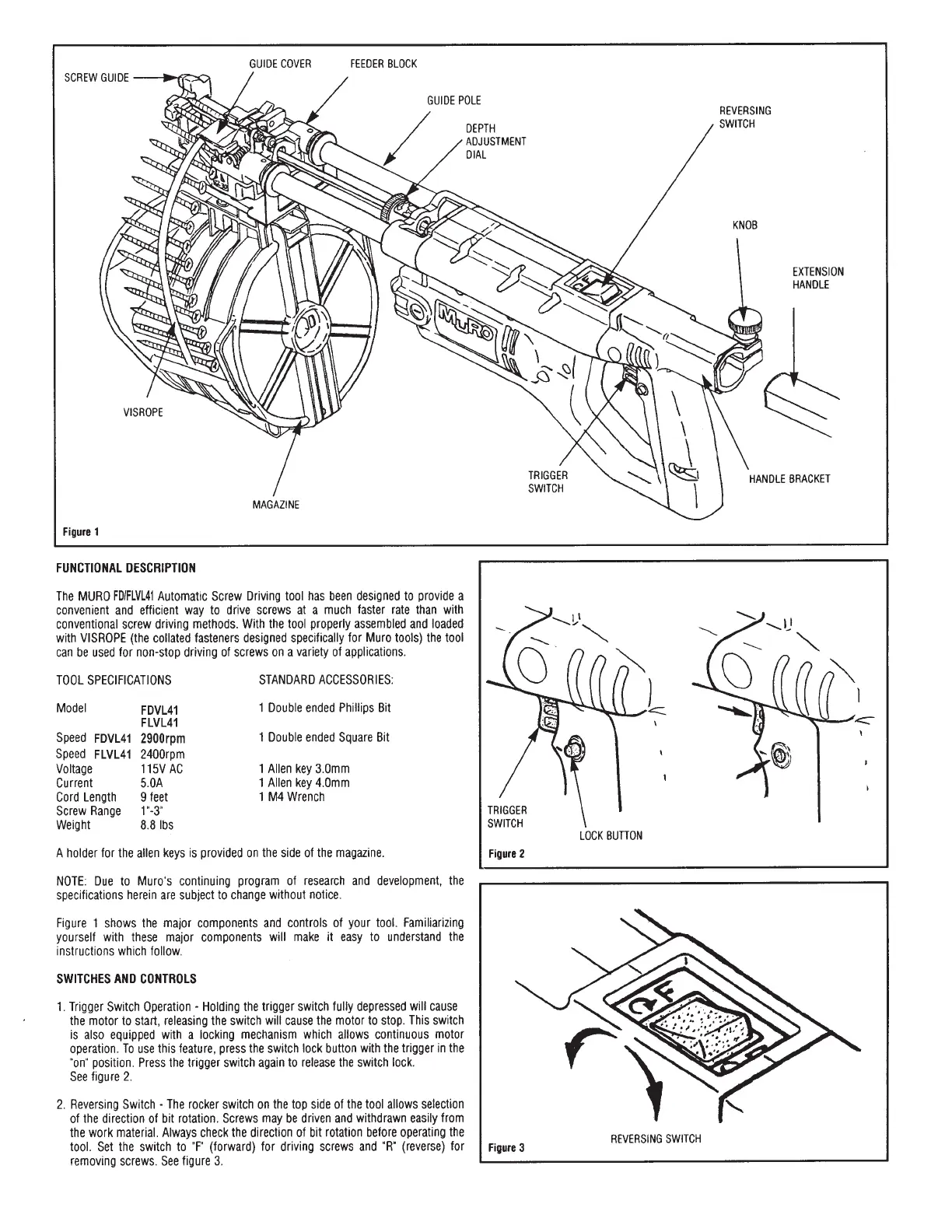
GUIDE
COVER
FEEDER
BLOCK
SCREW
GUIDE
GUIDE
POLE
VISROPE
MAGAZINE
Figure
1
FUNCTIONAL
DESCRIPTION
The
MURO
FDIFLVL41
Automatic
Screw
Driving
tool
has
been
designed
to
provide
a
convenient
and
efficient
way
to
drive
screws
at
a
much
faster
rate
than
with
conventional
screw
driving
methods.
With
the
tool
properly
assembled
and
loaded
with
VISROPE
(the
collated
fasteners
designed
specifically
for
Muro
tools)
the
tool
can
be
used
for
non-stop
driving
of
screws
on
a
variety
of
applications.
TOOL
SPECIFICATIONS
STANDARD
ACCESSORIES:
Model
FDVL41
1
Double
ended
Phillips
Bit
FLVL41
Speed
FDVL41
2900rpm
1
Double
ended
Square
Bit
Speed
FLVL41
2400rpm
Voltage
115V
AC
1
Allen
key
3.0mm
Current
5.0A
1
Allen
key
4.0mm
Cord
Length
9
feet
1
M4
Wrench
Screw
Range
1'"-3"
Weight
8.8
Ibs
A
holder
for
the
allen
keys
is
provided
on
the
side
of
the
magazine.
NOTE:
Due
to
Muro’s
continuing
program
of
research
and
development,
the
specifications
herein
are
subject
to
change
without
notice.
Figure
1
shows
the
major
components
and
controls
of
your
tool.
Familiarizing
yourself
with
these
major
components
will
make
it
easy
to
understand
the
instructions
which
follow.
SWITCHES
AND
CONTROLS
.
Trigger
Switch
Operation
-
Holding
the
trigger
switch
fuliy
depressed
will
cause
the
motor
to
start,
releasing
the
switch
will
cause
the
motor
to
stop.
This
switch
is
also
equipped
with
a
locking
mechanism
which
allows
continuous
motor
operation.
To
use
this
feature,
press
the
switch
lock
button
with
the
trigger
in
the
"on"
position.
Press
the
trigger
switch
again
to
release
the
switch
lock.
See
figure
2.
2.
Reversing
Switch
-
The
rocker
switch
on
the
top
side
of
the
tool
allows
selection
of
the
direction
of
bit
rotation.
Screws
may
be
driven
and
withdrawn
easily
from
the
work
material.
Always
check
the
direction
of
bit
rotation
before
operating
the
tool.
Set
the
switch
to
"F"
(forward)
for
driving
screws
and
"R”
(reverse)
for
removing
screws.
See
figure
3.
DEPTH
ADJUSTMENT
TRIGGER
SWITCH
Figure
2
Figure
3
TRIGGER
SWITCH
LOCK
BUTTON
REVERSING
SWITCH
REVERSING
SWITCH
EXTENSION
HANDLE
HANDLE
BRACKET