USB Flash Drive Setup in LXi
1.10.6
If you are new to LXi, follow the rst few steps in Section 1.10.1 to add the Muse to LXi Production Manager.
Using the UDISK (USB thumb drive) option involves saving a .PLT le containing the cut design and some
or all of the cut settings. This le can then be opened directly onto the Muse and cut. Remember that with
this option, once the le is saved to the thumb drive, the design is locked in and cannot be edited, other
than setting up an array of repeats.
Once your le is ready to cut in LXi, insert a USB ash drive into the design station computer.
Click on OK and LXi Production
Manager will open.
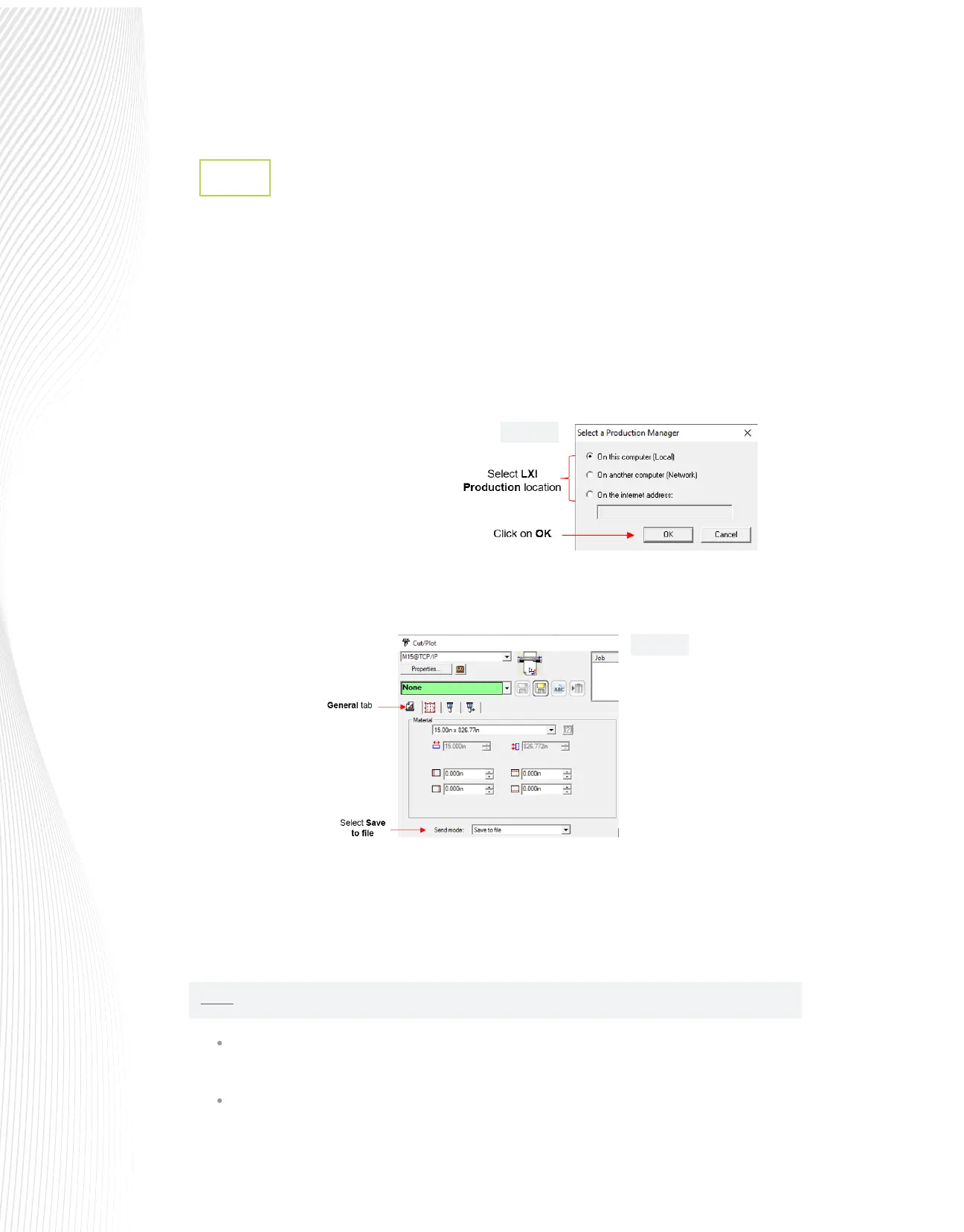
The Cut/Plot window will also have opened. On the General tab, select SAVE to FILE from the Send
mode drop-down menu:
When you have made any necessary changes to the le size, copies, rotation, etc., click the Send button at
the bottom right of the Cut/Plot window.
A window will open prompting you to select the desired location to save the .PLT le. Browse to the
installed ash drive and save the le after entering a new name. Go to Section 1.10.8.
Change the Port connection by right clicking on the Muse in the Production Manager list, and
selected Change Port (as shown in FIG. 1.10.14)
In the Change Port window, select FILE and then complete other options, as preferred:
Go to File>Cut/Plot or click the Cut/Plot
icon . A window will open and you will
need to select the location of the LXi
Production Manager in relation to your
design station computer:
NOTE: if you will continually be using the USB Flash Drive as your method of sending les to the Muse:
Fig. 1.10.12
Fig. 1.10.13


 To Next Page
 Loading...
